cancel
Showing results for 
Search instead for 
Did you mean: 

The Power BI Data Visualization World Championships is back! Get ahead of the game and start preparing now! Learn more

Reply
ibelouris
Frequent Visitor

Total of a measure

Hello All, I have been reading the forum and searching online without any luck for this issue I am facing.

My table has the following structure:


sample data


TypeDescriptionItemValuationPriceValuationPriceLYAcquisitionCost([ValuationPrice]-[ValuationPriceLY])/[ValuationPriceLY]ROI (previous column*AcquisitionCost)
Merchandise1                           1.46                                1.40                     9,042.00                     0.04             396.88
Merchandise2                           1.46                                1.35                        405.00                     0.08               33.29
Merchandise3                           1.32                                1.30                     7,065.60                     0.02             116.63
Merchandise4                           2.44                         109.23                          -                        -  
Merchandise5                         13.91                         428.74                          -                        -  
Merchandise6                           9.25                         223.54                          -                        -  
Merchandise7                           6.98                         248.51                          -                        -  
Merchandise8                           4.70                         304.14                          -                        -  
Merchandise9                           2.64                                2.42                           73.38                     0.09                  6.44
Merchandise10                         13.87                         138.90                          -                        -  
Merchandise11                           9.43                                9.03                        146.36                     0.04                  6.48
Merchandise12                           7.53                                6.89                        180.12                     0.09               16.75
Merchandise13                           4.76                                4.36                        345.92                     0.09               32.27

ROI Is a measure that =

IFERROR( ([ValuationPrice]-[ValuationPriceLY])/[ValuationPriceLY]*SUMx(Procurement_Periodics,Procurement_Periodics[AcquisitionCost]),0)
 
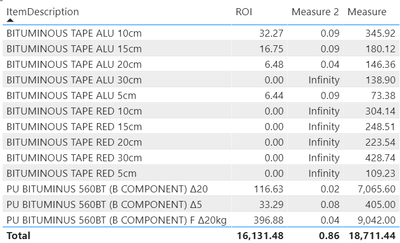
The excel total is ~608 on the measure total I am getting ~16.131
 
ibelouris_0-1630657177692.png

The picture above highlights the issue.

 
ROI is calculated correctly for each line.
However, ROI total is not. It should be the sum of the ROI of all the lines that are filtered. The total of ROI is the calucation of the total of cost (here measure)*([ValuationPrice]-[ValuationPriceLY])/[ValuationPriceLY] (here measure2).

Things I have tried so far that give incorrect results:
Measure 4 = sumx(VALUES(Procurement_Periodics[ItemType]),[ROI])
Measure 3 = VAR _table=SUMMARIZE(Procurement_Periodics,Procurement_Periodics[ItemType],"_value",[ROI])
RETURN
IF(HASONEVALUE(Procurement_Periodics[ItemType]),[ROI],SUMX(_table,[_value]))
 
Does anyone have an idea of how to approach this?
 
 
1 ACCEPTED SOLUTION
ibelouris
Frequent Visitor


Turns out this is giving me the total I need.


Measure =
sumx(VALUES(Procurement_Periodics[ItemDescription]),[ROI])

View solution in original post

2 REPLIES 2
Anonymous
Not applicable

Hi @ibelouris ,


Has your problem been solved? If it has been solved, please mark the correct reply as the standard answer to help the other members find it more quickly.Thank you very much for your kind cooperation!


Hope it helps,


Community Support Team _ Caitlyn Yan


If this post helps then please consider Accept it as the solution to help the other members find it more quickly.

ibelouris
Frequent Visitor


Turns out this is giving me the total I need.


Measure =
sumx(VALUES(Procurement_Periodics[ItemDescription]),[ROI])

Helpful resources

Announcements
Power BI DataViz World Championships

Power BI Dataviz World Championships

The Power BI Data Visualization World Championships is back! Get ahead of the game and start preparing now!

November Power BI Update Carousel

Power BI Monthly Update - November 2025

Check out the November 2025 Power BI update to learn about new features.

FabCon Atlanta 2026 carousel

FabCon Atlanta 2026

Join us at FabCon Atlanta, March 16-20, for the ultimate Fabric, Power BI, AI and SQL community-led event. Save $200 with code FABCOMM.