Get certified for free when you join Fabric Data Days 2026 and dive into Fabric, Power BI, SQL, AI, and other essential data skills.
Join nowJuly 7 - July 17 | Round 2 of the Power BI Dataviz World Championships. Don't miss your chance! Learn more
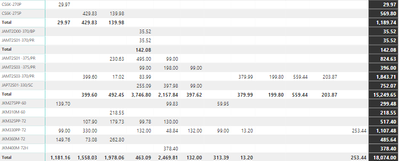
Im new to Power Bi and im having trouble with the Matrix Col adding up to the correct totals. I think I need a HASONEFILETR calc but im not sure how to do it.
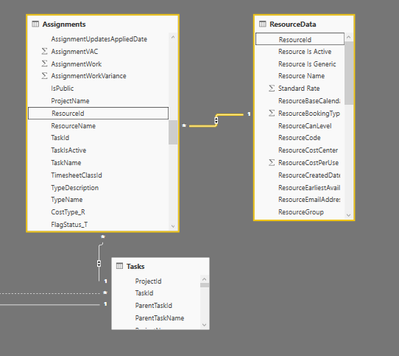
I have 3 tables
Any help would be appreciated.
AssignmentMaterialWork x PowerW =
(SUM('Assignments'[AssignmentMaterialWork]) * SUM('ResourceData'[PowerW])/1000)
Solved! Go to Solution.
This is probably an order of operations issue. Sum then Multiply will not produce the same answer as Multiply then Sum.
So I think the following might fix your issue:
AssignmentMaterialWork x PowerW =
(SUMX('Assignments', 'Assignments'[AssignmentMaterialWork] * (RELATED('ResourceData'[PowerW])/1000))
This looks like a measure totals problem. Very common. See my post about it here: https://community.powerbi.com/t5/DAX-Commands-and-Tips/Dealing-with-Measure-Totals/td-p/63376
Also, this Quick Measure, Measure Totals, The Final Word should get you what you need:
https://community.powerbi.com/t5/Quick-Measures-Gallery/Measure-Totals-The-Final-Word/m-p/547907
This is probably an order of operations issue. Sum then Multiply will not produce the same answer as Multiply then Sum.
So I think the following might fix your issue:
AssignmentMaterialWork x PowerW =
(SUMX('Assignments', 'Assignments'[AssignmentMaterialWork] * (RELATED('ResourceData'[PowerW])/1000))
Thanks this fixed it, appreciate the help.
Join us in Barcelona for FabCon and SQLCon, the Fabric, Power BI, SQL, and AI community event. Save €200 with code FABCMTY200.
Join Data Days 2026: 60 days of free live/on-demand sessions, challenges, study groups, and certification opportunities.
| User | Count |
|---|---|
| 29 | |
| 28 | |
| 26 | |
| 23 | |
| 18 |
| User | Count |
|---|---|
| 56 | |
| 47 | |
| 39 | |
| 27 | |
| 21 |