Get Fabric or SQL Certified for Free.
Get certified for free when you join Fabric Data Days 2026 and dive into Fabric, Power BI, SQL, AI, and other essential data skills.
Join now- Power BI forums
- Get Help with Power BI
- Desktop
- Service
- Report Server
- Power Query
- Mobile Apps
- Developer
- DAX Commands and Tips
- Custom Visuals Development Discussion
- Health and Life Sciences
- Power BI Spanish forums
- Translated Spanish Desktop
- Training and Consulting
- Instructor Led Training
- Dashboard in a Day for Women, by Women
- Galleries
- Data Stories Gallery
- Themes Gallery
- Contests Gallery
- QuickViz Gallery
- Quick Measures Gallery
- Visual Calculations Gallery
- Notebook Gallery
- Translytical Task Flow Gallery
- TMDL Gallery
- R Script Showcase
- Webinars and Video Gallery
- Ideas
- Custom Visuals Ideas (read-only)
- Issues
- Issues
- Events
- Upcoming Events
July 7 - July 17 | Round 2 of the Power BI Dataviz World Championships. Don't miss your chance! Learn more
- Power BI forums
- Forums
- Get Help with Power BI
- Desktop
- Re: Total difference between current and previous ...
- Subscribe to RSS Feed
- Mark Topic as New
- Mark Topic as Read
- Float this Topic for Current User
- Bookmark
- Subscribe
- Printer Friendly Page

- Mark as New
- Bookmark
- Subscribe
- Mute
- Subscribe to RSS Feed
- Permalink
- Report Inappropriate Content
Total difference between current and previous date
Hi All,
Could you please help writing DAX code for below query:
I have a dataset with lots of columns but only below columns are more relavent to this query:
| SnapshotDate | CreatedDate | TaskID |
| 01/Nov/2019 | 20/10/2018 | 1200 |
| 01/Nov/2018 | 20/10/2018 | 1201 |
| 01/Nov/2018 | 21/10/2018 | 1202 |
| 01/Nov/2018 | 22/10/2018 | 1203 |
| 01/Nov/2018 | 22/10/2018 | 1204 |
| 01/Nov/2018 | 23/10/2018 | 1205 |
| 01/Nov/2018 | 24/10/2018 | 1206 |
| 01/Nov/2018 | 25/10/2018 | 1207 |
| 10/Nov/2018 | 02/11/2018 | 1250 |
| 10/Nov/2018 | 02/11/2018 | 1251 |
| 10/Nov/2018 | 03/11/2018 | 1252 |
| 10/Nov/2018 | 04/11/2018 | 1253 |
| 10/Nov/2018 | 04/11/2018 | 1254 |
| 10/Nov/2018 | 05/11/2018 | 1255 |
| 10/Nov/2018 | 05/11/2018 | 1256 |
| 10/Nov/2018 | 06/11/2018 | 1257 |
| 20/Nov/2018 | 12/11/2018 | 1290 |
| 20/Nov/2018 | 12/11/2018 | 1291 |
| 20/Nov/2018 | 13/11/2018 | 1292 |
| 20/Nov/2018 | 14/11/2018 | 1293 |
| 20/Nov/2018 | 14/11/2018 | 1294 |
| 20/Nov/2018 | 15/11/2018 | 1295 |
| 20/Nov/2018 | 16/11/2018 | 1296 |
| 30/Nov/2018 | 22/11/2018 | 1380 |
| 30/Nov/2018 | 23/11/2018 | 1381 |
| 30/Nov/2018 | 24/11/2018 | 1382 |
| 30/Nov/2018 | 25/11/2018 | 1383 |
| 30/Nov/2018 | 26/11/2018 | 1384 |
| 30/Nov/2018 | 26/11/2018 | 1385 |
| 30/Nov/2018 | 27/11/2018 | 1386 |
| 30/Nov/2018 | 27/11/2018 | 1387 |
| 30/Nov/2018 | 27/11/2018 | 1388 |
| 30/Nov/2018 | 28/11/2018 | 1389 |
| 30/Nov/2018 | 29/11/2018 | 1390 |
| 30/Nov/2018 | 29/11/2018 | 1391 |
This is just made up data manully to create a scenario.
So I wanted to show it like below:
| SnapshotDate | Total Closed Tasks | Closed since last snapshotdate | Open since last snapshotdate |
| 30/Nov/2018 | 35 | 12 | 12 |
| 20/Nov/2018 | 23 | 7 | |
| 10/Nov/2018 | 16 | 8 | |
| 01/nov/2018 | 8 | ||
Total Closed Tasks = COUNT(TaskID)
Closed Since last snapshotdate = For 30/Nov/2019 there are total 35 closed but on 20/Nov/2018 there were 23 closed so answer should be 12. Please adivse DAX
Open since last snapshotdate = For 30/Nov/2019 - these are all created on or after previous snapshot (20/Nov/2018) and current snapshotdate
I am novice and tried all DAX experiment but due to movement between current and previous row I struggle. This will be a very good example moving forward to understand and apply moving forward.
all your help will be so appreciating and thanks in advance.
Regards
Zak
Solved! Go to Solution.


- Mark as New
- Bookmark
- Subscribe
- Mute
- Subscribe to RSS Feed
- Permalink
- Report Inappropriate Content
Hi @Anonymous ,
We can use the following measure to meet your requirement:
Total Closed =
CALCULATE (
    DISTINCTCOUNT ( 'Table'[Number] ),
    FILTER ( 'Table', [State] = "Closed" )
)
total closed since last snapshot date =
VAR currentSnapshotDate =
    MAX ( 'Table'[SnapshotDate] )
VAR lastSnapshotDate =
    CALCULATE (
        MAX ( 'Table'[SnapshotDate] ),
        FILTER ( ALLSELECTED ( 'Table' ), 'Table'[SnapshotDate] < currentSnapshotDate )
    )
RETURN
    CALCULATE (
        DISTINCTCOUNT ( 'Table'[Number] ),
        FILTER (
            'Table',
            'Table'[Created].[Date] <= currentSnapshotDate
                && 'Table'[Created].[Date] > lastSnapshotDate
                && 'Table'[State] = "Closed"
        )
    ) + 0
Total Open =
CALCULATE (
    DISTINCTCOUNT ( 'Table'[Number] ),
    FILTER ( 'Table', [State] = "Open" )
)
total open since last snapshot date =
VAR currentSnapshotDate =
    MAX ( 'Table'[SnapshotDate] )
VAR lastSnapshotDate =
    CALCULATE (
        MAX ( 'Table'[SnapshotDate] ),
        FILTER ( ALLSELECTED ( 'Table' ), 'Table'[SnapshotDate] < currentSnapshotDate )
    )
RETURN
    CALCULATE (
        DISTINCTCOUNT ( 'Table'[Number] ),
        FILTER (
            'Table',
            'Table'[Created].[Date] <= currentSnapshotDate
                && 'Table'[Created].[Date] > lastSnapshotDate
                && 'Table'[State] = "Open"
        )
    ) + 0
Total calls =
DISTINCTCOUNT('Table'[Number])
Running Total calls =
VAR snapshotDate =
    MAX ( 'Table'[SnapshotDate] )
RETURN
    CALCULATE (
        DISTINCTCOUNT ( 'Table'[Number] ),
        FILTER ( ALLSELECTED ( 'Table' ), [SnapshotDate] <= snapshotDate )
    )
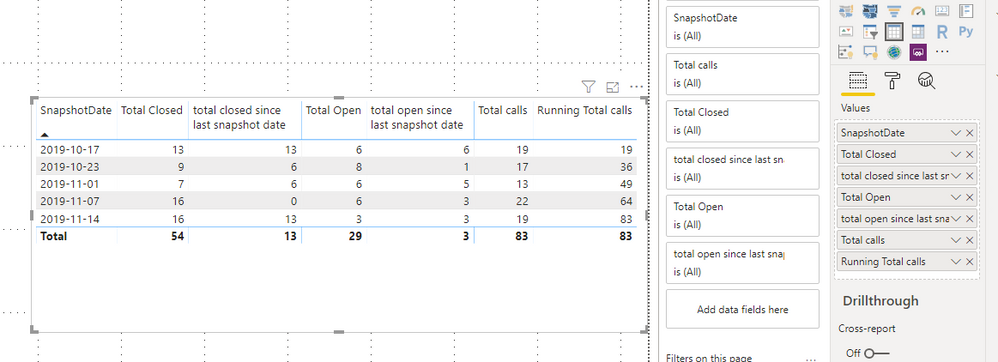
BTW, pbix as attached.
Best regards,
Community Support Team _ Dong Li
If this post helps, then please consider Accept it as the solution to help the other members find it more quickly.
If this post helps, then please consider Accept it as the solution to help the other members find it more quickly.


- Mark as New
- Bookmark
- Subscribe
- Mute
- Subscribe to RSS Feed
- Permalink
- Report Inappropriate Content
Hi,
Based on that data you have shared, please check whether the result in this PBI file is correct or not. You may download it from here.
Hope this helps.
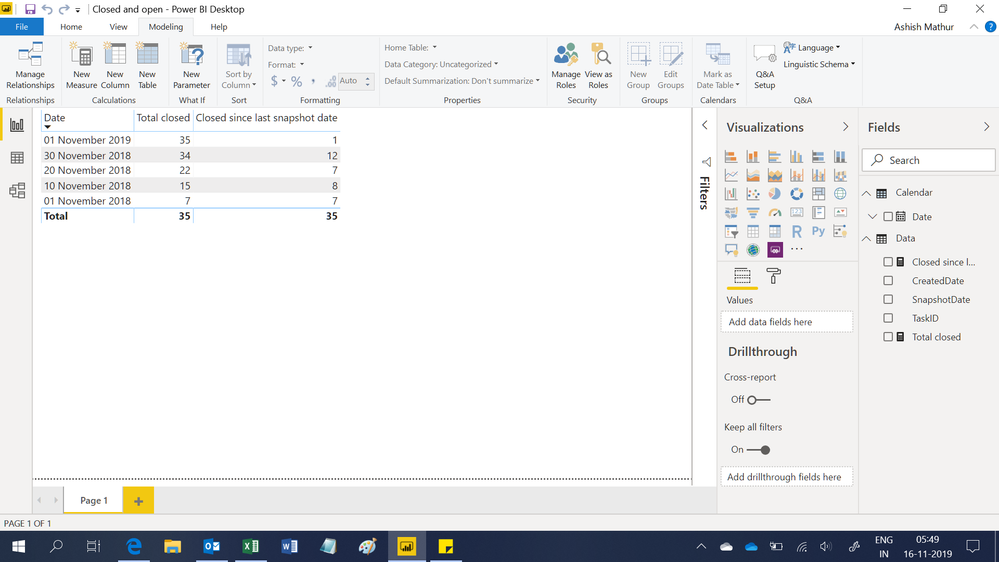
Regards,
Ashish Mathur
http://www.ashishmathur.com
https://www.linkedin.com/in/excelenthusiasts/
- Mark as New
- Bookmark
- Subscribe
- Mute
- Subscribe to RSS Feed
- Permalink
- Report Inappropriate Content
Thanks @Ashish_Mathur . I feel I am not good in time intelligence functions and will focus on that.
- Total closed between current snapshot date column and last snapshot date column (that is total closed since last snapshot date using [state] = "Closed" column)
- Total opened between current snapshot and last snapshot ( that is total opened since last snapshot date which will be calculated on the basis of [Created] column between these two dates
Really sorry for missing description previously. I could not find a way to attach file with data so copied/pasted below
| SnapshotDate | Number | State | Created |
| 17/10/2019 00:00 | 110042700 | Closed | 07/10/2019 15:18 |
| 17/10/2019 00:00 | 110042741 | Closed | 07/10/2019 16:17 |
| 17/10/2019 00:00 | 110043897 | Closed | 14/10/2019 12:30 |
| 17/10/2019 00:00 | 110043913 | Open | 14/10/2019 13:33 |
| 17/10/2019 00:00 | 110044026 | Closed | 15/10/2019 09:26 |
| 17/10/2019 00:00 | 110044077 | Closed | 15/10/2019 11:28 |
| 17/10/2019 00:00 | 110044112 | Closed | 15/10/2019 12:40 |
| 17/10/2019 00:00 | 110044144 | Closed | 15/10/2019 13:42 |
| 17/10/2019 00:00 | 110044169 | Closed | 15/10/2019 14:32 |
| 17/10/2019 00:00 | 110044226 | Closed | 15/10/2019 15:49 |
| 17/10/2019 00:00 | 110044293 | Closed | 16/10/2019 09:50 |
| 17/10/2019 00:00 | 110044326 | Closed | 16/10/2019 11:44 |
| 17/10/2019 00:00 | 110044405 | Open | 16/10/2019 13:55 |
| 17/10/2019 00:00 | 110044420 | Open | 16/10/2019 14:36 |
| 17/10/2019 00:00 | 110044513 | Open | 17/10/2019 09:29 |
| 17/10/2019 00:00 | 110044514 | Open | 17/10/2019 09:29 |
| 17/10/2019 00:00 | 110044516 | Closed | 17/10/2019 09:32 |
| 17/10/2019 00:00 | 110044520 | Closed | 17/10/2019 09:36 |
| 17/10/2019 00:00 | 110044559 | Open | 17/10/2019 10:52 |
| 23/10/2019 00:00 | 110013192 | Open | 17/04/2019 14:39 |
| 23/10/2019 00:00 | 110017705 | Open | 20/06/2019 08:44 |
| 23/10/2019 00:00 | 110028225 | Open | 04/07/2019 17:10 |
| 23/10/2019 00:00 | 110028300 | Open | 05/07/2019 11:48 |
| 23/10/2019 00:00 | 110028341 | Open | 05/07/2019 13:23 |
| 23/10/2019 00:00 | 110028343 | Open | 05/07/2019 13:34 |
| 23/10/2019 00:00 | 110028796 | Open | 09/07/2019 11:18 |
| 23/10/2019 00:00 | 110043873 | Closed | 14/10/2019 11:50 |
| 23/10/2019 00:00 | 110043892 | Closed | 14/10/2019 12:23 |
| 23/10/2019 00:00 | 110043894 | Closed | 14/10/2019 12:24 |
| 23/10/2019 00:00 | 110045260 | Closed | 22/10/2019 10:50 |
| 23/10/2019 00:00 | 110045264 | Closed | 22/10/2019 10:58 |
| 23/10/2019 00:00 | 110045357 | Closed | 22/10/2019 15:47 |
| 23/10/2019 00:00 | 110045431 | Closed | 23/10/2019 10:29 |
| 23/10/2019 00:00 | 110045480 | Closed | 23/10/2019 11:59 |
| 23/10/2019 00:00 | 110045535 | Closed | 23/10/2019 14:08 |
| 23/10/2019 00:00 | 110045584 | Open | 23/10/2019 15:35 |
| 01/11/2019 00:00 | 110010380 | Closed | 14/03/2019 13:55 |
| 01/11/2019 00:00 | 110020812 | Open | 19/07/2019 16:23 |
| 01/11/2019 00:00 | 110045690 | Closed | 24/10/2019 10:25 |
| 01/11/2019 00:00 | 110045729 | Closed | 24/10/2019 11:38 |
| 01/11/2019 00:00 | 110045779 | Closed | 24/10/2019 14:31 |
| 01/11/2019 00:00 | 110045809 | Closed | 24/10/2019 17:19 |
| 01/11/2019 00:00 | 110045819 | Closed | 24/10/2019 19:34 |
| 01/11/2019 00:00 | 110045838 | Closed | 25/10/2019 09:22 |
| 01/11/2019 00:00 | 110046527 | Open | 30/10/2019 13:43 |
| 01/11/2019 00:00 | 110046531 | Open | 30/10/2019 13:44 |
| 01/11/2019 00:00 | 110046685 | Open | 31/10/2019 11:36 |
| 01/11/2019 00:00 | 110046692 | Open | 31/10/2019 11:46 |
| 01/11/2019 00:00 | 110046751 | Open | 31/10/2019 13:16 |
| 07/11/2019 00:00 | 110010380 | Closed | 14/03/2019 13:55 |
| 07/11/2019 00:00 | 110011039 | Closed | 20/03/2019 12:05 |
| 07/11/2019 00:00 | 110011743 | Closed | 28/03/2019 10:22 |
| 07/11/2019 00:00 | 110035236 | Open | 05/11/2019 12:15 |
| 07/11/2019 00:00 | 110035283 | Open | 05/11/2019 13:50 |
| 07/11/2019 00:00 | 110035304 | Open | 05/11/2019 14:39 |
| 07/11/2019 00:00 | 110014077 | Open | 08/04/2019 13:05 |
| 07/11/2019 00:00 | 110014120 | Open | 08/04/2019 14:32 |
| 07/11/2019 00:00 | 110014534 | Open | 09/04/2019 15:50 |
| 07/11/2019 00:00 | 110043382 | Closed | 10/10/2019 09:38 |
| 07/11/2019 00:00 | 110043405 | Closed | 10/10/2019 10:33 |
| 07/11/2019 00:00 | 110045675 | Closed | 24/10/2019 09:52 |
| 07/11/2019 00:00 | 110045690 | Closed | 24/10/2019 10:25 |
| 07/11/2019 00:00 | 110045714 | Closed | 24/10/2019 10:53 |
| 07/11/2019 00:00 | 110045729 | Closed | 24/10/2019 11:38 |
| 07/11/2019 00:00 | 110045779 | Closed | 24/10/2019 14:31 |
| 07/11/2019 00:00 | 110045809 | Closed | 24/10/2019 17:19 |
| 07/11/2019 00:00 | 110045819 | Closed | 24/10/2019 19:34 |
| 07/11/2019 00:00 | 110045838 | Closed | 25/10/2019 09:22 |
| 07/11/2019 00:00 | 110046045 | Closed | 28/10/2019 10:26 |
| 07/11/2019 00:00 | 110046075 | Closed | 28/10/2019 11:31 |
| 07/11/2019 00:00 | 110046139 | Closed | 28/10/2019 14:17 |
| 14/11/2019 00:00 | 110047820 | Closed | 07/11/2019 10:32 |
| 14/11/2019 00:00 | 110047841 | Closed | 07/11/2019 11:22 |
| 14/11/2019 00:00 | 110047888 | Closed | 07/11/2019 13:56 |
| 14/11/2019 00:00 | 110048085 | Closed | 08/11/2019 11:32 |
| 14/11/2019 00:00 | 110048199 | Closed | 08/11/2019 15:36 |
| 14/11/2019 00:00 | 110048301 | Closed | 11/11/2019 10:35 |
| 14/11/2019 00:00 | 110048645 | Open | 12/11/2019 12:09 |
| 14/11/2019 00:00 | 110048656 | Open | 12/11/2019 12:16 |
| 14/11/2019 00:00 | 110048808 | Closed | 12/11/2019 18:30 |
| 14/11/2019 00:00 | 110048839 | Closed | 13/11/2019 10:48 |
| 14/11/2019 00:00 | 110048888 | Closed | 13/11/2019 11:43 |
| 14/11/2019 00:00 | 110048926 | Closed | 13/11/2019 13:35 |
| 14/11/2019 00:00 | 110048931 | Closed | 13/11/2019 13:36 |
| 14/11/2019 00:00 | 110049000 | Closed | 13/11/2019 16:07 |
| 14/11/2019 00:00 | 110049089 | Closed | 14/11/2019 09:54 |
| 14/11/2019 00:00 | 110049117 | Closed | 14/11/2019 10:43 |
| 14/11/2019 00:00 | 110049125 | Closed | 14/11/2019 10:50 |
| 14/11/2019 00:00 | 110049210 | Closed | 14/11/2019 14:37 |
| 14/11/2019 00:00 | 110049232 | Open | 14/11/2019 16:10 |
- Mark as New
- Bookmark
- Subscribe
- Mute
- Subscribe to RSS Feed
- Permalink
- Report Inappropriate Content
Hi,
Basis the revised data that you have shared in your last post, show me the exact result you are expecting. Only after my formula's results match yours will i share the solution PBI file with you.
Regards,
Ashish Mathur
http://www.ashishmathur.com
https://www.linkedin.com/in/excelenthusiasts/
- Mark as New
- Bookmark
- Subscribe
- Mute
- Subscribe to RSS Feed
- Permalink
- Report Inappropriate Content
Thanks again @Ashish_Mathur
Result will be
| Total closed | total closed since last snapshot date | Total Open | Total Open since last snapshot date | Total calls | Running Total calls |
| 13 | 13 | 6 | 19 | 19 | 19 |
| 9 | 6 | 8 | 7 | 17 | 36 |
| 7 | 6 | 6 | 11 | 13 | 49 |
| 16 | 0 | 6 | 3 | 22 | 71 |
| 16 | 13 | 3 | 16 | 19 | 90 |
| 61 | 29 | 90 |
and definition of each column will be
| Measure | Definition |
| Total Closed | count for [State] = 'Closed' and [Created] does not matter |
| total closed since last snapshot date | count for [State] = 'Closed' and [Created] between current [Snapshot date] and last[Snapshot date] - for example on 1st Nov, current snapshot date is 1st Nov and previous is 23rd Oct so count all closed within these two dates where [created] column is after 23rd Oct and [Created] column is on or before 1st Nov |
| Total Open | count for State] = 'Open' and [Created] does not matter |
| Total Open since last snapshot date | count for [State] = 'Open' and [Created] between current [Snapshot date] and last[Snapshot date] |
| Total calls | Count for [Number] for each snapshot |
| Running Total calls | Running total of new column [Total calls] |
Thanks for support.
Regards
- Mark as New
- Bookmark
- Subscribe
- Mute
- Subscribe to RSS Feed
- Permalink
- Report Inappropriate Content
Hi @Anonymous ,
We can use the following measure to meet your requirement:
Total Closed =
CALCULATE (
    DISTINCTCOUNT ( 'Table'[Number] ),
    FILTER ( 'Table', [State] = "Closed" )
)
total closed since last snapshot date =
VAR currentSnapshotDate =
    MAX ( 'Table'[SnapshotDate] )
VAR lastSnapshotDate =
    CALCULATE (
        MAX ( 'Table'[SnapshotDate] ),
        FILTER ( ALLSELECTED ( 'Table' ), 'Table'[SnapshotDate] < currentSnapshotDate )
    )
RETURN
    CALCULATE (
        DISTINCTCOUNT ( 'Table'[Number] ),
        FILTER (
            'Table',
            'Table'[Created].[Date] <= currentSnapshotDate
                && 'Table'[Created].[Date] > lastSnapshotDate
                && 'Table'[State] = "Closed"
        )
    ) + 0
Total Open =
CALCULATE (
    DISTINCTCOUNT ( 'Table'[Number] ),
    FILTER ( 'Table', [State] = "Open" )
)
total open since last snapshot date =
VAR currentSnapshotDate =
    MAX ( 'Table'[SnapshotDate] )
VAR lastSnapshotDate =
    CALCULATE (
        MAX ( 'Table'[SnapshotDate] ),
        FILTER ( ALLSELECTED ( 'Table' ), 'Table'[SnapshotDate] < currentSnapshotDate )
    )
RETURN
    CALCULATE (
        DISTINCTCOUNT ( 'Table'[Number] ),
        FILTER (
            'Table',
            'Table'[Created].[Date] <= currentSnapshotDate
                && 'Table'[Created].[Date] > lastSnapshotDate
                && 'Table'[State] = "Open"
        )
    ) + 0
Total calls =
DISTINCTCOUNT('Table'[Number])
Running Total calls =
VAR snapshotDate =
    MAX ( 'Table'[SnapshotDate] )
RETURN
    CALCULATE (
        DISTINCTCOUNT ( 'Table'[Number] ),
        FILTER ( ALLSELECTED ( 'Table' ), [SnapshotDate] <= snapshotDate )
    )
BTW, pbix as attached.
Best regards,
Community Support Team _ Dong Li
If this post helps, then please consider Accept it as the solution to help the other members find it more quickly.
If this post helps, then please consider Accept it as the solution to help the other members find it more quickly.
- Mark as New
- Bookmark
- Subscribe
- Mute
- Subscribe to RSS Feed
- Permalink
- Report Inappropriate Content
Thanks @v-lid-msft , this worked perfectly where I tweaked a bit due to what was expected but it was nothing wrong with your DAX code. More imporantly I understood the concept of using variables and jumping between current and previous row. This concept will have long lasting impacts I believe because i am going to use it a lot.
Thanks a lot for your support.
- Mark as New
- Bookmark
- Subscribe
- Mute
- Subscribe to RSS Feed
- Permalink
- Report Inappropriate Content
Hi,
You have not shown the Date column in your expected output. Also, please review the description in the total "closed since last snapshot date" row.
Regards,
Ashish Mathur
http://www.ashishmathur.com
https://www.linkedin.com/in/excelenthusiasts/
- Mark as New
- Bookmark
- Subscribe
- Mute
- Subscribe to RSS Feed
- Permalink
- Report Inappropriate Content
Thanks @Ashish_Mathur for your support through out and your point is valid as I forgot to provide Snapshot date column.
Thanks a lot again
Helpful resources

FabCon & SQLCon – Barcelona 2026
Join us in Barcelona for FabCon and SQLCon, the Fabric, Power BI, SQL, and AI community event. Save €200 with code FABCMTY200.

Data Days 2026
Join Data Days 2026: 60 days of free live/on-demand sessions, challenges, study groups, and certification opportunities.

Power BI DataViz World Championships - June 2026
A new Power BI DataViz World Championship is coming this June! Don't miss out on submitting your entry.

| User | Count |
|---|---|
| 28 | |
| 28 | |
| 26 | |
| 22 | |
| 18 |


| User | Count |
|---|---|
| 52 | |
| 49 | |
| 43 | |
| 38 | |
| 36 |


