Join us at FabCon Atlanta from March 16 - 20, 2026, for the ultimate Fabric, Power BI, AI and SQL community-led event. Save $200 with code FABCOMM.
Register now!The Power BI Data Visualization World Championships is back! Get ahead of the game and start preparing now! Learn more
Hello everyone!!
I have data from diferent groups, lets say: Group 1, 2, 3, 4.... If I made a table in visuales it gives me back the "total" or "average" of all the groups. Is it possible to add this "total" or "average" in a column chart??? It would be perfect if it can appear as a sepparate column in the graphic with the other columns of Group 1, 2, 3.... to compare them visually. Thanks in advance!!
Solved! Go to Solution.
Hi @Anonymous ,
Take "total " for example, you can create a measure such as below:
Measure = SUMX(ALL('Table'),'Table'[Consumption])
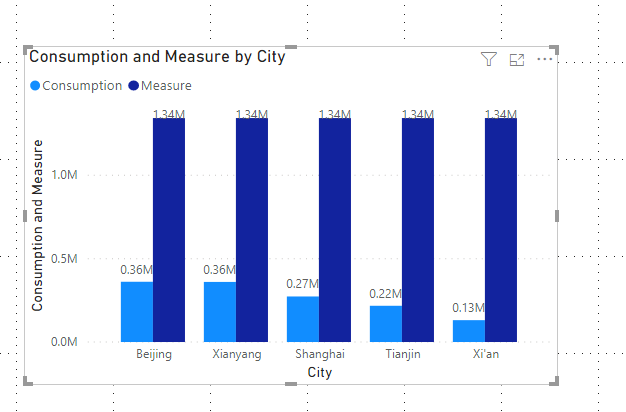
Then put the measure in the "value " field of a clustered column chart,and you will see:
The same with "average",here is a sample .pbix file you can refer to.
Hi @Anonymous ,
Take "total " for example, you can create a measure such as below:
Measure = SUMX(ALL('Table'),'Table'[Consumption])
Then put the measure in the "value " field of a clustered column chart,and you will see:
The same with "average",here is a sample .pbix file you can refer to.
The Power BI Data Visualization World Championships is back! Get ahead of the game and start preparing now!
| User | Count |
|---|---|
| 38 | |
| 38 | |
| 37 | |
| 28 | |
| 28 |
| User | Count |
|---|---|
| 124 | |
| 89 | |
| 73 | |
| 66 | |
| 65 |