Join us at FabCon Atlanta from March 16 - 20, 2026, for the ultimate Fabric, Power BI, AI and SQL community-led event. Save $200 with code FABCOMM.
Register now!The Power BI Data Visualization World Championships is back! Get ahead of the game and start preparing now! Learn more
hi all ,i need your help again.
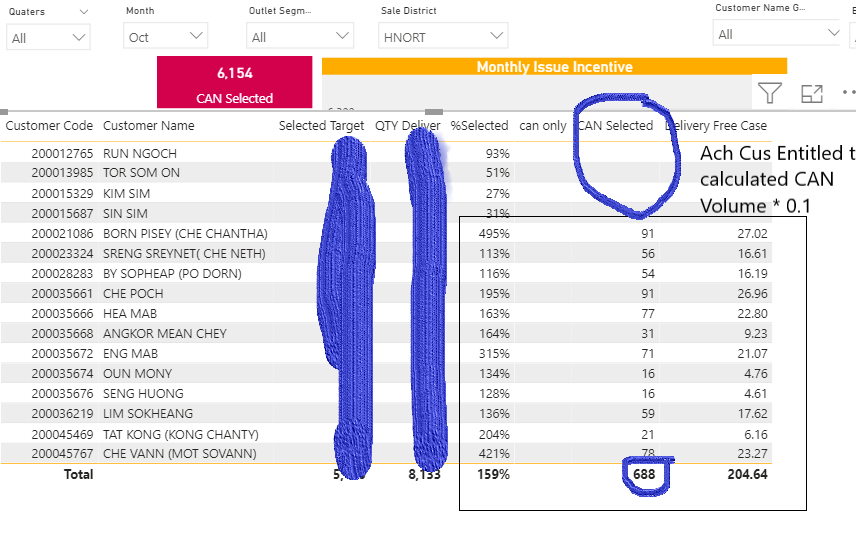
CAN selected Measure : is where i will be calculated * 0.1 If %Selected >=0.979 , though the total Row is not right , it's sum also the blank Customer that is not ach.
and another thing is , You see the Measure with red Background 6154 , i have no idea where it's coming from.
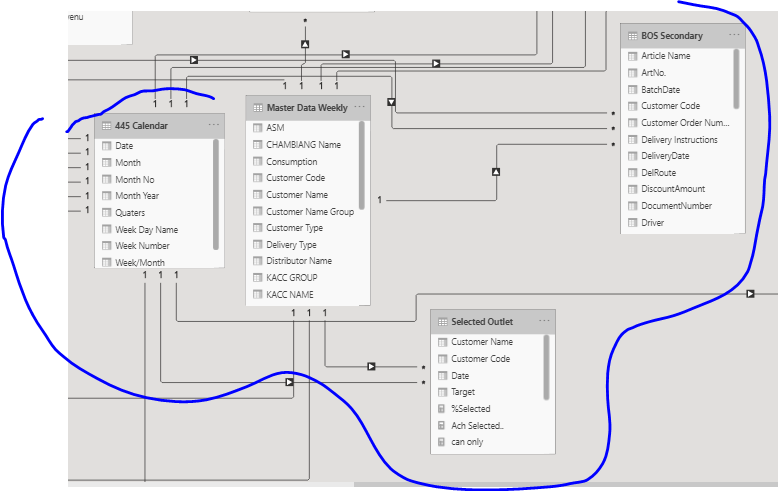
Customer code and Customer name were taken from Master Data , Target from other table , and QTY Deliver also from other table another Master SKU table
the formula i'm using is :
Solved! Go to Solution.
See the following link dealing with measurement totals:
https://community.powerbi.com/t5/DAX-Commands-and-Tips/Dealing-with-Measure-Totals/td-p/63376
Proud to be a Super User!
Hi , It works out perfectly from my side.
thanks you so much for your help
See the following link dealing with measurement totals:
https://community.powerbi.com/t5/DAX-Commands-and-Tips/Dealing-with-Measure-Totals/td-p/63376
Proud to be a Super User!
The Power BI Data Visualization World Championships is back! Get ahead of the game and start preparing now!
| User | Count |
|---|---|
| 39 | |
| 38 | |
| 38 | |
| 28 | |
| 27 |
| User | Count |
|---|---|
| 124 | |
| 88 | |
| 73 | |
| 66 | |
| 65 |