FabCon is coming to Atlanta
Join us at FabCon Atlanta from March 16 - 20, 2026, for the ultimate Fabric, Power BI, AI and SQL community-led event. Save $200 with code FABCOMM.
Register now!- Power BI forums
- Get Help with Power BI
- Desktop
- Service
- Report Server
- Power Query
- Mobile Apps
- Developer
- DAX Commands and Tips
- Custom Visuals Development Discussion
- Health and Life Sciences
- Power BI Spanish forums
- Translated Spanish Desktop
- Training and Consulting
- Instructor Led Training
- Dashboard in a Day for Women, by Women
- Galleries
- Data Stories Gallery
- Themes Gallery
- Contests Gallery
- QuickViz Gallery
- Quick Measures Gallery
- Visual Calculations Gallery
- Notebook Gallery
- Translytical Task Flow Gallery
- TMDL Gallery
- R Script Showcase
- Webinars and Video Gallery
- Ideas
- Custom Visuals Ideas (read-only)
- Issues
- Issues
- Events
- Upcoming Events
The Power BI Data Visualization World Championships is back! Get ahead of the game and start preparing now! Learn more
- Power BI forums
- Forums
- Get Help with Power BI
- Desktop
- Re: Total Employee Count by group
- Subscribe to RSS Feed
- Mark Topic as New
- Mark Topic as Read
- Float this Topic for Current User
- Bookmark
- Subscribe
- Printer Friendly Page


- Mark as New
- Bookmark
- Subscribe
- Mute
- Subscribe to RSS Feed
- Permalink
- Report Inappropriate Content
Total Employee Count by group
Hello All,
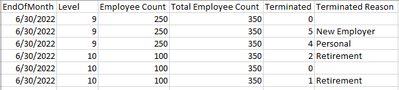
I'm trying to calculate calculate total employee count by group so I can get the % of the Grand Total (ex. level 10 employee count is 100 and total employee count is 350 so the % should be 28.57). Currently though when I try to sum it sums all the numbers (ex. level 10 employee count 100 + 100 + 100 which is 300). This would give me a % of 85.71, this is incorrect.
Any ideas on how to get this to work.
Solved! Go to Solution.


- Mark as New
- Bookmark
- Subscribe
- Mute
- Subscribe to RSS Feed
- Permalink
- Report Inappropriate Content
@nleuck_101
Please try this measure
Count Measure =
VAR T1 =
    SUMMARIZE (
        TableName,
        TableName[Level],
        "@Count", SUMX ( VALUES ( TableName[Count] ), TableName[Count] )
    )
RETURN
SUMX ( T1, [@Count] )- Mark as New
- Bookmark
- Subscribe
- Mute
- Subscribe to RSS Feed
- Permalink
- Report Inappropriate Content
Hi @nleuck_101
Please use
New Table =
VAR T1 =
    SUMMARIZE ( TableName, TableName[Level], "@Count", MAX ( TableName[Count] ) )
RETURN
ADDCOLUMNS ( T1, "% Count", DIVIDE ( [@Count], SUMX ( T1, [@Count] ) ) )- Mark as New
- Bookmark
- Subscribe
- Mute
- Subscribe to RSS Feed
- Permalink
- Report Inappropriate Content
That only get's me the % of grand total. I still need to display the correct employee count in the visual.
- Mark as New
- Bookmark
- Subscribe
- Mute
- Subscribe to RSS Feed
- Permalink
- Report Inappropriate Content
- Mark as New
- Bookmark
- Subscribe
- Mute
- Subscribe to RSS Feed
- Permalink
- Report Inappropriate Content
What about showing each level count, the total count (all the level sumed up), and % of grand total by month-year?
- Mark as New
- Bookmark
- Subscribe
- Mute
- Subscribe to RSS Feed
- Permalink
- Report Inappropriate Content
Tou mentioned that you want to create a calculated table. Seems now you are talking about a measure in a table visual. For a measure the count would be
Count Measure =
VAR T1 =
    SUMMARIZE ( TableName, TableName[Level], "@Count", MAX ( TableName[Count] ) )
RETURN
SUMX ( T1, [@Count] )- Mark as New
- Bookmark
- Subscribe
- Mute
- Subscribe to RSS Feed
- Permalink
- Report Inappropriate Content
There is still a problem. If I'm only getting the MAX it's not summing the levels that might have different values. Example level 10 could have 100, 100, 100, 90, 70. What I would want is for it to sum 100 + 90 +70 and show level 10 as 260 and not the max of 100.
- Mark as New
- Bookmark
- Subscribe
- Mute
- Subscribe to RSS Feed
- Permalink
- Report Inappropriate Content
@nleuck_101
You wanted to sum the distinct values of the count. Fore some reason I missed to read this reply. Please check the two solutions provided below for both a measure and a calculated table.
- Mark as New
- Bookmark
- Subscribe
- Mute
- Subscribe to RSS Feed
- Permalink
- Report Inappropriate Content
@nleuck_101
Would like to connect via teams or zoom to look into it as I believe I'm missing something here
- Mark as New
- Bookmark
- Subscribe
- Mute
- Subscribe to RSS Feed
- Permalink
- Report Inappropriate Content
I need to get the sum of the employee in the level. If you look at the original post level 10 has 3 rows. That's because there were two terminations reasons (I messed up and one of those needs to be a different reason like new employer or etc...). I want to get the total employee count of level 10 which is 100 but Power BI is summing up 100 three times becasue there are three entries and I'm getting 300 which is wrong.
- Mark as New
- Bookmark
- Subscribe
- Mute
- Subscribe to RSS Feed
- Permalink
- Report Inappropriate Content
@nleuck_101
And this is a calculated table
Count Measure =
VAR T1 =
    SUMMARIZE (
        TableName,
        TableName[Level],
        "@Count", SUMX ( VALUES ( TableName[Count] ), TableName[Count] )
    )
RETURN
ADDCOLUMNS ( T1, "% Count", DIVIDE ( [@Count], SUMX ( T1, [@Count] ) ) )- Mark as New
- Bookmark
- Subscribe
- Mute
- Subscribe to RSS Feed
- Permalink
- Report Inappropriate Content
@nleuck_101
Please try this measure
Count Measure =
VAR T1 =
    SUMMARIZE (
        TableName,
        TableName[Level],
        "@Count", SUMX ( VALUES ( TableName[Count] ), TableName[Count] )
    )
RETURN
SUMX ( T1, [@Count] )- Mark as New
- Bookmark
- Subscribe
- Mute
- Subscribe to RSS Feed
- Permalink
- Report Inappropriate Content
- Mark as New
- Bookmark
- Subscribe
- Mute
- Subscribe to RSS Feed
- Permalink
- Report Inappropriate Content
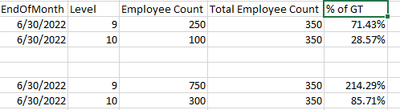
It's not that easy. The top part is the desired results but the bottom part it what I'm actually getting.

- Mark as New
- Bookmark
- Subscribe
- Mute
- Subscribe to RSS Feed
- Permalink
- Report Inappropriate Content
What I have seen is if the the "total" is summed up as a calculation in PBI, then you can right click to select the % versus doing a calculation to get the %; if that makes sense.

Helpful resources

Power BI Dataviz World Championships
The Power BI Data Visualization World Championships is back! Get ahead of the game and start preparing now!

Power BI Monthly Update - December 2025
Check out the December 2025 Power BI Holiday Recap!

FabCon Atlanta 2026
Join us at FabCon Atlanta, March 16-20, for the ultimate Fabric, Power BI, AI and SQL community-led event. Save $200 with code FABCOMM.

| User | Count |
|---|---|
| 39 | |
| 37 | |
| 33 | |
| 32 | |
| 29 |


| User | Count |
|---|---|
| 132 | |
| 88 | |
| 82 | |
| 68 | |
| 64 |


