Get Fabric certified for FREE!
Don't miss your chance to take the Fabric Data Engineer (DP-700) exam on us!
Learn more- Power BI forums
- Get Help with Power BI
- Desktop
- Service
- Report Server
- Power Query
- Mobile Apps
- Developer
- DAX Commands and Tips
- Custom Visuals Development Discussion
- Health and Life Sciences
- Power BI Spanish forums
- Translated Spanish Desktop
- Training and Consulting
- Instructor Led Training
- Dashboard in a Day for Women, by Women
- Galleries
- Data Stories Gallery
- Themes Gallery
- Contests Gallery
- QuickViz Gallery
- Quick Measures Gallery
- Visual Calculations Gallery
- Notebook Gallery
- Translytical Task Flow Gallery
- TMDL Gallery
- R Script Showcase
- Webinars and Video Gallery
- Ideas
- Custom Visuals Ideas (read-only)
- Issues
- Issues
- Events
- Upcoming Events
Next up in the FabCon + SQLCon recap series: The roadmap for Microsoft SQL and Maximizing Developer experiences in Fabric. All sessions are available on-demand after the live show. Register now
- Power BI forums
- Forums
- Get Help with Power BI
- Desktop
- Re: Total Count Without Duplicates
- Subscribe to RSS Feed
- Mark Topic as New
- Mark Topic as Read
- Float this Topic for Current User
- Bookmark
- Subscribe
- Printer Friendly Page


- Mark as New
- Bookmark
- Subscribe
- Mute
- Subscribe to RSS Feed
- Permalink
- Report Inappropriate Content
Total Count Without Duplicates
How to Count total number of rows in table after using some filter. I have created column and Measure to calculate number of rows in table but could not get right result.
As you can see in pic 4th rows (Yellow Highlighted) has count value 2 insted 1. Total count of table should be 5 insted 6.. Please guide me how can i calculate the right count.



- Mark as New
- Bookmark
- Subscribe
- Mute
- Subscribe to RSS Feed
- Permalink
- Report Inappropriate Content
Hi @vishalbaldania,
Could you please mark the proper answer as solution if it's convenient for you? That will be a help to the others.
Best Regards!
Dale
If this post helps, then please consider Accept it as the solution to help the other members find it more quickly.


- Mark as New
- Bookmark
- Subscribe
- Mute
- Subscribe to RSS Feed
- Permalink
- Report Inappropriate Content
@vishalbaldania unfortunately with this limited information i would need to be a bit psychic to understand the issue 
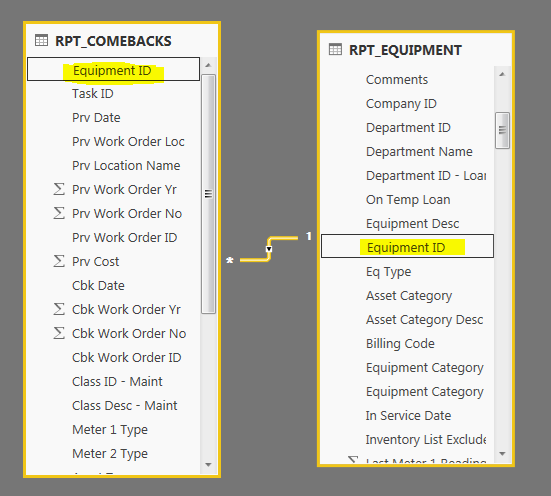
as i said i need a screen shot of your relationships if you are using more than one table?
can you also post how you did your measures, the code?
If I took the time to answer your question and I came up with a solution, please mark my post as a solution and /or give kudos freely for the effort 🙂 Thank you!
Proud to be a Super User!
- Mark as New
- Bookmark
- Subscribe
- Mute
- Subscribe to RSS Feed
- Permalink
- Report Inappropriate Content
Formula for Column: Column = COUNT(RPT_COMEBACKS[Equipment ID])
Formula for Measure: Measure = COUNTROWS(RPT_COMEBACKS)

- Mark as New
- Bookmark
- Subscribe
- Mute
- Subscribe to RSS Feed
- Permalink
- Report Inappropriate Content
@vishalbaldania so are you wanting a unique count of equipment id, or just a count of all the rows in the table?
Formula for Column: Column = distinctCOUNT(RPT_COMEBACKS[Equipment ID])
Formula for Measure: Measure = distinctCOUNT(RPT_COMEBACKS)
this is for unique count
If I took the time to answer your question and I came up with a solution, please mark my post as a solution and /or give kudos freely for the effort 🙂 Thank you!
Proud to be a Super User!
- Mark as New
- Bookmark
- Subscribe
- Mute
- Subscribe to RSS Feed
- Permalink
- Report Inappropriate Content
Could you please tell me formula for count of all rows in the table. becasue i want to use that as KPI
- Mark as New
- Bookmark
- Subscribe
- Mute
- Subscribe to RSS Feed
- Permalink
- Report Inappropriate Content
@vishalbaldania counting all rows is simply countrows(tablename)
If I took the time to answer your question and I came up with a solution, please mark my post as a solution and /or give kudos freely for the effort 🙂 Thank you!
Proud to be a Super User!
- Mark as New
- Bookmark
- Subscribe
- Mute
- Subscribe to RSS Feed
- Permalink
- Report Inappropriate Content
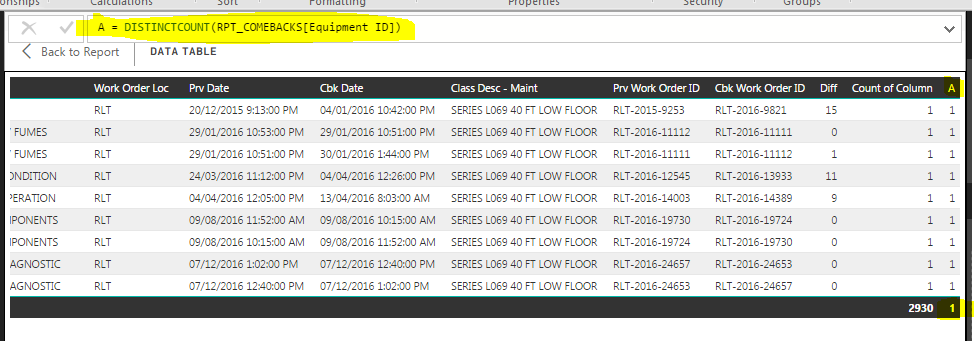
As you said i used DISTINCTCOUNT(RPT_COMEBACKS[Equipment ID]) but the still output does not right (you can see in image). if you calculate total number of rows in table then it would be 9 insted 10.
I also used COUNTROW: Measure = COUNTROWS(RPT_COMEBACKS) but result is not changed.


- Mark as New
- Bookmark
- Subscribe
- Mute
- Subscribe to RSS Feed
- Permalink
- Report Inappropriate Content
@vishalbaldania why are you creating a column? they should both be measures
just so that i understand what you trying to do.
you want to see the total rows in the table vs the count of unique equipment id's?
If I took the time to answer your question and I came up with a solution, please mark my post as a solution and /or give kudos freely for the effort 🙂 Thank you!
Proud to be a Super User!
- Mark as New
- Bookmark
- Subscribe
- Mute
- Subscribe to RSS Feed
- Permalink
- Report Inappropriate Content
YES that's right
- Mark as New
- Bookmark
- Subscribe
- Mute
- Subscribe to RSS Feed
- Permalink
- Report Inappropriate Content
@vishalbaldania change the column to measure and see if it adjusts it properly
ps are you wanting to see the total of all on every row, or only what is related to that row
you also need to check your data because the measure might be correct, if you still struggling you can send me your pbix
if i am not understanding you
detail what you expect to see
If I took the time to answer your question and I came up with a solution, please mark my post as a solution and /or give kudos freely for the effort 🙂 Thank you!
Proud to be a Super User!
- Mark as New
- Bookmark
- Subscribe
- Mute
- Subscribe to RSS Feed
- Permalink
- Report Inappropriate Content
As you said i created Measure A and it's works but I can't see the total rows on the bottom. Might be becasue of i used distictcount if i use something else like count or countrows it does not works
- Mark as New
- Bookmark
- Subscribe
- Mute
- Subscribe to RSS Feed
- Permalink
- Report Inappropriate Content
@vishalbaldania ok but can you tell me what you expect to see there? because i dont quite understand the issue here,what is the expected value at the bottom the total is going to return a distinct count of all equipment ids, it look like you only have one equipment id in your table.
i am not quite sure what you objective is, if you explain the business requirement mabye i can help you better
If I took the time to answer your question and I came up with a solution, please mark my post as a solution and /or give kudos freely for the effort 🙂 Thank you!
Proud to be a Super User!

Helpful resources

New to Fabric Survey
If you have recently started exploring Fabric, we'd love to hear how it's going. Your feedback can help with product improvements.

Power BI DataViz World Championships - June 2026
A new Power BI DataViz World Championship is coming this June! Don't miss out on submitting your entry.

Join our Fabric User Panel
Share feedback directly with Fabric product managers, participate in targeted research studies and influence the Fabric roadmap.

Power BI Community Update - March 2026
Check out the March 2026 Power BI update to learn about new features.

| User | Count |
|---|---|
| 53 | |
| 45 | |
| 44 | |
| 20 | |
| 19 |


| User | Count |
|---|---|
| 73 | |
| 71 | |
| 34 | |
| 33 | |
| 31 |


