Get Fabric or SQL Certified for Free.
Get certified for free when you join Fabric Data Days 2026 and dive into Fabric, Power BI, SQL, AI, and other essential data skills.
Join now- Power BI forums
- Get Help with Power BI
- Desktop
- Service
- Report Server
- Power Query
- Mobile Apps
- Developer
- DAX Commands and Tips
- Custom Visuals Development Discussion
- Health and Life Sciences
- Power BI Spanish forums
- Translated Spanish Desktop
- Training and Consulting
- Instructor Led Training
- Dashboard in a Day for Women, by Women
- Galleries
- Data Stories Gallery
- Themes Gallery
- Contests Gallery
- QuickViz Gallery
- Quick Measures Gallery
- Visual Calculations Gallery
- Notebook Gallery
- Translytical Task Flow Gallery
- TMDL Gallery
- R Script Showcase
- Webinars and Video Gallery
- Ideas
- Custom Visuals Ideas (read-only)
- Issues
- Issues
- Events
- Upcoming Events
July 7 - July 17 | Round 2 of the Power BI Dataviz World Championships. Don't miss your chance! Learn more
- Power BI forums
- Forums
- Get Help with Power BI
- Desktop
- Re: Total Calculation with multiple fact Table
- Subscribe to RSS Feed
- Mark Topic as New
- Mark Topic as Read
- Float this Topic for Current User
- Bookmark
- Subscribe
- Printer Friendly Page


- Mark as New
- Bookmark
- Subscribe
- Mute
- Subscribe to RSS Feed
- Permalink
- Report Inappropriate Content
Total Calculation with multiple fact Table
I cannot make changes in Data Model, so I hope there is a possibility to calculate correctly totals in measure.
Data model:
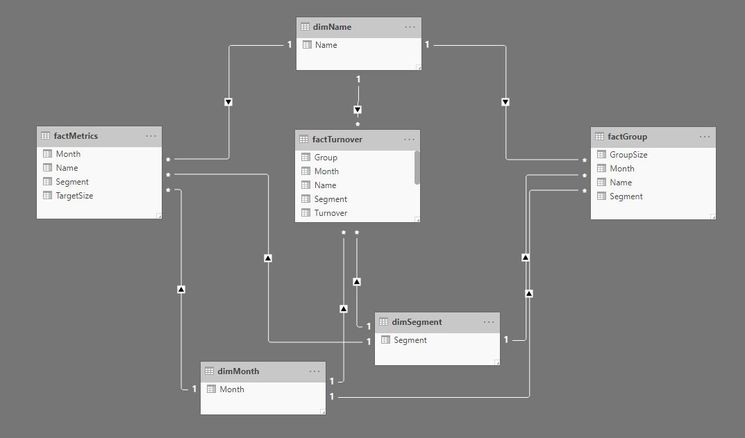
It is a simplified version of a real model.
Correct Absolute Turnover should be 15

I cannot get the correct "Absolute Turnover Target_Control" measure.
Absolute Turnover Target_Control HASONEFILTER =
        IF(
            HASONEFILTER(dimName[Name]);
            [Target+control Size]*[AVG Target turnover];
            "need help"
            )
AVG Target turnover = DIVIDE([Turnover Target];SUM(factMetrics[TargetSize]))Target+control Size = SUM(factGroup[GroupSize])+SUM(factMetrics[TargetSize])Turnover Target = CALCULATE(SUM(factTurnover[Turnover]);factTurnover[Group]="Target")
I tried different options, but none of them worked.
@ImkeF The last time you helped me with similar issue maybe you will know also this time?
The file can be found here: File
Solved! Go to Solution.


- Mark as New
- Bookmark
- Subscribe
- Mute
- Subscribe to RSS Feed
- Permalink
- Report Inappropriate Content
I created it like this.
Absolute Turnover Target_Control =
sumx(SUMMARIZE(factGroup,dimName[Name],dimMonth[Month],dimSegment[Segment],"_1",[Target+control Size],"_2",[AVG Target turnover]),[_1]*[_2])
and corrected datatype. it coming 14.48. Can you explain how it should be 15.
File attached.
- Mark as New
- Bookmark
- Subscribe
- Mute
- Subscribe to RSS Feed
- Permalink
- Report Inappropriate Content
@ignas ,
Multiplication needs to be sum(A*B). As we already have aggregated columns, We need to get the correct row context. You need to change the group by in summarize to force calculation at the correct row level
I added three of them
sumx(summarize(Table,Table[Name],table[Month], table[Segment],"_1",[Target+control Size],"_2",[AVG Target turnover]),[_1]*[_2])- Mark as New
- Bookmark
- Subscribe
- Mute
- Subscribe to RSS Feed
- Permalink
- Report Inappropriate Content
@amitchandak Thanks a lot for such a quick response. I am not entirely sure how I can implement your suggested solution. There is no one table that I can summarise. Measure come from 3 different tables: factMetrics, factTurnover and factGroup.
How can I use summarise function in this case?
- Mark as New
- Bookmark
- Subscribe
- Mute
- Subscribe to RSS Feed
- Permalink
- Report Inappropriate Content
- Mark as New
- Bookmark
- Subscribe
- Mute
- Subscribe to RSS Feed
- Permalink
- Report Inappropriate Content
@amitchandak I do not know how I can summarise across the common dimensions. Could you please help me with the formula?
Summarise function is used for one Table as far as I know.
I cannot use one fact in summarising, because in the real data model none of the facts contain a full list.
The file can be found here: File
- Mark as New
- Bookmark
- Subscribe
- Mute
- Subscribe to RSS Feed
- Permalink
- Report Inappropriate Content
I created it like this.
Absolute Turnover Target_Control =
sumx(SUMMARIZE(factGroup,dimName[Name],dimMonth[Month],dimSegment[Segment],"_1",[Target+control Size],"_2",[AVG Target turnover]),[_1]*[_2])
and corrected datatype. it coming 14.48. Can you explain how it should be 15.
File attached.
- Mark as New
- Bookmark
- Subscribe
- Mute
- Subscribe to RSS Feed
- Permalink
- Report Inappropriate Content
@amitchandak You saved my day. It was a bit too difficult for me, but now I have learned. Highly appreciated.
By the way, how are you able to attach the file?
I cannot find this button.

- Mark as New
- Bookmark
- Subscribe
- Mute
- Subscribe to RSS Feed
- Permalink
- Report Inappropriate Content

Helpful resources

FabCon & SQLCon – Barcelona 2026
Join us in Barcelona for FabCon and SQLCon, the Fabric, Power BI, SQL, and AI community event. Save €200 with code FABCMTY200.

Data Days 2026
Join Data Days 2026: 60 days of free live/on-demand sessions, challenges, study groups, and certification opportunities.

Power BI DataViz World Championships - June 2026
A new Power BI DataViz World Championship is coming this June! Don't miss out on submitting your entry.

| User | Count |
|---|---|
| 28 | |
| 27 | |
| 25 | |
| 22 | |
| 18 |


| User | Count |
|---|---|
| 52 | |
| 49 | |
| 43 | |
| 36 | |
| 36 |


