cancel
Showing results for 
Search instead for 
Did you mean: 

Learn from the best! Meet the four finalists headed to the FINALS of the Power BI Dataviz World Championships! Register now

Reply
Anonymous
Not applicable

TopN and Ranking

Hello 


I have a set of data, as below.  I need to achieve the following:

  • summarise the customers
  • total the sales for each customer
  • rank the customer by total sales
  • put any customer outside top 2 as "other"

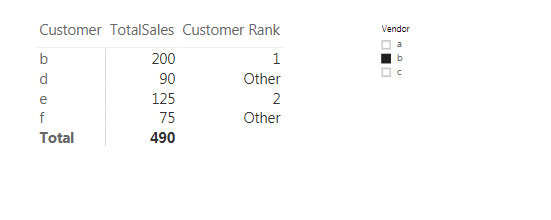
Finally, I need the table/rank to change if my slicer of vendor, for example, changes.


Any ideas?  


Thanks 


Data example:


Customer            Sales             Vendor

a                            100                    a

a                            100                    a

a                            100                    a

b                            100                    b

b                             50                    a

b                            100                    b

c                              10                    c

c                              50                    a

c                            100                    a

d                             90                    b

d                             20                    c

d                             60                    a

e                            100                    c

e                              75                    b

e                              50                    b

f                               40                    a

f                               90                    c

f                               75                    b


1 ACCEPTED SOLUTION
LivioLanzo
Solution Sage
Solution Sage

@Anonymous


Hello @Anonymous,


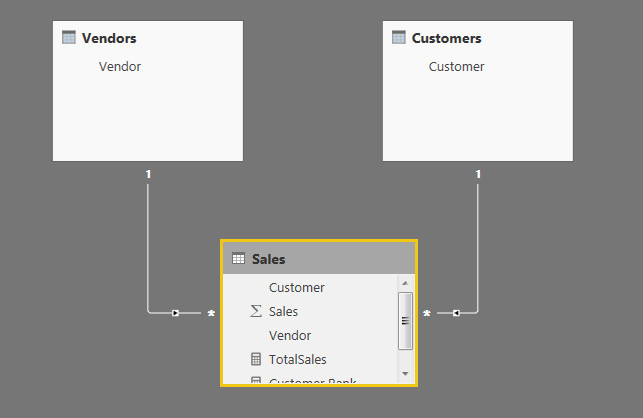
you need to build the below simple model


and add the below measures:


TotalSales = SUM( Sales[Sales] )
 
Customer Rank = 
IF(
    COUNTROWS( Sales ) > 0,
    VAR Ranking = 
    IF(
        HASONEVALUE( Customers[Customer] ),
        RANKX(
            ALLSELECTED( Customers[Customer] ),
            [TotalSales],,DESC
        )
    )
    RETURN IF( Ranking < 3, Ranking, "Other" )
)


Capture.PNG

 
Capture.PNG


Did I answer your question correctly? Mark my answer as a solution!


Proud to be a Datanaut!  

View solution in original post

1 REPLY 1
LivioLanzo
Solution Sage
Solution Sage

@Anonymous


Hello @Anonymous,


you need to build the below simple model


and add the below measures:


TotalSales = SUM( Sales[Sales] )
 
Customer Rank = 
IF(
    COUNTROWS( Sales ) > 0,
    VAR Ranking = 
    IF(
        HASONEVALUE( Customers[Customer] ),
        RANKX(
            ALLSELECTED( Customers[Customer] ),
            [TotalSales],,DESC
        )
    )
    RETURN IF( Ranking < 3, Ranking, "Other" )
)


Capture.PNG

 
Capture.PNG


Did I answer your question correctly? Mark my answer as a solution!


Proud to be a Datanaut!  

Helpful resources

Announcements
Join our Fabric User Panel

Join our Fabric User Panel

Share feedback directly with Fabric product managers, participate in targeted research studies and influence the Fabric roadmap.

March Power BI Update Carousel

Power BI Community Update - March 2026

Check out the March 2026 Power BI update to learn about new features.