cancel
Showing results for 
Search instead for 
Did you mean: 

The Power BI Data Visualization World Championships is back! It's time to submit your entry. Live now!

Reply
Anonymous
Not applicable

TopN and Ranking

Hello 


I have a set of data, as below.  I need to achieve the following:

  • summarise the customers
  • total the sales for each customer
  • rank the customer by total sales
  • put any customer outside top 2 as "other"

Finally, I need the table/rank to change if my slicer of vendor, for example, changes.


Any ideas?  


Thanks 


Data example:


Customer            Sales             Vendor

a                            100                    a

a                            100                    a

a                            100                    a

b                            100                    b

b                             50                    a

b                            100                    b

c                              10                    c

c                              50                    a

c                            100                    a

d                             90                    b

d                             20                    c

d                             60                    a

e                            100                    c

e                              75                    b

e                              50                    b

f                               40                    a

f                               90                    c

f                               75                    b


1 ACCEPTED SOLUTION
LivioLanzo
Solution Sage
Solution Sage

@Anonymous


Hello @Anonymous,


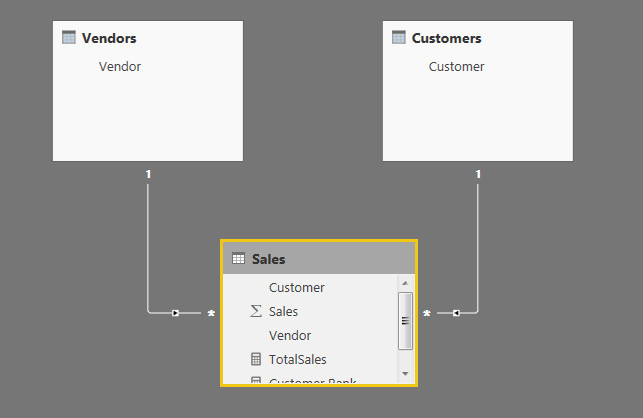
you need to build the below simple model


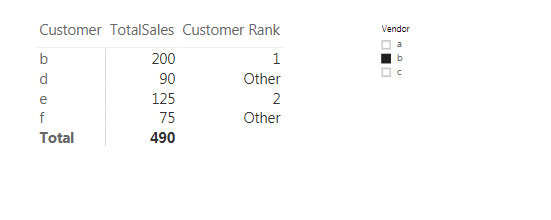
and add the below measures:


TotalSales = SUM( Sales[Sales] )
 
Customer Rank = 
IF(
    COUNTROWS( Sales ) > 0,
    VAR Ranking = 
    IF(
        HASONEVALUE( Customers[Customer] ),
        RANKX(
            ALLSELECTED( Customers[Customer] ),
            [TotalSales],,DESC
        )
    )
    RETURN IF( Ranking < 3, Ranking, "Other" )
)


Capture.PNG

 
Capture.PNG


Did I answer your question correctly? Mark my answer as a solution!


Proud to be a Datanaut!  

View solution in original post

1 REPLY 1
LivioLanzo
Solution Sage
Solution Sage

@Anonymous


Hello @Anonymous,


you need to build the below simple model


and add the below measures:


TotalSales = SUM( Sales[Sales] )
 
Customer Rank = 
IF(
    COUNTROWS( Sales ) > 0,
    VAR Ranking = 
    IF(
        HASONEVALUE( Customers[Customer] ),
        RANKX(
            ALLSELECTED( Customers[Customer] ),
            [TotalSales],,DESC
        )
    )
    RETURN IF( Ranking < 3, Ranking, "Other" )
)


Capture.PNG

 
Capture.PNG


Did I answer your question correctly? Mark my answer as a solution!


Proud to be a Datanaut!  

Helpful resources

Announcements
Power BI DataViz World Championships

Power BI Dataviz World Championships

The Power BI Data Visualization World Championships is back! It's time to submit your entry.

January Power BI Update Carousel

Power BI Monthly Update - January 2026

Check out the January 2026 Power BI update to learn about new features.

FabCon Atlanta 2026 carousel

FabCon Atlanta 2026

Join us at FabCon Atlanta, March 16-20, for the ultimate Fabric, Power BI, AI and SQL community-led event. Save $200 with code FABCOMM.