Join us at FabCon Atlanta from March 16 - 20, 2026, for the ultimate Fabric, Power BI, AI and SQL community-led event. Save $200 with code FABCOMM.
Register now!The Power BI Data Visualization World Championships is back! Get ahead of the game and start preparing now! Learn more
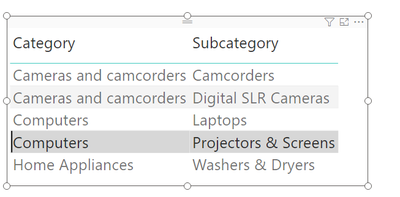
we want to produce a dashboard that shows the category and subcategory of products that sold more than twice the average sales amount.
The folloiwng code produces the table :
BestCategories =
VAR Subcategories =
ALL ( 'Product'[Category], 'Product'[Subcategory] )
VAR AverageSales =
AVERAGEX (
Subcategories,
SUMX ( RELATEDTABLE ( Sales ), Sales[Quantity] * Sales[Net Price] )
)
VAR TopCategories =
FILTER (
Subcategories,
VAR SalesOfCategory =
SUMX ( RELATEDTABLE ( Sales ), Sales[Quantity] * Sales[Net Price] )
RETURN
SalesOfCategory >= AverageSales * 2
)
RETURN
TopCategories
However, is it possible to write a shorter and more efficient code using CALCULATE and Filter context ?
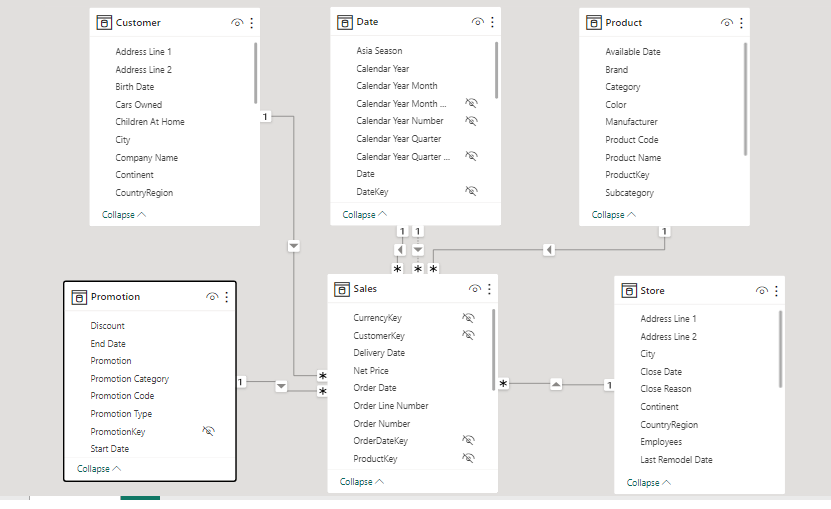
I have attached the Model View of the data set and the Out Put of the Code for reference.
Regards,
Somnath6309
Hi @somnath6309 ,
You can use the following DAX code:
BestCategories =
CALCULATETABLE (
SUMMARIZE (
Sales,
'Product'[Category],
'Product'[Subcategory],
"Total Sales", SUM ( Sales[Quantity] * Sales[Net Price] )
),
FILTER (
ALLSELECTED ( 'Product'[Category], 'Product'[Subcategory] ),
[Total Sales] >= 2 * AVERAGE ( Sales[Quantity] * Sales[Net Price] )
)
)
Hope it helps.
Best Regards,
Stephen Tao
If this post helps, then please consider Accept it as the solution to help the other members find it more quickly.
The Power BI Data Visualization World Championships is back! Get ahead of the game and start preparing now!
| User | Count |
|---|---|
| 58 | |
| 47 | |
| 40 | |
| 39 | |
| 22 |
| User | Count |
|---|---|
| 175 | |
| 138 | |
| 118 | |
| 80 | |
| 54 |