cancel
Showing results for 
Search instead for 
Did you mean: 

The Power BI Data Visualization World Championships is back! Get ahead of the game and start preparing now! Learn more

Reply
BobWong1
Helper II
Helper II

Top N function does not work in the Filter Pane?

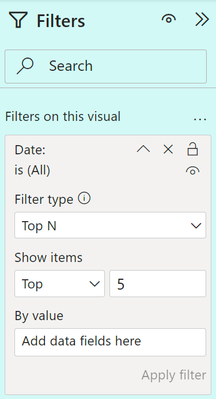
I tried to use the Top N filter function in Filter Pane as shown;

When I tried to drag a field/measure into the <<By Value>> well of 'Add data fields here', in my case I can't, why?

Is it Power BI Desktop having a problem in this area or is there a limitation of type of fields/measure that I could use?

BobWong1_0-1707296969967.png


1 ACCEPTED SOLUTION
Daniel29195
Super User
Super User

@BobWong1 

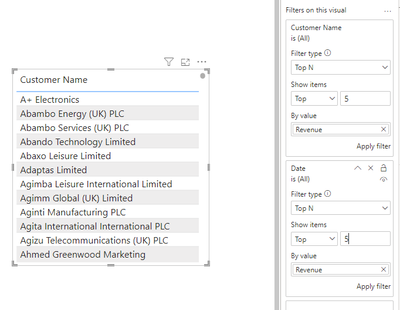
you can use measure with TOPN, as shown below.

Daniel29195_0-1707330435582.png

can you share the measure you are trying to use with the TOPN ? 


best regards

View solution in original post

2 REPLIES 2
Daniel29195
Super User
Super User

@BobWong1 

you can use measure with TOPN, as shown below.

Daniel29195_0-1707330435582.png

can you share the measure you are trying to use with the TOPN ? 


best regards

Dear Daniel,

I managed resolved this issue after I restart Power BI Desktop. It seems to me at certain condition, it may not work. Nevertheless, I should close this issue aa accepted solution. Thanks anyway for your kind reply.

BR,

Helpful resources

Announcements
Power BI DataViz World Championships

Power BI Dataviz World Championships

The Power BI Data Visualization World Championships is back! Get ahead of the game and start preparing now!

December 2025 Power BI Update Carousel

Power BI Monthly Update - December 2025

Check out the December 2025 Power BI Holiday Recap!

FabCon Atlanta 2026 carousel

FabCon Atlanta 2026

Join us at FabCon Atlanta, March 16-20, for the ultimate Fabric, Power BI, AI and SQL community-led event. Save $200 with code FABCOMM.