Join us at FabCon Atlanta from March 16 - 20, 2026, for the ultimate Fabric, Power BI, AI and SQL community-led event. Save $200 with code FABCOMM.
Register now!The Power BI Data Visualization World Championships is back! Get ahead of the game and start preparing now! Learn more
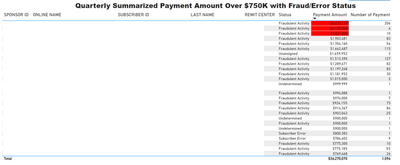
I have a table visual with multiple categorical columns (Sponsor ID, Online Name, Subscriber ID, Last Name, Remit Center, Status) and descending sorted by Payment Amount as shown below. I would like to list top 50 lines, how may I do it? The "Top N" filter is good when there is only 1 categorical column. But it doesn't work as expected with multiple categorical columns.
Thanks.
@bergen288 , Try like
2 column top N = CALCULATE([Net], TOPN(10, SUMMARIZE(ALLSELECTED('Item'), 'Item'[Brand], 'Item'[Category]), [Net],DESC),VALUES('Item'[Brand]), VALUES('Item'[Category]) )
or
2 column top N = CALCULATE([Net], keepfilters( TOPN(10, SUMMARIZE(ALLSELECTED('Item'), 'Item'[Brand], 'Item'[Category]), [Net],DESC) ) )
amitchandak:
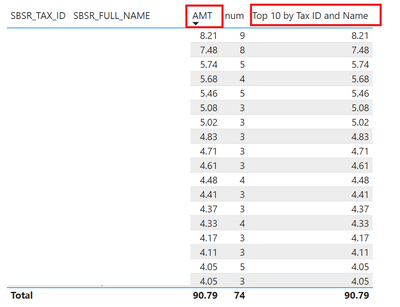
I tried a simple table with 2 categorical columns first. Below is my measure based on your 2nd suggestion:
The Power BI Data Visualization World Championships is back! Get ahead of the game and start preparing now!
Check out the November 2025 Power BI update to learn about new features.
| User | Count |
|---|---|
| 59 | |
| 43 | |
| 42 | |
| 23 | |
| 17 |
| User | Count |
|---|---|
| 190 | |
| 122 | |
| 96 | |
| 66 | |
| 47 |