cancel
Showing results for 
Search instead for 
Did you mean: 

The Power BI Data Visualization World Championships is back! Get ahead of the game and start preparing now! Learn more

Reply
Anonymous
Not applicable

Top N filter and legend chart Problem

Hi guys, I did a filter using dax, where I get the TOP N Countries by # of Travels.

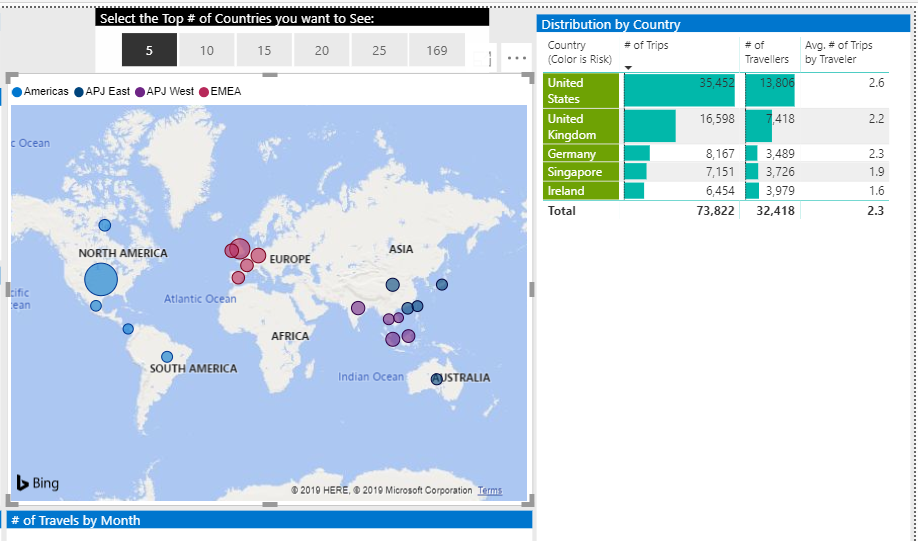
The problem is that when I display the TOP N, it display the TOP N by the legend I have in my chart.

I wanted to pick up the top 5 countries with # of countries, but it gets the top N by legend.

So If I select top 5 for the top n filter, instead of returning me the top 5 countries, it returns me the top 5 countries by legend (which is region, so it returns the top 5 by region). Anything I can do to still have the legend colors, but to display only the real top 5 countries, and not the top 5 by region?


Thanks!

4 REPLIES 4
Ashish_Mathur
Super User
Super User

Hi,

Show your PBI file and the expected result.


Regards,
Ashish Mathur
http://www.ashishmathur.com
https://www.linkedin.com/in/excelenthusiasts/
Anonymous
Not applicable

Here you can see the problem.

My column is ok showing the top 5 because it has no legend, but my graphic is getting the top 5 by region (legend).

I want just the top 5, independent of the region...top n.PNG

Anonymous
Not applicable

HI @Anonymous ,

In fact, I also not found suitable functions to solve this scenario, 'topn filter' will filter on summarize records. When you use legend on visual, power bi will auto split summarize records based on their legend and category.

You can try to use measure to replace value field to force display summarize records, but you can't prevent power bi split current data labels.

Regards,

Xiaoxin Sheng

Anonymous
Not applicable

Hi Friend,

can you give me more info on that:

"You can try to use measure to replace value field to force display summarize records, but you can't prevent power bi split current data labels." - I'm not so sure about what you're saying here...


And what I did to solve that and get what I wanted is just using the legend colors as conditional formatting...

Thanks!

Helpful resources

Announcements
Power BI DataViz World Championships

Power BI Dataviz World Championships

The Power BI Data Visualization World Championships is back! Get ahead of the game and start preparing now!

December 2025 Power BI Update Carousel

Power BI Monthly Update - December 2025

Check out the December 2025 Power BI Holiday Recap!

FabCon Atlanta 2026 carousel

FabCon Atlanta 2026

Join us at FabCon Atlanta, March 16-20, for the ultimate Fabric, Power BI, AI and SQL community-led event. Save $200 with code FABCOMM.