cancel
Showing results for 
Search instead for 
Did you mean: 

July 7 - July 17 | Round 2 of the Power BI Dataviz World Championships. Don't miss your chance! Learn more

Reply
Anonymous
Not applicable

Tooltip shows same table/values

Hello all,


I have a question related to tooltips and I couldn't figure it out why.


I have a table visual(let's name it 'reason table') and other page named as 'tooltip1' and when I hover on rows on 'reason table' it shows the table in 'tooltip1' page which is I want.


But it doesn't change when I hover different rows on 'table visual'


In 'reason table' I use 'reason' field which is coming from calculated table but also I use same field in 'drag tooltip fields here' filter in 'tooltip1' page .


I didn't understand why it is happening? How can I solve this?

Any comment would be helpful

Thanks a lot!


1 ACCEPTED SOLUTION
amitchandak
Super User
Super User

@Anonymous , if you have created a table(Calculated) and if that table is not joined with the dimension you want to filter. The table is as good as static content.

Any table created using some calculations will not take slicer/filter values. They have to be joined back with filter/dimension tables to do so.


Hope steps are correct.

https://docs.microsoft.com/en-us/power-bi/desktop-tooltips

Share with Power BI Enthusiasts: Full Power BI Video (20 Hours) YouTube
Microsoft Fabric Series 60+ Videos YouTube
Microsoft Fabric Hindi End to End YouTube

View solution in original post

4 REPLIES 4
FarhanAhmed
Community Champion
Community Champion

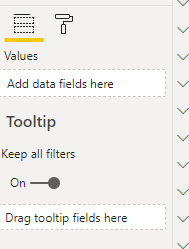
Can you please share the screenshot of what is happening? In the meantime can you please make sure that you have enabled "Keep All Filters" on at Tooltip page 

ToolTip.png


Did I answer your question? Mark my post as a solution! Appreciate your Kudos!!

Proud to be a Super User!


amitchandak
Super User
Super User

@Anonymous , if you have created a table(Calculated) and if that table is not joined with the dimension you want to filter. The table is as good as static content.

Any table created using some calculations will not take slicer/filter values. They have to be joined back with filter/dimension tables to do so.


Hope steps are correct.

https://docs.microsoft.com/en-us/power-bi/desktop-tooltips

Share with Power BI Enthusiasts: Full Power BI Video (20 Hours) YouTube
Microsoft Fabric Series 60+ Videos YouTube
Microsoft Fabric Hindi End to End YouTube
Anonymous
Not applicable

@amitchandak I am facing a similar issue. There are 3 filters on my dashboard which I am trying to add to my measure. I am getting an error stating that the parameter is not correct type. Please guide me on this.


This is my DAX

Current Week Totals_CF =
CALCULATE(SUM(fred_h8_banking[Amt in Bn_CF]), FILTER(ALLSELECTED(fred_h8_banking), fred_h8_banking[Week Rank_CF] = MAX(fred_h8_banking[Week Rank_CF])))
Need to add filter for criteria 1,2 and 3 where all the filters are string.
harshnathani
Community Champion
Community Champion

Hi @Anonymous ,


See if this helps you


https://www.youtube.com/watch?v=URTA7JZsAtw

https://www.youtube.com/watch?v=epDb9ruV0bU


Regards,
Harsh Nathani
Did I answer your question? Mark my post as a solution! Appreciate with a Kudos!! (Click the Thumbs Up Button)

Helpful resources

Announcements
FabCon and SQLCon Barcelona 2026

FabCon & SQLCon – Barcelona 2026

Join us in Barcelona for FabCon and SQLCon, the Fabric, Power BI, SQL, and AI community event. Save €200 with code FABCMTY200.

60 days of Data Days Carousel

Data Days 2026

Join Fabric Data Days 2026: 60 days of free live/on-demand sessions, challenges, study groups, and certification opportunities.

Power BI DataViz World Championships carousel

Power BI DataViz World Championships - June 2026

A new Power BI DataViz World Championship is coming this June! Don't miss out on submitting your entry.