cancel
Showing results for 
Search instead for 
Did you mean: 

Vote for your favorite vizzies from the Power BI Dataviz World Championship submissions. Vote now!

Reply
sgannon1
Frequent Visitor

'Token then expected' error

Hi all, 


Can anybody please tell me what 'token then expected' error means?

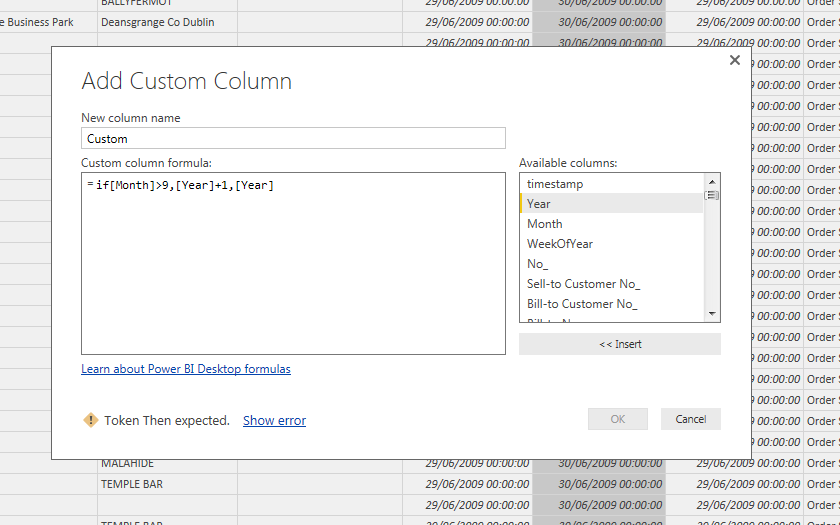
I have created the below formula (I am trying to allocated fiscal year to each month), but obviously I am doing something wrong.


Capture.PNG

1 ACCEPTED SOLUTION
Anonymous
Not applicable

You're using DAX syntax to write a function in M. The query editor uses a different language. It should be


=if [Month] > 9 then [Year] + 1 else [Year]

View solution in original post

4 REPLIES 4
kcantor
Community Champion
Community Champion

This is referring to the proper set up of the if statement. It is not like excel. It needs a 'then' and and 'else' instead of commas.

It should be:

=if [Month]>9 then [year] + 1 else [year]

If in PQL follws this format:

= if <Logical_test> then <result> else <alternate_result>


Did I answer your question? Mark my post as a solution!

Proud to be a Super User!


Anonymous
Not applicable

@kcantor  or @smpa01 See below If then error for custom column. It is only erroring out the first then- please advise how to fix this formula. thank you

If then Error.JPG

Anonymous
Not applicable

I figured it out nevermind. Once I removed all the ) before each of the thens the formula was accepted. Wish the error highlighted the ) parenthesis --calling it a token Then error is misleading bc the then is already there.

Anonymous
Not applicable

You're using DAX syntax to write a function in M. The query editor uses a different language. It should be


=if [Month] > 9 then [Year] + 1 else [Year]

Helpful resources

Announcements
Power BI DataViz World Championships

Power BI Dataviz World Championships

Vote for your favorite vizzies from the Power BI World Championship submissions!

Sticker Challenge 2026 Carousel

Join our Community Sticker Challenge 2026

If you love stickers, then you will definitely want to check out our Community Sticker Challenge!

January Power BI Update Carousel

Power BI Monthly Update - January 2026

Check out the January 2026 Power BI update to learn about new features.

FabCon Atlanta 2026 carousel

FabCon Atlanta 2026

Join us at FabCon Atlanta, March 16-20, for the ultimate Fabric, Power BI, AI and SQL community-led event. Save $200 with code FABCOMM.