cancel
Showing results for 
Search instead for 
Did you mean: 

The Power BI Data Visualization World Championships is back! Get ahead of the game and start preparing now! Learn more

Reply
WillEyedowin
Frequent Visitor

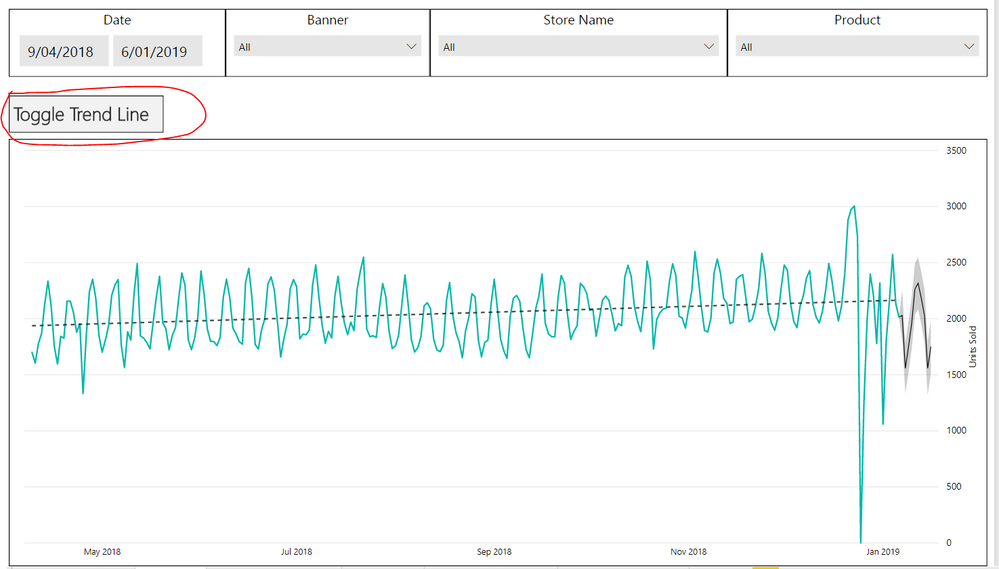
Toggle Trend Line Button

Hi All,


Just a quick question:


I have created a line chart which can be filtered in numerous ways.


However, I would like the ability for the person viewing the report without edit access to toggle a Trend Line on and off at their desire.


Is there any way of doing this?


Something like pictured below with a button which toggles the trend line function would be ideal:

trend line.PNG


Thanks in advance : )

3 REPLIES 3
Vulkany
Frequent Visitor

Hello, 
In my opinion, you have, at least two ways to achieve it.
1. Create a toggle button On/Off and associate it the bookmars;
2. Create your own DAX code to create a trend line, then use it, for example, with a Fields Parameter.

Here an example of a DAX measure.
Adapt it to your model.

TrendLine =
VAR AvgX = AVERAGE(DS_Tariff_By_Day[Tariff_Day])
VAR AvgY = AVERAGE(DS_Tariff[Value])
VAR MinStartDate = MIN(DS_Tariff[StartValidityDate])

VAR DaysSinceStart = DATEDIFF(MinStartDate, DS_Tariff_By_Day[Tariff_Day], DAY)

VAR Numerator = SUMX(DS_Tariff, ([Value] - AvgY) * (DaysSinceStart - AvgX))
VAR Denominator = SUMX(DS_Tariff, POWER(DaysSinceStart - AvgX, 2))

VAR Slope = Numerator / Denominator
VAR Intercept = AvgY - Slope * AvgX

RETURN Slope * AvgX + Intercept

Let me know if it help you.

Anonymous
Not applicable

I would also be interested in this. A button which will turn the trend line on or off. Please could anyone provide info on how to do something like the implementation in Will's original post? 

v-juanli-msft
Community Support
Community Support

Hi @WillEyedowin

To make users only view, You could try two ways:

1.create a report using power bi desktop,

publish this report to my workplace in power bi service,

share this report to users.


2.create a report using power bi desktop,

create an app workplace in power bi service, add users as members, grant users only view permission.

publish this report to the app workplace above.

users of this app workplace can view reports。


As for "toggles the trend line function", i don't know "how the line chart which can be filtered", please clear me so that i can provide more ideas.


Best Regards

maggie

Helpful resources

Announcements
Power BI DataViz World Championships

Power BI Dataviz World Championships

The Power BI Data Visualization World Championships is back! Get ahead of the game and start preparing now!

December 2025 Power BI Update Carousel

Power BI Monthly Update - December 2025

Check out the December 2025 Power BI Holiday Recap!

FabCon Atlanta 2026 carousel

FabCon Atlanta 2026

Join us at FabCon Atlanta, March 16-20, for the ultimate Fabric, Power BI, AI and SQL community-led event. Save $200 with code FABCOMM.