cancel
Showing results for 
Search instead for 
Did you mean: 

The Power BI Data Visualization World Championships is back! Get ahead of the game and start preparing now! Learn more

Reply
aarikc17
Advocate I
Advocate I

Timestamp Nested If

I work in a manufacturing setting.


I am trying to create a dashboard that will tell me how many units I've started that day.


Currently I have created a new column with the following.


VStart = IF(Query1[WRK_AREA]="CLES10000",IF(DAY(Query1[ARRIVAL_TS])=TODAY(),"True","False"),"False")


A started unit counts when it reaches the WRK-AREA "CLES10000".


I have validated that the data I want to retrieve is in my data set.


Any advice/help?

1 ACCEPTED SOLUTION
v-qiuyu-msft
Community Support
Community Support

Hi @aarikc17,


Based on my understanding, you want to count how many records when [WRK-AREA] is "CLES10000" and [ARRIVAL_TS] equals today, right?


You can create a measure below:


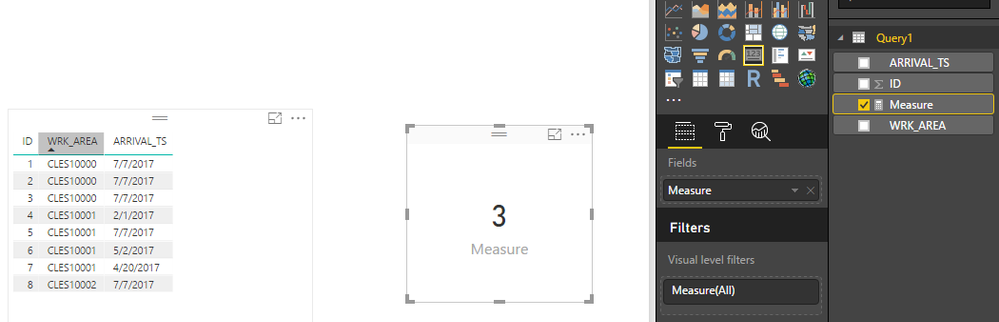
Measure = CALCULATE(COUNTROWS('Query1'),FILTER(ALL(Query1),'Query1'[WRK_AREA]="CLES10000" && 'Query1'[ARRIVAL_TS]=TODAY()))


w1.PNG


If above doesn't meet your requirement, please clarify which results you want based on the dummy data.


Best Regards,
Qiuyun Yu

Community Support Team _ Qiuyun Yu
If this post helps, then please consider Accept it as the solution to help the other members find it more quickly.

View solution in original post

4 REPLIES 4
v-qiuyu-msft
Community Support
Community Support

Hi @aarikc17,


Based on my understanding, you want to count how many records when [WRK-AREA] is "CLES10000" and [ARRIVAL_TS] equals today, right?


You can create a measure below:


Measure = CALCULATE(COUNTROWS('Query1'),FILTER(ALL(Query1),'Query1'[WRK_AREA]="CLES10000" && 'Query1'[ARRIVAL_TS]=TODAY()))


w1.PNG


If above doesn't meet your requirement, please clarify which results you want based on the dummy data.


Best Regards,
Qiuyun Yu

Community Support Team _ Qiuyun Yu
If this post helps, then please consider Accept it as the solution to help the other members find it more quickly.

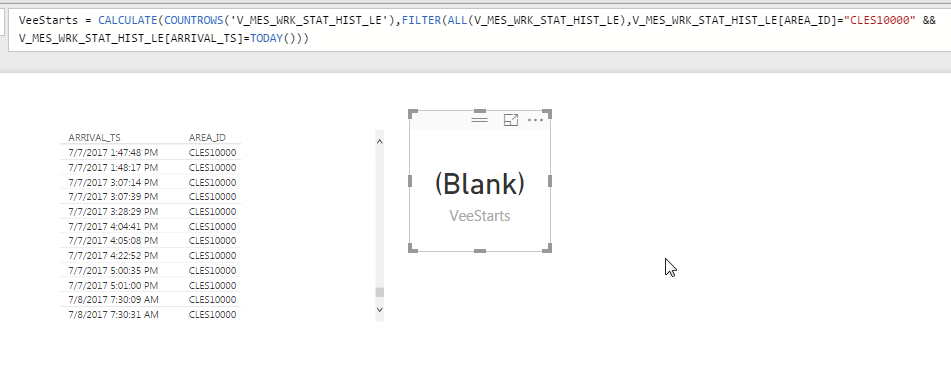
2017_07_08_08_02_18_Eric_s_2nd_Attempt_SOL_Power_BI_Desktop.png

This calculate measure worked yesterday, but today the count is (blank).


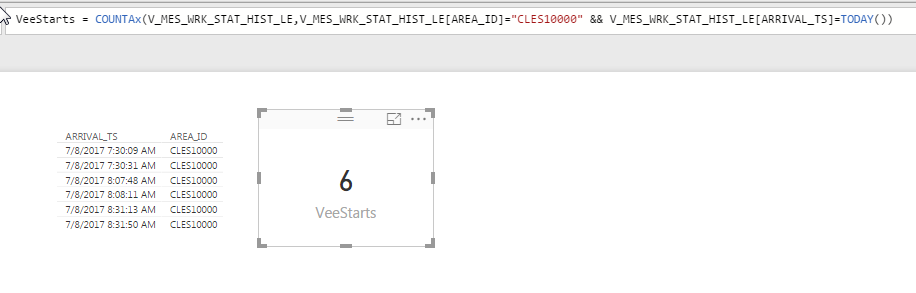
2017_07_08_08_42_34_Eric_s_2nd_Attempt_SOL_Power_BI_Desktop.png

CountAX seems to be working

How would you do this with a direct query?

Helpful resources

Announcements
Power BI DataViz World Championships

Power BI Dataviz World Championships

The Power BI Data Visualization World Championships is back! Get ahead of the game and start preparing now!

December 2025 Power BI Update Carousel

Power BI Monthly Update - December 2025

Check out the December 2025 Power BI Holiday Recap!

FabCon Atlanta 2026 carousel

FabCon Atlanta 2026

Join us at FabCon Atlanta, March 16-20, for the ultimate Fabric, Power BI, AI and SQL community-led event. Save $200 with code FABCOMM.