Join us at FabCon Atlanta from March 16 - 20, 2026, for the ultimate Fabric, Power BI, AI and SQL community-led event. Save $200 with code FABCOMM.
Register now!Get Fabric Certified for FREE during Fabric Data Days. Don't miss your chance! Request now
Hi,
I have a dataset of timesheet data, relevant columns are:
Entry Date - date of time entry e.g. 26 July 2018
Hours Worked- time spent on an activity - decimal hours
Task User Name - details of a specific actitvity e.g. Administration
MonthYear - custom column showing just hte Month and Year to help order things - August 2018
I need to show the time spent on a task (e.g. administration) as a percentage of the total time recorded in a single month. I think I need to create an additonal column with the subtotal of hours for each month and then can use that to create the percentage in a further column but i cannot work out how to make the subtotal!
It also needs to be dynamic as am creating a template that I want to run each month without updating it...
Any help appreicated.
Thanks,
James
@Anonymous,
You may take a look at the following post.
https://community.powerbi.com/t5/Desktop/Subtotal-Percentages/m-p/313658#M139139
Hi @Anonymous,
You need to create a measure to calculate this:
hours =
SUM ( Timesheet[Hours Worked] )
/ CALCULATE (
SUM ( Timesheet[Hours Worked] );
ALL ( Timesheet[Month Year]; Timesheet[Task User Name] )
)
Without any data example is difficult to give you a better answer.
Chan you share some sample data and expected result?
Regards,
MFelix
Regards
Miguel Félix
Proud to be a Super User!
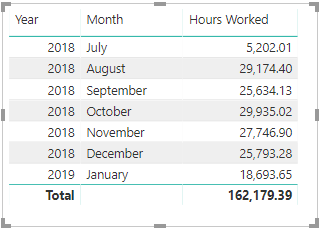
Check out my blog: Power BI em PortuguêsI can get the subtotals in a visualisation easily - I just want to use these montly substotals in further calculations!
Is there a way to refer to this table or can i create this table dynamically in an expression so i can set up a robust template?
Thanks,
James
Hi @MFelix
Thanks for replying.
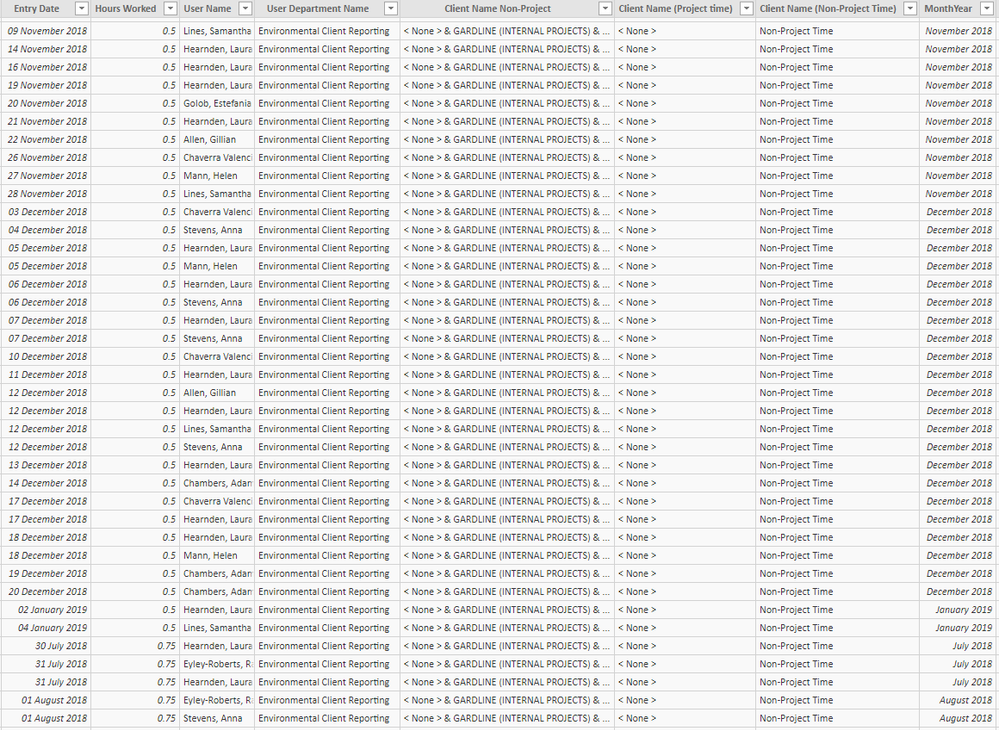
Sample data attached.
I don't understand how that measure will help me to find the monthly total for each month and then
allow me to use that in later calculations?
Thanks,
James
Check out the November 2025 Power BI update to learn about new features.
Advance your Data & AI career with 50 days of live learning, contests, hands-on challenges, study groups & certifications and more!