

cancel
Showing results for 
Search instead for 
Did you mean: 

Vote for your favorite vizzies from the Power BI Dataviz World Championship submissions. Vote now!

Reply
Anonymous
Not applicable

Timeline not working

My Timeline suddenly stop working with below error message, anyone know why?  thanks. 

the Date is from a 'Calendar' table

CRM.PNG


1 ACCEPTED SOLUTION

@prateekraina


I haven't reproduced your issue.


Capture.PNG


Please update your Power BI Desktop into latest version and re-import the custom visual.


Regards,

View solution in original post

4 REPLIES 4
prateekraina
Memorable Member
Memorable Member

Hi @Anonymous,


This usually happens when your visual has more values that it can render/plot. 

Prateek Raina

@prateekraina


I haven't reproduced your issue.


Capture.PNG


Please update your Power BI Desktop into latest version and re-import the custom visual.


Regards,

Anonymous
Not applicable

it just worked after i re-download the app. 

Anonymous
Not applicable

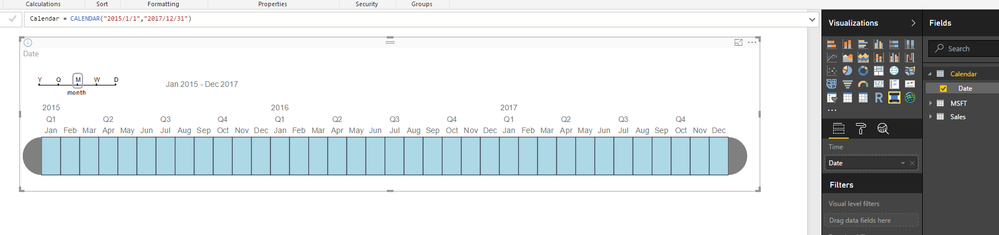
@prateekraina it's just the 'Data' from 'Calendar' table, see the picture below, plus it's working before. 

CRM.PNG

Helpful resources

Announcements
Power BI DataViz World Championships

Power BI Dataviz World Championships

Vote for your favorite vizzies from the Power BI World Championship submissions!

Sticker Challenge 2026 Carousel

Join our Community Sticker Challenge 2026

If you love stickers, then you will definitely want to check out our Community Sticker Challenge!

January Power BI Update Carousel

Power BI Monthly Update - January 2026

Check out the January 2026 Power BI update to learn about new features.

FabCon Atlanta 2026 carousel

FabCon Atlanta 2026

Join us at FabCon Atlanta, March 16-20, for the ultimate Fabric, Power BI, AI and SQL community-led event. Save $200 with code FABCOMM.