Join us at FabCon Atlanta from March 16 - 20, 2026, for the ultimate Fabric, Power BI, AI and SQL community-led event. Save $200 with code FABCOMM.
Register now!The Power BI Data Visualization World Championships is back! It's time to submit your entry. Live now!
Hello,
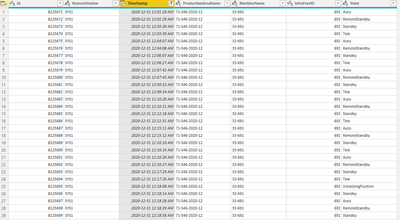
I have the following dataset. I wanted to populate a another column to generate the next timestamp adjacent to the timestamp column to indicate the endtime of each state. After that I would like to calculate the duration of each state by taking the difference between the starting timestamp and the ending one. I am relatively new so could you kindly guide me on how to create the columns for the ending timestamp and a column which generates the value of the timedifference between the timestamps.
Thank you!
Solved! Go to Solution.
Hi @Anonymous
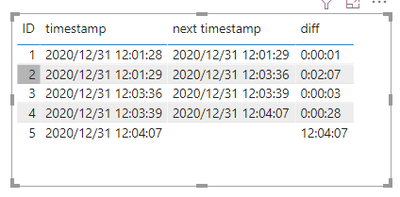
Is this the result you want ?
There is too much data in the screenshot you provided, so I extracted a small part and created a sample .
First , create a column to return the next timestamp and then create a column to calculate the diff .
next timestamp =
var _ID='Table'[ID]+1
return
CALCULATE(MAX('Table'[timestamp]),FILTER('Table','Table'[ID]=_ID))diff = 'Table'[next timestamp]-'Table'[timestamp]
I have attached my pbix file ,you can refer to it .
Best Regards
Community Support Team _ Ailsa Tao
If this post helps, then please consider Accept it as the solution to help the other members find it more quickly.
Hi @Anonymous
Is this the result you want ?
There is too much data in the screenshot you provided, so I extracted a small part and created a sample .
First , create a column to return the next timestamp and then create a column to calculate the diff .
next timestamp =
var _ID='Table'[ID]+1
return
CALCULATE(MAX('Table'[timestamp]),FILTER('Table','Table'[ID]=_ID))diff = 'Table'[next timestamp]-'Table'[timestamp]
I have attached my pbix file ,you can refer to it .
Best Regards
Community Support Team _ Ailsa Tao
If this post helps, then please consider Accept it as the solution to help the other members find it more quickly.
| User | Count |
|---|---|
| 51 | |
| 38 | |
| 33 | |
| 22 | |
| 19 |
| User | Count |
|---|---|
| 136 | |
| 102 | |
| 59 | |
| 36 | |
| 35 |