Join us at FabCon Atlanta from March 16 - 20, 2026, for the ultimate Fabric, Power BI, AI and SQL community-led event. Save $200 with code FABCOMM.
Register now!The Power BI Data Visualization World Championships is back! Get ahead of the game and start preparing now! Learn more
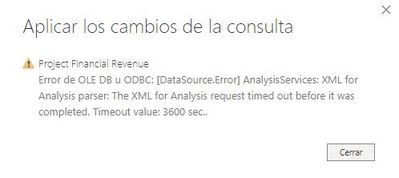
Hi, i have problem while refreshing the data on my Power BI desktop, i have a cube from SSAS charging over 9 million rows, the problem is when **bleep** reachs 1 hour refreshing and give me the next message:
i have tried with different parameters on my query advanced editor like CommandTimeout=#duration(0,4,0,0) but no one works, my SSAS parameters are:
SSAS Parameters
I have been really stuck for a while and i need to solve it!!
Thank you all for your time and your help.
@Anonymous , Clear Connection/permission, and try.
If do not work, log an issue
in that SSAS screenshot, what's the column to the right of the "Current Value" ?
hi, thank you. The column is "Default Value"
does it say 3600 ? Have you rebooted your SSAS server after making the changes?
Yes!
The Power BI Data Visualization World Championships is back! Get ahead of the game and start preparing now!
| User | Count |
|---|---|
| 56 | |
| 45 | |
| 35 | |
| 34 | |
| 21 |
| User | Count |
|---|---|
| 143 | |
| 122 | |
| 100 | |
| 80 | |
| 57 |