cancel
Showing results for 
Search instead for 
Did you mean: 

The Power BI Data Visualization World Championships is back! Get ahead of the game and start preparing now! Learn more

Reply
Anonymous
Not applicable

Time to Complete Survey

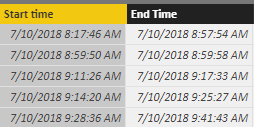
I have some attached data:


Start and End time for a survey. (Date/Time formatted)


Can someone help me write the DAX formula for total, avergage, Min and Max time to complete?


Let me know if you have any questions.Time Question.PNG


1 ACCEPTED SOLUTION
OwenAuger
Super User
Super User

Hi @Anonymous


With your data in the form it is, You can use iterators to do these calculations: SUMX, AVERAGEX, MINX, and MAXX.


With the below measures, I formatted them as HH:mm:ss


Total Time to Complete = 
SUMX ( Survey, Survey[End Time] - Survey[Start time] )
Average Time to Complete = 
VAR Result =
    AVERAGEX ( Survey, Survey[End Time] - Survey[Start time] )
RETURN
    IF ( NOT ISBLANK ( Result ), Result + TIME ( 0, 0, 0 ) )
    // When datetime values are averaged, the result must be cast as datetime by adding a zero time value
Min Time to Complete = 
MINX ( Survey, Survey[End Time] - Survey[Start time] )
Max Time to Complete = 
MAXX( Survey, Survey[End Time] - Survey[Start time] )

You could also add a column to your table to pre-compute End Time - Start time, rather than calculating the duration of each row within the measure.


Regards,

Owen


Owen Auger
Did I answer your question? Mark my post as a solution!
Blog
LinkedIn

View solution in original post

2 REPLIES 2
OwenAuger
Super User
Super User

Hi @Anonymous


With your data in the form it is, You can use iterators to do these calculations: SUMX, AVERAGEX, MINX, and MAXX.


With the below measures, I formatted them as HH:mm:ss


Total Time to Complete = 
SUMX ( Survey, Survey[End Time] - Survey[Start time] )
Average Time to Complete = 
VAR Result =
    AVERAGEX ( Survey, Survey[End Time] - Survey[Start time] )
RETURN
    IF ( NOT ISBLANK ( Result ), Result + TIME ( 0, 0, 0 ) )
    // When datetime values are averaged, the result must be cast as datetime by adding a zero time value
Min Time to Complete = 
MINX ( Survey, Survey[End Time] - Survey[Start time] )
Max Time to Complete = 
MAXX( Survey, Survey[End Time] - Survey[Start time] )

You could also add a column to your table to pre-compute End Time - Start time, rather than calculating the duration of each row within the measure.


Regards,

Owen


Owen Auger
Did I answer your question? Mark my post as a solution!
Blog
LinkedIn
Anonymous
Not applicable

Thank you so much! Very helpful (especially the Average time)

Helpful resources

Announcements
Power BI DataViz World Championships

Power BI Dataviz World Championships

The Power BI Data Visualization World Championships is back! Get ahead of the game and start preparing now!

November Power BI Update Carousel

Power BI Monthly Update - November 2025

Check out the November 2025 Power BI update to learn about new features.

FabCon Atlanta 2026 carousel

FabCon Atlanta 2026

Join us at FabCon Atlanta, March 16-20, for the ultimate Fabric, Power BI, AI and SQL community-led event. Save $200 with code FABCOMM.