FabCon is coming to Atlanta
Join us at FabCon Atlanta from March 16 - 20, 2026, for the ultimate Fabric, Power BI, AI and SQL community-led event. Save $200 with code FABCOMM.
Register now!- Power BI forums
- Get Help with Power BI
- Desktop
- Service
- Report Server
- Power Query
- Mobile Apps
- Developer
- DAX Commands and Tips
- Custom Visuals Development Discussion
- Health and Life Sciences
- Power BI Spanish forums
- Translated Spanish Desktop
- Training and Consulting
- Instructor Led Training
- Dashboard in a Day for Women, by Women
- Galleries
- Data Stories Gallery
- Themes Gallery
- Contests Gallery
- QuickViz Gallery
- Quick Measures Gallery
- Visual Calculations Gallery
- Notebook Gallery
- Translytical Task Flow Gallery
- TMDL Gallery
- R Script Showcase
- Webinars and Video Gallery
- Ideas
- Custom Visuals Ideas (read-only)
- Issues
- Issues
- Events
- Upcoming Events
The Power BI Data Visualization World Championships is back! Get ahead of the game and start preparing now! Learn more
- Power BI forums
- Forums
- Get Help with Power BI
- Desktop
- Re: Time slot in x-axis
- Subscribe to RSS Feed
- Mark Topic as New
- Mark Topic as Read
- Float this Topic for Current User
- Bookmark
- Subscribe
- Printer Friendly Page

- Mark as New
- Bookmark
- Subscribe
- Mute
- Subscribe to RSS Feed
- Permalink
- Report Inappropriate Content
Time slot in x-axis
Hi All,
I have two datasets Timeslot which contains timerange and slot fields, MainSet contains DateTime and client_Id.
Here I want to show slot number in x-axis, so that I can check the sales for each slot which defined in my Timeslot dataset. I have tried to create lookup for these which did not helped me.
https://www.dropbox.com/sh/vquoveulzrb8trd/AAAO5el6H0FkNitbnnP9U1R9a?dl=0
Please help me on this.
Regards,
Srivalli


- Mark as New
- Bookmark
- Subscribe
- Mute
- Subscribe to RSS Feed
- Permalink
- Report Inappropriate Content
Hi @Anonymous ,
I am a little confused about your needs. Do you want to get the total sales value corresponding to the time from "From time" to "to time", right? So what is the role of the "Client Id" field in the Mainset table?
Can you provide more information, preferably to provide the expected expected results, so that I can do further testing for you.
Best Regards,
Henry
If this post helps, then please consider Accept it as the solution to help the other members find it more quickly.
- Mark as New
- Bookmark
- Subscribe
- Mute
- Subscribe to RSS Feed
- Permalink
- Report Inappropriate Content
@v-henryk-mstf I have placed my required in detail here.
https://www.dropbox.com/scl/fi/td52uxm0scupr5lmn4vzm/TimeSlotDoc.docx?dl=0&rlkey=ikfrvh4dplbtk7fbtxy...
Regards,
Srivalli
- Mark as New
- Bookmark
- Subscribe
- Mute
- Subscribe to RSS Feed
- Permalink
- Report Inappropriate Content
Hi,
You can try the following formula:
Filter =
CALCULATE (
    SUM ( MainSet[Sales] ),
    FILTER (
        MainSet,
        MainSet[Time] >= MAX ( Timelot[FromTime] )
            && MainSet[Time] <= MAX ( Timelot[ToTime] )
    )
)
Then put the field in the corresponding position of the visual:
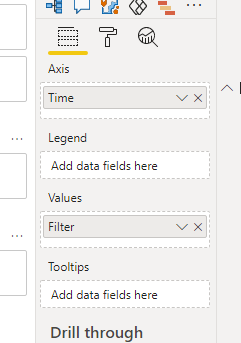
Since the data you provided is incomplete and the sales corresponding to the date that meets the conditions are empty, I cannot fully reproduce your expected results. But you can follow my steps above to test.
Best Regards,
Henry
If this post helps, then please consider Accept it as the solution to help the other members find it more quickly.
- Mark as New
- Bookmark
- Subscribe
- Mute
- Subscribe to RSS Feed
- Permalink
- Report Inappropriate Content
@v-henryk-mstf I again placed the files and expected output in the link
https://www.dropbox.com/scl/fi/m4387c8hs8np7kf5bvnqu/MainSet.xlsx?dl=0&rlkey=ebftgek9jxrmm8fjxrdlue3...
https://www.dropbox.com/s/z8gunzrbkopncho/Timeslot.PNG?dl=0
I got the above output because i have created the timekey (extracting hour and minute from time)for both the datasets and give the relationship(which was not getting proper output as expected as we have 2 date fields in the dataset).And the Time slot range might vary like 5, 10, 15 which was there in TimeInterval slicer. If we select 15 from TimeInterval then we will get 96 slots in the slot slicer, sameway if we select 10 from slicer, we will get 144 slots.
https://www.dropbox.com/s/2gguagugm9g7oo1/Slot%20Range.PNG?dl=0
Slots should be defined based on the date from above link.
Thanks,
Srivalli


- Mark as New
- Bookmark
- Subscribe
- Mute
- Subscribe to RSS Feed
- Permalink
- Report Inappropriate Content
@Anonymous , Create a time table with slots you want as suggested in this blog. Separate out time from datetime and join with that.
https://kohera.be/blog/power-bi/how-to-create-a-time-table-in-power-bi-in-a-few-simple-steps/
- Mark as New
- Bookmark
- Subscribe
- Mute
- Subscribe to RSS Feed
- Permalink
- Report Inappropriate Content
@amitchandak I want slot field in x-axis from the dataset TimeSlot. So that I can check Sales data for the selected slot from the filter(slot field as a slicer)
Helpful resources

Power BI Dataviz World Championships
The Power BI Data Visualization World Championships is back! Get ahead of the game and start preparing now!

Power BI Monthly Update - December 2025
Check out the December 2025 Power BI Holiday Recap!

FabCon Atlanta 2026
Join us at FabCon Atlanta, March 16-20, for the ultimate Fabric, Power BI, AI and SQL community-led event. Save $200 with code FABCOMM.

| User | Count |
|---|---|
| 39 | |
| 38 | |
| 36 | |
| 28 | |
| 28 |


| User | Count |
|---|---|
| 124 | |
| 88 | |
| 74 | |
| 66 | |
| 65 |


