FabCon is coming to Atlanta
Join us at FabCon Atlanta from March 16 - 20, 2026, for the ultimate Fabric, Power BI, AI and SQL community-led event. Save $200 with code FABCOMM.
Register now!- Power BI forums
- Get Help with Power BI
- Desktop
- Service
- Report Server
- Power Query
- Mobile Apps
- Developer
- DAX Commands and Tips
- Custom Visuals Development Discussion
- Health and Life Sciences
- Power BI Spanish forums
- Translated Spanish Desktop
- Training and Consulting
- Instructor Led Training
- Dashboard in a Day for Women, by Women
- Galleries
- Data Stories Gallery
- Themes Gallery
- Contests Gallery
- QuickViz Gallery
- Quick Measures Gallery
- Visual Calculations Gallery
- Notebook Gallery
- Translytical Task Flow Gallery
- TMDL Gallery
- R Script Showcase
- Webinars and Video Gallery
- Ideas
- Custom Visuals Ideas (read-only)
- Issues
- Issues
- Events
- Upcoming Events
View all the Fabric Data Days sessions on demand. View schedule
- Power BI forums
- Forums
- Get Help with Power BI
- Desktop
- Re: Time since last spend column
- Subscribe to RSS Feed
- Mark Topic as New
- Mark Topic as Read
- Float this Topic for Current User
- Bookmark
- Subscribe
- Printer Friendly Page


- Mark as New
- Bookmark
- Subscribe
- Mute
- Subscribe to RSS Feed
- Permalink
- Report Inappropriate Content
Time since last spend column
I’m looking to create a report to show which of our clients are New, Lost or Retained.
New = spent in the last 13 months only
Lost= haven’t spent in the last 13 months
Retained = have spent in the last 13 months and greater than 13 months.
I’m thinking something like:
if Client last spend is less than 13 months and not greater than 13 months, then call it New Business.
If spend is greater than 13 month and not less than 13 months, then lost business.
If spend greater than 13 months and less than 13 months, then retained business.
Is this the best way to go around it, and how would you write the dax?
My data has multiple rows per client booking. Eg if a client made a booking to have various of our products delivered in Mar, Apr and May, then there would be a row for each month for each product type.
Not sure if I first need a separate column (or table?) that gives me a consolidated view of every month each client has spent?
Thanks very much
Solved! Go to Solution.


- Mark as New
- Bookmark
- Subscribe
- Mute
- Subscribe to RSS Feed
- Permalink
- Report Inappropriate Content
Assuming the formula you had only need the date change
ClientRetention =
VAR _today = max('Date'[Date])
VAR max1 = CALCULATE ( MAX ( 'Data'[Month]), ALLEXCEPT ( 'Data', 'Data'[ClientName] ) )
VAR min1 = CALCULATE ( MIN ('Data'[Month]), ALLEXCEPT ( 'Data', 'Data'[ClientName] ) )
RETURN
IF ( DATEDIFF ( max1, _today, MONTH ) > 13, "Lost",
IF ( DATEDIFF ( min1, _today, MONTH ) = 1, "New",
"Retained" )
)


- Mark as New
- Bookmark
- Subscribe
- Mute
- Subscribe to RSS Feed
- Permalink
- Report Inappropriate Content
Hi @abloor ,
Here is my sample data.
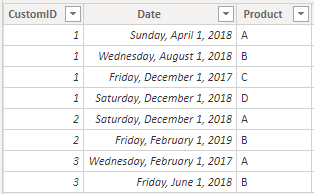
You need to create a new measure.
Status =
VAR max1 =
    CALCULATE ( MAX ( test[Date] ), ALLEXCEPT ( test, test[CustomID] ) )
VAR min1 =
    CALCULATE ( MIN ( test[Date] ), ALLEXCEPT ( test, test[CustomID] ) )
RETURN
    IF (
        DATEDIFF ( max1, TODAY (), MONTH ) > 13,
        "Lost",
        IF ( DATEDIFF ( min1, TODAY (), MONTH ) <= 13, "New", "Retained" )
    )
Here is the result.
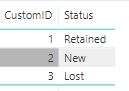
If this post helps, then please consider Accept it as the solution to help the other members find it.
- Mark as New
- Bookmark
- Subscribe
- Mute
- Subscribe to RSS Feed
- Permalink
- Report Inappropriate Content
Thanks @v-eachen-msft I think that might be working to some degree, but I need some help tweaking it please. Can you please advise me how to get it based on x months from slicer date, not x months from today? We may need to get this information retrospectively, not always based on what it is on day of report usage.
Also I made an error in my inital post. A 'New' client is actually one that has spent in the chosen slicer month, but NOT in the 12 prior months. e.g. they have spent in Aug 2019, but not Aug18-Jul19. How would I alter the line regarding a new client below to make this work?
Here is my code
- Mark as New
- Bookmark
- Subscribe
- Mute
- Subscribe to RSS Feed
- Permalink
- Report Inappropriate Content
Will taking a max of slicer date and use in place of Today(), solve the purpose?
VAR _today = max('Date'[Date])
Where data[date] is the date of the slicer.
- Mark as New
- Bookmark
- Subscribe
- Mute
- Subscribe to RSS Feed
- Permalink
- Report Inappropriate Content
Thanks for your quick reply @amitchandak
I'm only new to PBI and don't understand your solution. Can you please explain it in simple terms for a newbie?
e.g. if I need to change the dax in my above post, what bit do I change? Do I need to create any new measures or calc columns?
Much appreciated!!
- Mark as New
- Bookmark
- Subscribe
- Mute
- Subscribe to RSS Feed
- Permalink
- Report Inappropriate Content
Assuming the formula you had only need the date change
ClientRetention =
VAR _today = max('Date'[Date])
VAR max1 = CALCULATE ( MAX ( 'Data'[Month]), ALLEXCEPT ( 'Data', 'Data'[ClientName] ) )
VAR min1 = CALCULATE ( MIN ('Data'[Month]), ALLEXCEPT ( 'Data', 'Data'[ClientName] ) )
RETURN
IF ( DATEDIFF ( max1, _today, MONTH ) > 13, "Lost",
IF ( DATEDIFF ( min1, _today, MONTH ) = 1, "New",
"Retained" )
)


- Mark as New
- Bookmark
- Subscribe
- Mute
- Subscribe to RSS Feed
- Permalink
- Report Inappropriate Content
Hi,
daxpatterns.com has a pattern that I think will do well on what you are looking for:
https://www.daxpatterns.com/new-and-returning-customers/
regards,
S

Helpful resources

Power BI Monthly Update - November 2025
Check out the November 2025 Power BI update to learn about new features.

Fabric Data Days
Advance your Data & AI career with 50 days of live learning, contests, hands-on challenges, study groups & certifications and more!

FabCon Atlanta 2026
Join us at FabCon Atlanta, March 16-20, for the ultimate Fabric, Power BI, AI and SQL community-led event. Save $200 with code FABCOMM.


