cancel
Showing results for 
Search instead for 
Did you mean: 

The Power BI Data Visualization World Championships is back! It's time to submit your entry. Live now!

Reply
wouter-GJI
New Member

Time difference with values in the same column

Dear fellow PowerBi-ers,


I started PowerBI about a year ago and have learned a lot from this forum but now I am a bit stuck.


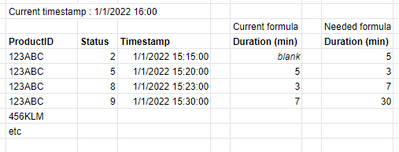
I want to calculate how long a product was in a certain status and I found a formula but its needs some tweaking.


The current formula  (new column):

Duration (min) =

var Temp =

    TOPN(

        1,

        Filter (

            'ProductLogs',

            'ProductLogs'[ProductID] = EARLIER('ProductLogs'[ProductID])

                && 'ProductLogs'[Timestamp] < EARLIER('ProductLogs'[Timestamp])

        ),

        [Timestamp], DESC

    )

Return

DATEDIFF(MINX(Temp,[Timestamp]),'ProductLogs'[Timestamp],MINUTE)


This returns the correct number but puts it in the wrong row.

wouterGJI_0-1669972180266.png


On top of this, I want to include that whenever the product in its current/last status its calculates the difference with the current time.


Hope you can help. Thanks in advance

1 ACCEPTED SOLUTION
wouter-GJI
New Member

1 REPLY 1
wouter-GJI
New Member

Few minutes after my post a similar question was posted and solved:
https://community.powerbi.com/t5/Desktop/Starting-date-and-End-Date-same-field-Diff-in-Dates/m-p/294...

Helpful resources

Announcements
Power BI DataViz World Championships

Power BI Dataviz World Championships

The Power BI Data Visualization World Championships is back! It's time to submit your entry.

January Power BI Update Carousel

Power BI Monthly Update - January 2026

Check out the January 2026 Power BI update to learn about new features.

FabCon Atlanta 2026 carousel

FabCon Atlanta 2026

Join us at FabCon Atlanta, March 16-20, for the ultimate Fabric, Power BI, AI and SQL community-led event. Save $200 with code FABCOMM.