cancel
Showing results for 
Search instead for 
Did you mean: 

Learn from the best! Meet the four finalists headed to the FINALS of the Power BI Dataviz World Championships! Register now

Reply
Anonymous
Not applicable

Time difference per day

Hi Everybody,

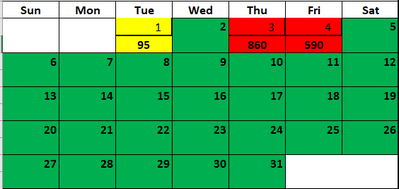
I have sample data as below. Looking to find time in mins per day & trying to show them in calender visual similar as below. How can i calculate time per day? Please help.


Event DateStart TimeEnd Time
12/03/202012/03/2020 11:0012/05/2020 18:27


susheel1347_0-1607990190965.png


Thanks


1 ACCEPTED SOLUTION
Anonymous
Not applicable

Hi Everybody,

Solved this using similar logic @amitchandak .


Created a time calender table  "Date" using below M language code:


let
Start = Date.AddMonths(Date.StartOfMonth(DateTime.LocalNow()),-11),
End = Date.AddMonths(Start,12),
Count = Number.From(End-Start)*1440,
Calendar = Table.FromColumns({List.DateTimes(Start,Count,#duration(0,0,1,0))}, type table[DateTime=datetime]),
#"Renamed Columns" = Table.RenameColumns(Calendar,{{"DateTime", "Date"}})
in
#"Renamed Columns"


and created a column "Count" with default value 1.


and Created a measure "Value"


Value = CALCULATE(SUMX(FILTER(CROSSJOIN('Event Log','Date'),'Date'[Date] >= 'Event Log'[Start Date] && 'Date'[Date]< 'Event Log'[End Date]),'Date'[Count]))
 
Which I used to display on the calender.
 
Thanks

View solution in original post

3 REPLIES 3
amitchandak
Super User
Super User

@Anonymous , Not very clear. I have blog on dividing data across day. You need take care of time part

#POWERBI: How to divide/distribute values between start date or end date or count days across months/days: https://community.powerbi.com/t5/Community-Blog/How-to-divide-distribute-values-between-start-date-or-end-date/ba-p/1503785

Share with Power BI Enthusiasts: Full Power BI Video (20 Hours) YouTube
Microsoft Fabric Series 60+ Videos YouTube
Microsoft Fabric Hindi End to End YouTube
Anonymous
Not applicable

Thanks @amitchandak   for responding. My bad if I was not clear. Below is what I am looking for in detail. Hope this helps.


start date is 12/03/2020 11:00

end Date is  12/05/2020 18:27


so time active on 12/03 is : 23:59 - 11:00 = 779 mins

on 12/04 it's active full day= 1440 mins

on 12/05 : 18:27-00:00 = 1107 mins


so I want to display all these mins on the calendar on particular days.


Does your solution work if I replace the value   Column in your solution  with the time in mins?

Anonymous
Not applicable

Hi Everybody,

Solved this using similar logic @amitchandak .


Created a time calender table  "Date" using below M language code:


let
Start = Date.AddMonths(Date.StartOfMonth(DateTime.LocalNow()),-11),
End = Date.AddMonths(Start,12),
Count = Number.From(End-Start)*1440,
Calendar = Table.FromColumns({List.DateTimes(Start,Count,#duration(0,0,1,0))}, type table[DateTime=datetime]),
#"Renamed Columns" = Table.RenameColumns(Calendar,{{"DateTime", "Date"}})
in
#"Renamed Columns"


and created a column "Count" with default value 1.


and Created a measure "Value"


Value = CALCULATE(SUMX(FILTER(CROSSJOIN('Event Log','Date'),'Date'[Date] >= 'Event Log'[Start Date] && 'Date'[Date]< 'Event Log'[End Date]),'Date'[Count]))
 
Which I used to display on the calender.
 
Thanks
Helpful resources

Announcements
Join our Fabric User Panel

Join our Fabric User Panel

Share feedback directly with Fabric product managers, participate in targeted research studies and influence the Fabric roadmap.

February Power BI Update Carousel

Power BI Monthly Update - February 2026

Check out the February 2026 Power BI update to learn about new features.

Users online (15,595)