cancel
Showing results for 
Search instead for 
Did you mean: 

Next up in the FabCon + SQLCon recap series: The roadmap for Microsoft SQL and Maximizing Developer experiences in Fabric. All sessions are available on-demand after the live show. Register now

Reply
Anonymous
Not applicable

Time date Matrix

Hi Experts


I am trying to produce and time v Date matrix with conditional ofrmatting to show the density for the number of time people have visted a website.

Across the columns i would like to have unique dates and down the rows the hrs in 24hr clock format. 00:00 t0 24:00 and the values for the site vists to be added into the relavent buckets (see image below). 


My data set has mulitple vists per day... 

Link: to sample data https://www.dropbox.com/s/g1co4nqqzp4yavo/time.pbix?dl=0


Canadapvalue.PNG 

1 ACCEPTED SOLUTION
v-lili6-msft
Community Support
Community Support

hi  @Anonymous 

For your case, you could try this way as below:

Step1:

Create two calculate columns that

Weekday = FORMAT([Date],"dddd")

Weekday num = WEEKDAY([Date],2)

Step2:

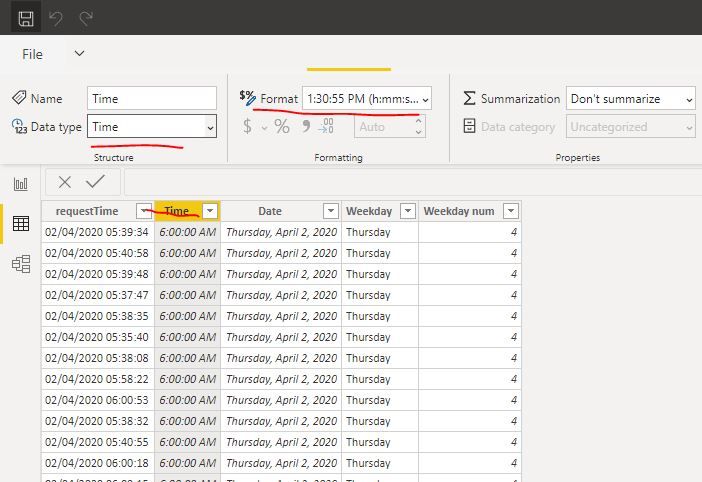
You'd better change the data type for [Time] column as below:

2.JPG

Step3:

Create a simple measure

Measure = COUNTROWS(Sheet1)

Step4:

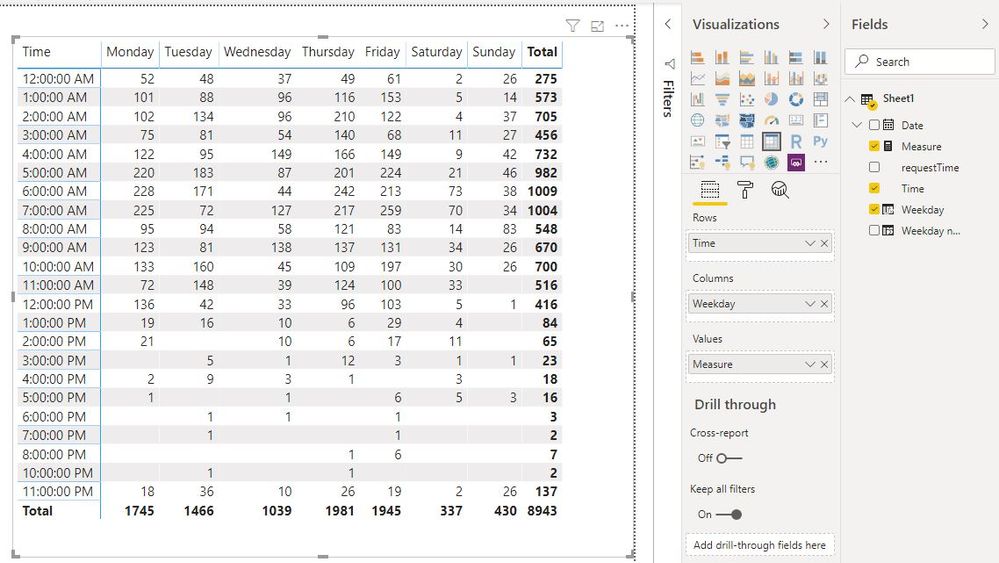
then create a matrix as below:

3.JPG


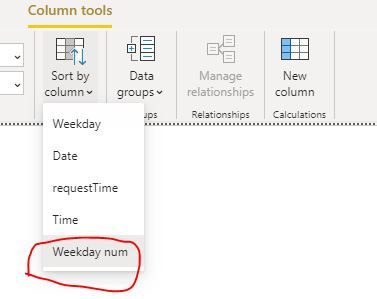
Of course, you'd better set the sort by column for weekday column.

4.JPG

https://radacad.com/sort-by-column-in-power-bi


and here is sample pbix file, please try it.


Regards,

Lin

Community Support Team _ Lin
If this post helps, then please consider Accept it as the solution to help the other members find it more quickly.

View solution in original post

6 REPLIES 6
v-lili6-msft
Community Support
Community Support

hi  @Anonymous 

For your case, you could try this way as below:

Step1:

Create two calculate columns that

Weekday = FORMAT([Date],"dddd")

Weekday num = WEEKDAY([Date],2)

Step2:

You'd better change the data type for [Time] column as below:

2.JPG

Step3:

Create a simple measure

Measure = COUNTROWS(Sheet1)

Step4:

then create a matrix as below:

3.JPG


Of course, you'd better set the sort by column for weekday column.

4.JPG

https://radacad.com/sort-by-column-in-power-bi


and here is sample pbix file, please try it.


Regards,

Lin

Community Support Team _ Lin
If this post helps, then please consider Accept it as the solution to help the other members find it more quickly.
FrankAT
Community Champion
Community Champion

Hi,

you can find my solution here.


05-03-_2020_23-56-18.png


Regards FrankAT

Greg_Deckler
Community Champion
Community Champion

So like the attached PBIX?


Follow on LinkedIn
@ me in replies or I'll lose your thread!!!
Instead of a Kudo, please vote for this idea
Become an expert!: Enterprise DNA
External Tools: MSHGQM
YouTube Channel!: Microsoft Hates Greg
Latest book!:
DAX For Humans

DAX is easy, CALCULATE makes DAX hard...
Anonymous
Not applicable

Hi Greg


the final result has to be in the same format as the image i attached to the question...in a matrix table. dates across the top and time running the side vertically 

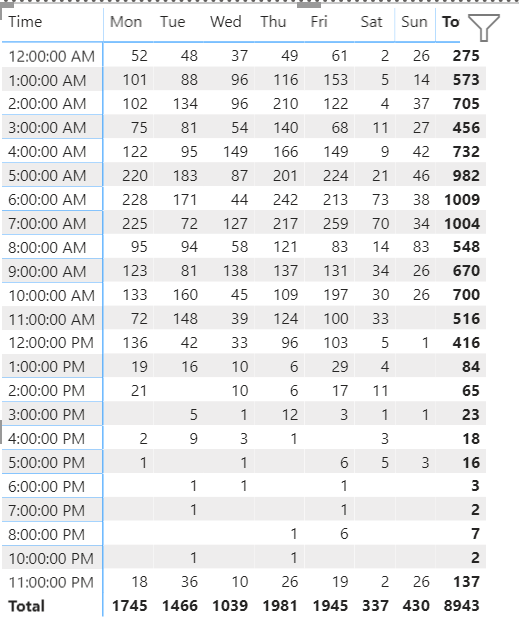
It is in a matrix table, it looks exactly like your image unless I am missing something obvious.


image.png


Follow on LinkedIn
@ me in replies or I'll lose your thread!!!
Instead of a Kudo, please vote for this idea
Become an expert!: Enterprise DNA
External Tools: MSHGQM
YouTube Channel!: Microsoft Hates Greg
Latest book!:
DAX For Humans

DAX is easy, CALCULATE makes DAX hard...
Anonymous
Not applicable

Greg Sorry my fault. thanks for te excellent feedback as always

Helpful resources

Announcements
New to Fabric survey Carousel

New to Fabric Survey

If you have recently started exploring Fabric, we'd love to hear how it's going. Your feedback can help with product improvements.

Power BI DataViz World Championships carousel

Power BI DataViz World Championships - June 2026

A new Power BI DataViz World Championship is coming this June! Don't miss out on submitting your entry.

Join our Fabric User Panel

Join our Fabric User Panel

Share feedback directly with Fabric product managers, participate in targeted research studies and influence the Fabric roadmap.

March Power BI Update Carousel

Power BI Community Update - March 2026

Check out the March 2026 Power BI update to learn about new features.