Get certified for free when you join Fabric Data Days 2026 and dive into Fabric, Power BI, SQL, AI, and other essential data skills.
Join nowData Days is here! Join us now for 60+ days of learning, challenges, and connection. Learn more
Hi experts,
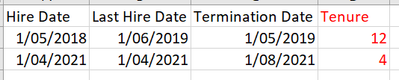
I have the following data:
I want to create a calculated column (either in PQ or DAX - whatever is most suitable) to calculate tenure in months based on Last Hire Date. However if the Last Hire Date is after the Termination Date (in a fraction of cases) I want to use the Hire Date column.
The output would look like the red column above.
Any help greatly appreciated!
Best,
Soph
Solved! Go to Solution.
@Anonymous ,
try this DAX formula,
Tenure in Months =
IF (
'Table'[Last Hire Date] > 'Table'[Termination Date],
DATEDIFF ( 'Table'[Hire Date], 'Table'[Termination Date], MONTH ),
DATEDIFF ( 'Table'[Last Hire Date], 'Table'[Termination Date], MONTH )
)
Thanks,
Arul
You can use
Tenure = SWITCH(TRUE(),Tenure[Last Hire Date]>Tenure[Termination Date],DATEDIFF(Tenure[Hire Data],Tenure[Termination Date],DAY),Tenure[Last Hire Date]<Tenure[Termination Date],DATEDIFF(Tenure[Last Hire Date],Tenure[Termination Date],DAY))
@Anonymous ,
try this DAX formula,
Tenure in Months =
IF (
'Table'[Last Hire Date] > 'Table'[Termination Date],
DATEDIFF ( 'Table'[Hire Date], 'Table'[Termination Date], MONTH ),
DATEDIFF ( 'Table'[Last Hire Date], 'Table'[Termination Date], MONTH )
)
Thanks,
Arul
Hi @Anonymous ,
As per your requirement, we have created sample table with columns as you mentioned Hire Date, Last Hire Date, Termination Date.
Please refer to the below screenshot,
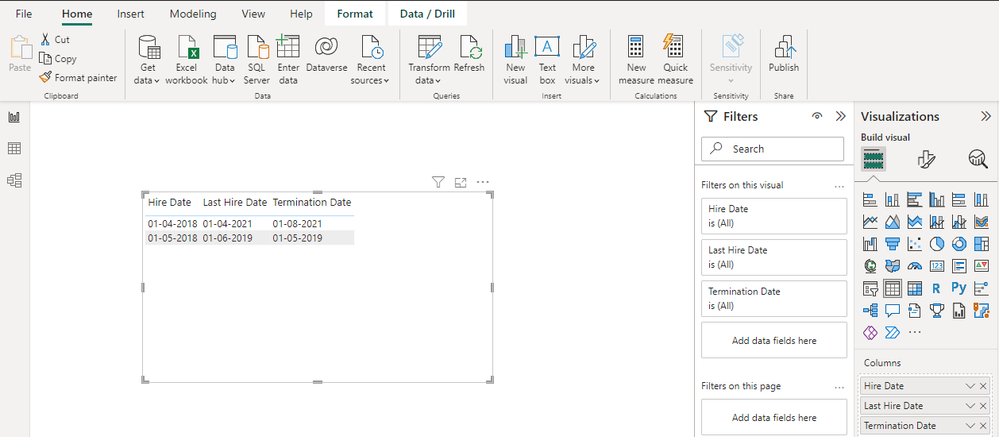
For calculating Tenure in Months you can create a new Column with below DAX expression,
Tenure = If('Hire Table'[Last Hire Date].[Date]> 'Hire Table'[Termination Date].[Date],DATEDIFF('Hire Table'[Hire Date].[Date],'Hire Table'[Termination Date].[Date],MONTH), DATEDIFF('Hire Table'[Last Hire Date].[Date],'Hire Table'[Termination Date].[Date],MONTH))
These will result as below with Tenure in Months:
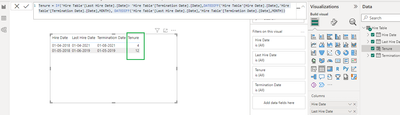
If this answer helps, please mark it as Accepted Solution so it would help others to find the solution.
Thanks!
Inogic Professional Service Division
An expert technical extension for your techno-functional business needs
Power Platform/Dynamics 365 CRM
Drop an email at crm@inogic.com
Service: http://www.inogic.com/services/
Power Platform/Dynamics 365 CRM Tips and Tricks: http://www.inogic.com/blog/
For DAX:
Tenure =
var useDate= MAX([LastHireDate], [TerminationDate])
return DATEDIFF([HireDate], useDate, DAY)
It will be something very similar in PowerQuery, but unfortunately I'm less familiar with that. Hope that helps!
Don't miss out on Data Days, June 15 through August 7. Learn Fabric, Power BI, SQL, AI and more.
Check out the May 2026 Power BI update to learn about new features.
| User | Count |
|---|---|
| 23 | |
| 23 | |
| 21 | |
| 17 | |
| 14 |
| User | Count |
|---|---|
| 58 | |
| 50 | |
| 37 | |
| 29 | |
| 24 |