cancel
Showing results for 
Search instead for 
Did you mean: 

Did you hear? There's a new SQL AI Developer certification (DP-800). Start preparing now and be one of the first to get certified. Register now

Reply
mariner84
Advocate I
Advocate I

Time and Duration Help

Hello,

I have a data set where I have duration in seconds, which I'm looking to convert to a format to show days, hours, minutes and seconds. Once converted, I'm then hoping it's possible to put the information on a graph where I can show average duration on the y-axis and the month on the x-axis based on my other column called Closed Date.


I could not figure out how to use query editor to convert the duration from seconds to the format I am requiring. I've also never seen graphs in Power BI where the y-axis is time.


Below is a sample excel of my data and a pbix

Duration - Excel 

PBIX 

Any help would be really appreciated.

1 ACCEPTED SOLUTION
Anonymous
Not applicable

@mariner84 


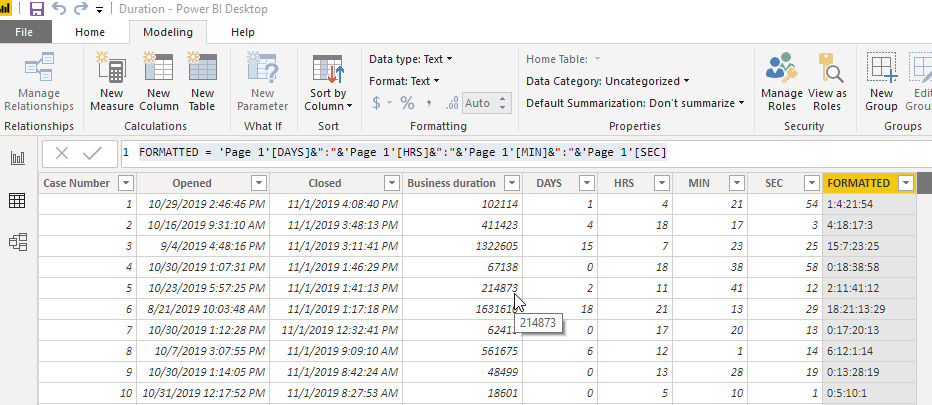
What if you generate these columns:


DAYS = TRUNC([Business Duration]/86400)

HRS = TRUNC(MOD([Business duration]/86400,1)*24)
MIN = TRUNC(MOD(MOD([Business duration]/86400,1)*24,1)*60)
SEC = TRUNC(MOD(MOD(MOD([Business duration]/86400,1)*24,1)*60,1)*60)
FORMATTED = 'Page 1'[DAYS]&":"&'Page 1'[HRS]&":"&'Page 1'[MIN]&":"&'Page 1'[SEC]
 
Does that help?
 
2019-11-04 18_08_56-Duration - Power BI Desktop.png
 

View solution in original post

4 REPLIES 4
Anonymous
Not applicable

@mariner84 

I had this issue and I found out that Power BI doesn't support showing Y Axis duration data as time in that DD:HH:MM:SS format. I had a data set that calculates an average duration in minutes, and I made a line graph to show that average duration vs day. I created measures:


TruckWaitMin = (AVERAGEX(TAG,CALCULATE(SUM ([ScaleOut]) - SUM([Arrive])) * 1440))
HRS = TRUNC([TruckWaitMin]/60)
MIN = TRUNC([TruckWaitMin]-[HRS]*60)
WAITDuration = RIGHT("0"&[HRS],2)&":"&RIGHT("0"&[MIN],2)  <- this will give a formatted HH:MM duration
 
The WAITDuration is added to the Tooltips. So the chart shows he duration in minutes, the toolips sows the formatted time.


Line chart attached showing tooltip.


2019-11-02 17_35_10-2019 - Power BI Desktop.png

@Anonymous 


Thank you for responding and providing some insight into your data. It's too bad it cannot graph the data as required.


I'm in need to graph the average duration (once converted to dd:hh:mm:ss) monthly to show the trend that is occurring. 


Have you had to do similar reporting over that time instead of looking at it vs day?

Anonymous
Not applicable

@mariner84 


What if you generate these columns:


DAYS = TRUNC([Business Duration]/86400)

HRS = TRUNC(MOD([Business duration]/86400,1)*24)
MIN = TRUNC(MOD(MOD([Business duration]/86400,1)*24,1)*60)
SEC = TRUNC(MOD(MOD(MOD([Business duration]/86400,1)*24,1)*60,1)*60)
FORMATTED = 'Page 1'[DAYS]&":"&'Page 1'[HRS]&":"&'Page 1'[MIN]&":"&'Page 1'[SEC]
 
Does that help?
 
2019-11-04 18_08_56-Duration - Power BI Desktop.png
 

@Anonymous 


This is great, I'll be able to work with this. Appreciate you helping me out!

Helpful resources

Announcements
April Power BI Update Carousel

Power BI Monthly Update - April 2026

Check out the April 2026 Power BI update to learn about new features.

Fabric SQL PBI Data Days

Data Days 2026 coming soon!

Sign up to receive a private message when registration opens and key events begin.

New to Fabric survey Carousel

New to Fabric Survey

If you have recently started exploring Fabric, we'd love to hear how it's going. Your feedback can help with product improvements.

Power BI DataViz World Championships carousel

Power BI DataViz World Championships - June 2026

A new Power BI DataViz World Championship is coming this June! Don't miss out on submitting your entry.