Get Fabric or SQL Certified for Free.
Get certified for free when you join Fabric Data Days 2026 and dive into Fabric, Power BI, SQL, AI, and other essential data skills.
Join now- Power BI forums
- Get Help with Power BI
- Desktop
- Service
- Report Server
- Power Query
- Mobile Apps
- Developer
- DAX Commands and Tips
- Custom Visuals Development Discussion
- Health and Life Sciences
- Power BI Spanish forums
- Translated Spanish Desktop
- Training and Consulting
- Instructor Led Training
- Dashboard in a Day for Women, by Women
- Galleries
- Data Stories Gallery
- Themes Gallery
- Contests Gallery
- QuickViz Gallery
- Quick Measures Gallery
- Visual Calculations Gallery
- Fabric Apps Gallery
- Notebook Gallery
- Translytical Task Flow Gallery
- TMDL Gallery
- R Script Showcase
- Webinars and Video Gallery
- Ideas
- Custom Visuals Ideas (read-only)
- Issues
- Issues
- Events
- Upcoming Events
July 7 - July 17 | Round 2 of the Power BI Dataviz World Championships. Don't miss your chance! Learn more
- Power BI forums
- Forums
- Get Help with Power BI
- Desktop
- Re: Time Values Distributed Into Shifts
- Subscribe to RSS Feed
- Mark Topic as New
- Mark Topic as Read
- Float this Topic for Current User
- Bookmark
- Subscribe
- Printer Friendly Page


- Mark as New
- Bookmark
- Subscribe
- Mute
- Subscribe to RSS Feed
- Permalink
- Report Inappropriate Content
Time Values Distributed Into Shifts
Hi,
I'm not sure how to do this in Power BI Desktop. Any help you can provide me is greatly appreciated.
I have a table that contains two managers (Manager 1 and Manager 2) with different work shift and break time for each day.

Then another table which contains the finished date and time of a product.

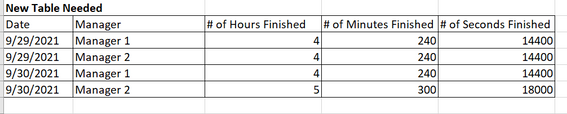
What I need is a similar table like below wherein:
1. Date - is the date the when the product was finished.
2. Manager - Manager who is assigned to that shift when the product was finished.
3. # of Hour Finished - Computed by getting the earliest finished time - latest finished time, and removing the time spent during break time. Value should be in hours.
4. # of Minutes Finished - Computed by getting the earliest finished time - latest finished time, and removing the time spent during break time. Value should be in minutes.
5. # of Seconds Finished - Computed by getting the earliest finished time - latest finished time, and removing the time spent during break time. Value should be in seconds.
If anything is unclear please let me know.
Best regards,
Mark V.
Solved! Go to Solution.


- Mark as New
- Bookmark
- Subscribe
- Mute
- Subscribe to RSS Feed
- Permalink
- Report Inappropriate Content
@markefrody , sorry, I've missed some details.
hh =
VAR timeIn =  MIN ( 'Table 1'[Start Time] )
VAR timeOut = MAX ( 'Table 1'[Clock Out] )
VAR timeRange =
    FILTER (
        VALUES ( 'Table 2'[Date and Time Finished] ),
        'Table 2'[Date and Time Finished] >= timeIn
            && 'Table 2'[Date and Time Finished] <= timeOut
    )
VAR break = DATEDIFF( MIN ( 'Table 1'[Break1 Start] ), MAX ( 'Table 1'[Break1 End] ), SECOND)
VAR ss = DATEDIFF ( MINX ( timeRange, 'Table 2'[Date and Time Finished] ), MAXX ( timeRange, 'Table 2'[Date and Time Finished] ), SECOND ) - break
VAR mm = ss / 60
VAR hh = mm / 60
RETURN
    hh
Just use what you need in the return (ss / mm / hh) and change the measure name accordingly.
Regards
If this post helps, then please consider Accept it as the solution ✔️to help the other members find it more quickly.
If this post helps, then please considerAccept it as the solution to help the other members find it more quickly.
Appreciate your Kudos 
Stand with Ukraine!
- Mark as New
- Bookmark
- Subscribe
- Mute
- Subscribe to RSS Feed
- Permalink
- Report Inappropriate Content
Hi @ERD,
Thank you for your solution. When you say that both tables are connected via seperate Date table by Date column, does it mean I need to setup a relationship between Table 1 and Table 2?
- Mark as New
- Bookmark
- Subscribe
- Mute
- Subscribe to RSS Feed
- Permalink
- Report Inappropriate Content
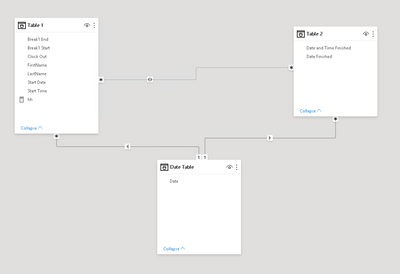
you need to set up relations between
- Date table and Table 1;
- Date table and Table 2.
If this post helps, then please consider Accept it as the solution ✔️to help the other members find it more quickly.
If this post helps, then please considerAccept it as the solution to help the other members find it more quickly.
Appreciate your Kudos
Stand with Ukraine!
- Mark as New
- Bookmark
- Subscribe
- Mute
- Subscribe to RSS Feed
- Permalink
- Report Inappropriate Content
Hi @ERD,
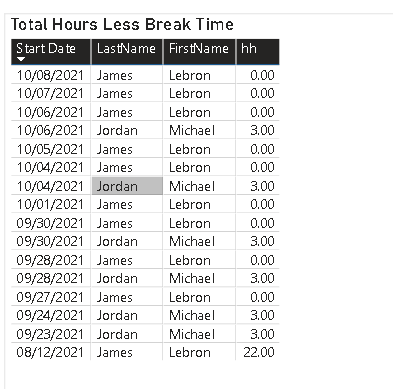
I tried to setup the relationship of the date table to tables 1 and 2 but it seems I am not getting the right hours. I have placed the Power BI file with the tables for reference in the link below:
https://www.dropbox.com/s/2a0k6javqjjw7wx/Production%20Hours%20per%20Manager.pbix?dl=0
- Mark as New
- Bookmark
- Subscribe
- Mute
- Subscribe to RSS Feed
- Permalink
- Report Inappropriate Content
@markefrody , please, use Date column from the Date table in your visual.
If this post helps, then please consider Accept it as the solution ✔️to help the other members find it more quickly.
If this post helps, then please considerAccept it as the solution to help the other members find it more quickly.
Appreciate your Kudos
Stand with Ukraine!
- Mark as New
- Bookmark
- Subscribe
- Mute
- Subscribe to RSS Feed
- Permalink
- Report Inappropriate Content
Hi @ERD,
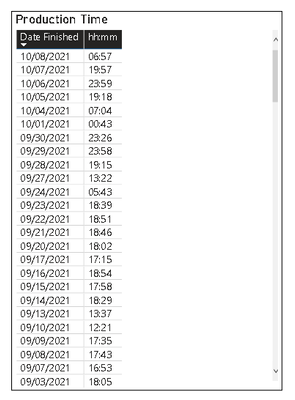
Have now applied the Date column in the Data table but I am getting 0 hours in most of the days.

As per checking, there is production hours (Table 2) for these days.
- Mark as New
- Bookmark
- Subscribe
- Mute
- Subscribe to RSS Feed
- Permalink
- Report Inappropriate Content
@markefrody , sorry, I've missed some details.
hh =
VAR timeIn =  MIN ( 'Table 1'[Start Time] )
VAR timeOut = MAX ( 'Table 1'[Clock Out] )
VAR timeRange =
    FILTER (
        VALUES ( 'Table 2'[Date and Time Finished] ),
        'Table 2'[Date and Time Finished] >= timeIn
            && 'Table 2'[Date and Time Finished] <= timeOut
    )
VAR break = DATEDIFF( MIN ( 'Table 1'[Break1 Start] ), MAX ( 'Table 1'[Break1 End] ), SECOND)
VAR ss = DATEDIFF ( MINX ( timeRange, 'Table 2'[Date and Time Finished] ), MAXX ( timeRange, 'Table 2'[Date and Time Finished] ), SECOND ) - break
VAR mm = ss / 60
VAR hh = mm / 60
RETURN
    hh
Just use what you need in the return (ss / mm / hh) and change the measure name accordingly.
Regards
If this post helps, then please consider Accept it as the solution ✔️to help the other members find it more quickly.
If this post helps, then please considerAccept it as the solution to help the other members find it more quickly.
Appreciate your Kudos
Stand with Ukraine!
- Mark as New
- Bookmark
- Subscribe
- Mute
- Subscribe to RSS Feed
- Permalink
- Report Inappropriate Content
- Mark as New
- Bookmark
- Subscribe
- Mute
- Subscribe to RSS Feed
- Permalink
- Report Inappropriate Content
Hi @markefrody ,
Next time, please, provide sample data as text, use the table tool in the editing bar.
You can use the measure below to get your hours:
hh =
VAR timeIn = HOUR ( MIN ( 'T1'[TimeIn] ) )
VAR timeOut = HOUR ( MAX ( 'T1'[TimeOut] ) )
VAR timeRange =
    FILTER (
        VALUES ( 'T2'[DateTime] ),
        HOUR ( 'T2'[DateTime] ) >= timeIn
            && HOUR ( 'T2'[DateTime] ) <= timeOut
    )
VAR break = HOUR ( MIN ( 'T1'[BreakStart] ) - MAX ( 'T1'[BreakEnd] ) )
VAR hh = HOUR ( MINX ( timeRange, [DateTime] ) - MAXX ( timeRange, [DateTime] ) ) - break
RETURN
    hh
Please, take into account that both tables are connected via a separate Date table by Date column.
If this post helps, then please consider Accept it as the solution ✔️to help the other members find it more quickly.
If this post helps, then please considerAccept it as the solution to help the other members find it more quickly.
Appreciate your Kudos
Stand with Ukraine!

Helpful resources

FabCon & SQLCon – Barcelona 2026
Join us in Barcelona for FabCon and SQLCon, the Fabric, Power BI, SQL, and AI community event. Save €200 with code FABCMTY200.

Power BI Monthly Update - July 2026
Check out the July 2026 Power BI update to learn about new features.

Data Days 2026
Join Data Days 2026: 60 days of free live/on-demand sessions, challenges, study groups, and certification opportunities.

Power BI DataViz World Championships - June 2026
A new Power BI DataViz World Championship is coming this June! Don't miss out on submitting your entry.

| User | Count |
|---|---|
| 30 | |
| 25 | |
| 23 | |
| 22 | |
| 13 |


| User | Count |
|---|---|
| 49 | |
| 32 | |
| 19 | |
| 19 | |
| 17 |


