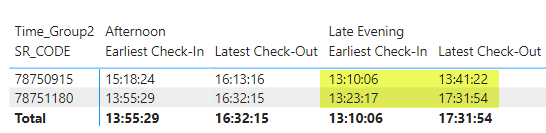
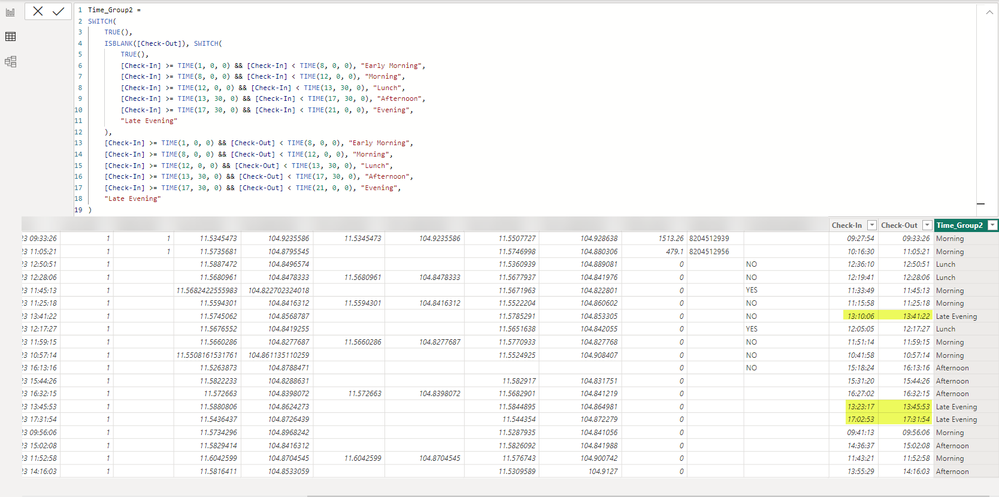
I adjusted your dax code to the following :
Time_Group2 =


SWITCH(
    TRUE(),
    ISBLANK([Check-Out]), SWITCH(
        TRUE(),
        [Check-In] >= TIME(1, 0, 0) && [Check-In] < TIME(8, 0, 0), "Early Morning",
        [Check-In] >= TIME(8, 0, 0) && [Check-In] < TIME(12, 0, 0), "Morning",
        [Check-In] >= TIME(12, 0, 0) && [Check-In] < TIME(13, 30, 0), "Lunch",
        [Check-In] >= TIME(13, 30, 0) && [Check-In] < TIME(17, 30, 0), "Afternoon",
        [Check-In] >= TIME(17, 30, 0) && [Check-In] < TIME(21, 0, 0), "Evening",
        "Late Evening"
    ),
    [Check-In] >= TIME(1, 0, 0) && [Check-Out] < TIME(8, 0, 0), "Early Morning",
    [Check-In] >= TIME(8, 0, 0) && [Check-Out] < TIME(12, 0, 0), "Morning",
    [Check-In] >= TIME(12, 0, 0) && [Check-Out] < TIME(13, 30, 0), "Lunch",
    [Check-In] >= TIME(13, 30, 0) && [Check-Out] < TIME(17, 30, 0), "Afternoon",
    [Check-In] >= TIME(17, 30, 0) && [Check-Out] < TIME(21, 0, 0), "Evening",
    "Late Evening"
)

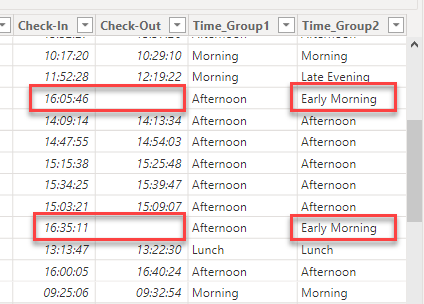
The code you provided doesn't handle the case where the "Check-Out" value is blank. In your provided logic, you directly compare "Check-In" and "Check-Out" times without considering the scenario when "Check-Out" is blank.
Since the code does not include any conditional check to handle a blank "Check-Out" value, it may lead to incorrect results in that specific case. If "Check-Out" is blank, the code does not have any instruction on how to handle that scenario, so it may lead to wrong categorizations or unexpected results.
Proud to be a Power BI Super User !
Microsoft Community : https://docs.microsoft.com/en-us/users/AmiraBedhiafi
Linkedin : https://www.linkedin.com/in/amira-bedhiafi/
StackOverflow : https://stackoverflow.com/users/9517769/amira-bedhiafi
C-Sharp Corner : https://www.c-sharpcorner.com/members/amira-bedhiafi
Power BI Community :https://community.powerbi.com/t5/user/viewprofilepage/user-id/332696