This time we’re going bigger than ever. Fabric, Power BI, SQL, AI and more. We're covering it all. You won't want to miss it.
Learn moreLevel up your Power BI skills this month - build one visual each week and tell better stories with data! Get started
Hey everyone,
I need help with a problem I am currently facing.
I need to count free calender timeslots for sales-users in a specific time range (09:00 - 20:00).
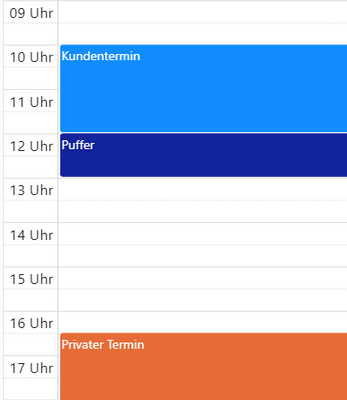
I have data from the sales-users´ calender. This data has a start-time and an end time of the appointments. Each appointment is two hours long and after the appointment there should be a 1 hour period in which no appointment can be except if it is a private one. The goal is to give a person who sets the appointments for the sales-users a number of how many slots there are available for appointments. I tried a couple of methods and checked the community but I have not found a solution for this problem.
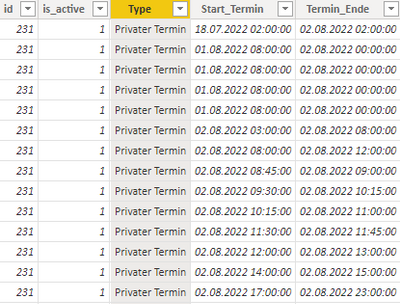
Table with Start and End Date. ID is for the sales-user.
In this case the visual should show "1" because there is one slot available which fits the 2h + 1h rule.
Thank you!
Solved! Go to Solution.
Hi @Anonymous ,
Here are the steps you can follow:
1. Create measure.
Flag1 =
var _9time=
DATE(YEAR(MAX('Table'[Start_Termin])),MONTH(MAX('Table'[Start_Termin])),DAY(MAX('Table'[Start_Termin])))
+
TIME(9,0,0)
return
IF(
MAX('Table'[Start_Termin])>=_9time,1,0)Measure =
var _mindate=
MINX(FILTER(ALL('Table'),[Flag1]=1),[Start_Termin]) //2022.8.2 9:30
var _mindate2=_mindate + TIME(2,0,0)
var _mindate3=_mindate + TIME(3,0,0)
var _hour=DATEDIFF(
MAX('Table'[Start_Termin]),MAX('Table'[Termin_Ende]),HOUR)
return
SWITCH(
TRUE(),
MAX('Table'[Start_Termin])>=_mindate&&MAX('Table'[Start_Termin])<=_mindate2,"Kundentermin",
MAX('Table'[Start_Termin])>_mindate2&&MAX('Table'[Start_Termin])<=_mindate3,"Puffer",
_hour>=2&&[Flag1]=1,"Privater Termin")Measure 3 =
var _table1=
FILTER(ALL('Table'),[Flag1]=1)
var _table2=
ADDCOLUMNS(_table1,"1",
SWITCH(
TRUE(),
'Table'[Start_Termin]>=MINX(FILTER(ALL('Table'),[Flag1]=1),[Start_Termin])&&'Table'[Start_Termin]<=MINX(FILTER(ALL('Table'),[Flag1]=1),[Start_Termin])+TIME(2,0,0),"Kundentermin",
'Table'[Start_Termin]>MINX(FILTER(ALL('Table'),[Flag1]=1),[Start_Termin])+TIME(2,0,0)&&'Table'[Start_Termin]<=MINX(FILTER(ALL('Table'),[Flag1]=1),[Start_Termin])+TIME(3,0,0),"Puffer",
DATEDIFF(
'Table'[Start_Termin],'Table'[Termin_Ende],HOUR)>=2&&[Flag1]=1,"Privater Termin"))
var _table3=
SUMMARIZE(_table2,[id],[1])
return
COUNTX(FILTER(_table3,[1]<>"Privater Termin"&&[1]<>BLANK()),[id])
&""& "h"
&" + "&
COUNTX(FILTER(_table3,[1]="Privater Termin"),[id])
&""& "h"
2. Result:
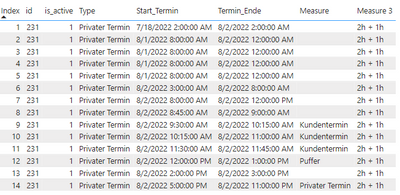
If you need pbix, please click here.
Best Regards,
Liu Yang
If this post helps, then please consider Accept it as the solution to help the other members find it more quickly
Hi @Anonymous ,
Here are the steps you can follow:
1. Create measure.
Flag1 =
var _9time=
DATE(YEAR(MAX('Table'[Start_Termin])),MONTH(MAX('Table'[Start_Termin])),DAY(MAX('Table'[Start_Termin])))
+
TIME(9,0,0)
return
IF(
MAX('Table'[Start_Termin])>=_9time,1,0)Measure =
var _mindate=
MINX(FILTER(ALL('Table'),[Flag1]=1),[Start_Termin]) //2022.8.2 9:30
var _mindate2=_mindate + TIME(2,0,0)
var _mindate3=_mindate + TIME(3,0,0)
var _hour=DATEDIFF(
MAX('Table'[Start_Termin]),MAX('Table'[Termin_Ende]),HOUR)
return
SWITCH(
TRUE(),
MAX('Table'[Start_Termin])>=_mindate&&MAX('Table'[Start_Termin])<=_mindate2,"Kundentermin",
MAX('Table'[Start_Termin])>_mindate2&&MAX('Table'[Start_Termin])<=_mindate3,"Puffer",
_hour>=2&&[Flag1]=1,"Privater Termin")Measure 3 =
var _table1=
FILTER(ALL('Table'),[Flag1]=1)
var _table2=
ADDCOLUMNS(_table1,"1",
SWITCH(
TRUE(),
'Table'[Start_Termin]>=MINX(FILTER(ALL('Table'),[Flag1]=1),[Start_Termin])&&'Table'[Start_Termin]<=MINX(FILTER(ALL('Table'),[Flag1]=1),[Start_Termin])+TIME(2,0,0),"Kundentermin",
'Table'[Start_Termin]>MINX(FILTER(ALL('Table'),[Flag1]=1),[Start_Termin])+TIME(2,0,0)&&'Table'[Start_Termin]<=MINX(FILTER(ALL('Table'),[Flag1]=1),[Start_Termin])+TIME(3,0,0),"Puffer",
DATEDIFF(
'Table'[Start_Termin],'Table'[Termin_Ende],HOUR)>=2&&[Flag1]=1,"Privater Termin"))
var _table3=
SUMMARIZE(_table2,[id],[1])
return
COUNTX(FILTER(_table3,[1]<>"Privater Termin"&&[1]<>BLANK()),[id])
&""& "h"
&" + "&
COUNTX(FILTER(_table3,[1]="Privater Termin"),[id])
&""& "h"
2. Result:
If you need pbix, please click here.
Best Regards,
Liu Yang
If this post helps, then please consider Accept it as the solution to help the other members find it more quickly
Check out the April 2026 Power BI update to learn about new features.
Sign up to receive a private message when registration opens and key events begin.
If you have recently started exploring Fabric, we'd love to hear how it's going. Your feedback can help with product improvements.
| User | Count |
|---|---|
| 36 | |
| 33 | |
| 27 | |
| 24 | |
| 18 |
| User | Count |
|---|---|
| 67 | |
| 49 | |
| 32 | |
| 27 | |
| 22 |