cancel
Showing results for 
Search instead for 
Did you mean: 

Join the FabCon + SQLCon recap series. Up next: Power BI, Real-Time Intelligence, IQ and AI, and Data Factory take center stage. All sessions are available on-demand after the live show. Register now

Reply
NavaneethaRaju
Helper IV
Helper IV

Time Issue

Hi, 
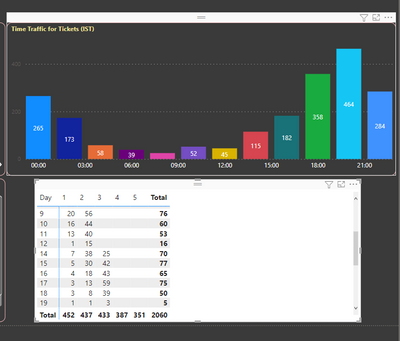
I created a time traffic of the tickets, there i created a time bin.


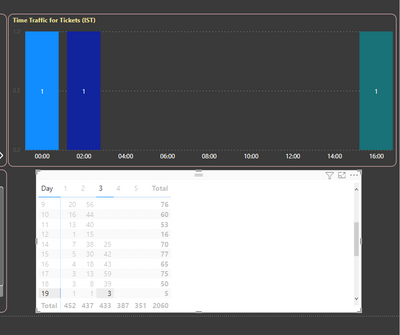
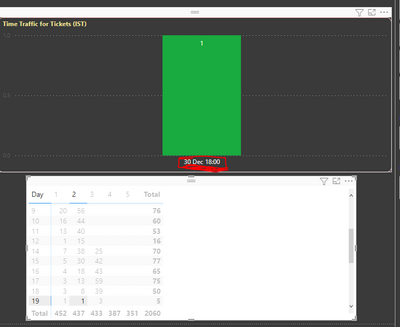
Now i have tickets details in datewise, if i select the one of the date ticket count, the bar chart show the which time those tickets are coming. someday only one ticket alone coming.  while i click on that value. its show the 30 Dec and the ticket coming time. I really dont know why it showing like this. 

I enclosed the three images for reference.

NavaneethaRaju_0-1651483605599.pngNavaneethaRaju_1-1651483621989.png

NavaneethaRaju_2-1651483659328.png


2 REPLIES 2
v-easonf-msft
Community Support
Community Support

Hi, @NavaneethaRaju 

Can you enclosed a sample file for further research?

Best Regards,
Community Support Team _ Eason

JirkaZ
Solution Specialist
Solution Specialist

That will be caused by some data model issue. 

Do the days in the matrix rows come from a date table? 

Helpful resources

Announcements
April Power BI Update Carousel

Power BI Monthly Update - April 2026

Check out the April 2026 Power BI update to learn about new features.

New to Fabric survey Carousel

New to Fabric Survey

If you have recently started exploring Fabric, we'd love to hear how it's going. Your feedback can help with product improvements.

Power BI DataViz World Championships carousel

Power BI DataViz World Championships - June 2026

A new Power BI DataViz World Championship is coming this June! Don't miss out on submitting your entry.

FabCon and SQLCon Highlights Carousel

FabCon &SQLCon Highlights

Experience the highlights from FabCon & SQLCon, available live and on-demand starting April 14th.