Join us in Barcelona for FabCon and SQLCon, September 28 - October 1, 2026.
This is best Fabric, Power BI, SQL and AI community event. How do we know? The last event sold out! Save €200 with code FABCMTY200.
Register now- Power BI forums
- Get Help with Power BI
- Desktop
- Service
- Report Server
- Power Query
- Mobile Apps
- Developer
- DAX Commands and Tips
- Custom Visuals Development Discussion
- Health and Life Sciences
- Power BI Spanish forums
- Translated Spanish Desktop
- Training and Consulting
- Instructor Led Training
- Dashboard in a Day for Women, by Women
- Galleries
- Data Stories Gallery
- Themes Gallery
- Contests Gallery
- QuickViz Gallery
- Quick Measures Gallery
- Visual Calculations Gallery
- Fabric Apps Gallery
- Notebook Gallery
- Translytical Task Flow Gallery
- TMDL Gallery
- R Script Showcase
- Webinars and Video Gallery
- Ideas
- Custom Visuals Ideas (read-only)
- Issues
- Issues
- Events
- Upcoming Events
The Fabric community is upgrading! Read all of the details including the timeline and what you can expect. Learn more
- Power BI forums
- Forums
- Get Help with Power BI
- Desktop
- Re: Time Intelligence
- Subscribe to RSS Feed
- Mark Topic as New
- Mark Topic as Read
- Float this Topic for Current User
- Bookmark
- Subscribe
- Printer Friendly Page


- Mark as New
- Bookmark
- Subscribe
- Mute
- Subscribe to RSS Feed
- Permalink
- Report Inappropriate Content
Time Intelligence
Hi,
I have a table which has records of maintenance jobs completed at rented houses. Each record has (amongst other things):
Created On Date
Completed Date
Priority (associated SLA for that priority).
I have various calculated columns already which show me:
For jobs that do not have a completed date (i.e are still outstanding), how many days over their SLA target they are
For completed jobs, how many days after their SLA they were completed on.
What I now want to see, is, (I'm not sure what you would use? A slicer or a measure etc..) but I would like to see, on a certain date in the past, how many jobs were live (i.e not completed) and overdue on that day.
I know I have all of the data, I just don't know what to do to visulise this.
Further to this I would like to be able to compare this for example to the same month the previous year, or the previous month etc.
Thanks for your help
Lottie
Solved! Go to Solution.


- Mark as New
- Bookmark
- Subscribe
- Mute
- Subscribe to RSS Feed
- Permalink
- Report Inappropriate Content
Hi @lottieritchie Thanks for your description. I create a new measure to count the live jobs. It works when you select a continuous period of time (month, week, quarter) or a specific date. Here is the PBIX file.
Live jobs 2 =
VAR _periodStart = MIN ( Dates[Date] )
VAR _periodEnd = MAX ( Dates[Date] )
RETURN
    CALCULATE (
        COUNT ( 'Table'[Job] ),
        FILTER (
            ALL ( 'Table' ),
            NOT (
                'Table'[Created Date] > _periodEnd
                    || (
                        'Table'[Completed Date] < _periodStart
                            && NOT ( ISBLANK ( 'Table'[Completed Date] ) )
                    )
            )
        )
    )
Regards,
Jing
- Mark as New
- Bookmark
- Subscribe
- Mute
- Subscribe to RSS Feed
- Permalink
- Report Inappropriate Content
Additionally, if you want to get the result of last period or the same period last year, you can change the variables _periodStart and _periodEnd in above measure. For example:
- Last month
- Same month last year

- Mark as New
- Bookmark
- Subscribe
- Mute
- Subscribe to RSS Feed
- Permalink
- Report Inappropriate Content
You can achieve this using DAX measures rather than calculated columns, as they allow for dynamic filtering based on user selection.
Steps to visualize overdue live jobs on a past date:
Create a Date Table (if you don’t have one) and mark it as a Date Table in Power BI.
Create a Measure to Count Overdue Jobs on a selected date:
Overdue Live Jobs = VAR SelectedDate = SELECTEDVALUE('DateTable'[Date]) RETURN CALCULATE( COUNT('MaintenanceTable'[JobID]), 'MaintenanceTable'[Completed Date] = BLANK(), 'MaintenanceTable'[Created On Date] <= SelectedDate, 'MaintenanceTable'[SLA Target Date] < SelectedDate )
Use a Date Slicer to select any past date and see the overdue jobs count.
To compare with previous periods, create time intelligence measures like:
Overdue Live Jobs Last Year = CALCULATE([Overdue Live Jobs], SAMEPERIODLASTYEAR('DateTable'[Date])) Overdue Live Jobs Last Month = CALCULATE([Overdue Live Jobs], PREVIOUSMONTH('DateTable'[Date]))
Use a Line Chart or Table Visual to compare trends over time.
- Mark as New
- Bookmark
- Subscribe
- Mute
- Subscribe to RSS Feed
- Permalink
- Report Inappropriate Content
I'm still having trouble with this issue if anyone is able to help? Many thanks
- Mark as New
- Bookmark
- Subscribe
- Mute
- Subscribe to RSS Feed
- Permalink
- Report Inappropriate Content
It seems there are several issues to deal with. Let's start with selecting a certain date.
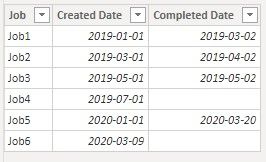
Assume you have data like above, you can create below measure to calculate the number of live jobs on a selected date. I add an independent Date table in the model. You can use this Date table to select a date in a slicer. Here is the pbix file .
Live jobs =
VAR _selectedDate = SELECTEDVALUE ( Dates[Date] )
RETURN
    CALCULATE (
        COUNT ( 'Table'[Job] ),
        FILTER (
            ALL ( 'Table' ),
            'Table'[Created Date] <= _selectedDate
                && (
                    'Table'[Completed Date] > _selectedDate
                        || ISBLANK ( 'Table'[Completed Date] )
                )
        )
    )
My question is that, if a job was created on 15th March 2019 and completed on 10th April 2019, when you want to count the number of live jobs at month level, should it be counted as a live job in March 2019 or in April 2019 or other result? How to deal with this condition? Also how to deal with a job only lasting for several days in the same month?
Regards,
Jing
- Mark as New
- Bookmark
- Subscribe
- Mute
- Subscribe to RSS Feed
- Permalink
- Report Inappropriate Content
Hi Jing,
Thanks so much for your response. And that you for the formula.
They are very good questions...
In your example I think I would want to count a live job in both March and April ideally, to show that the team were managing a job both in March and in April. Same for if the job only lasted for several days, I would still want to count that as a live job for that month.
Sorry one more question, now I have created that formula (I have a date table in my data already), I have added a filter to the page pulling in the date, but it doesn't seem to effect my, in the case 'card' which I have displaying the Live Jobs count. Could you advise what I may be doing incorrectly? Many thanks again for your help!
Lottie
- Mark as New
- Bookmark
- Subscribe
- Mute
- Subscribe to RSS Feed
- Permalink
- Report Inappropriate Content
Sorry my slicer is working, but as you say, only if I select a specific day, rather than being able to select a month, or a week.
Am I able to use this new Live Jobs field to compare trends etc, as opposed to just using a slicer to look at specific dates?
Many thanks
- Mark as New
- Bookmark
- Subscribe
- Mute
- Subscribe to RSS Feed
- Permalink
- Report Inappropriate Content
Hi @lottieritchie Thanks for your description. I create a new measure to count the live jobs. It works when you select a continuous period of time (month, week, quarter) or a specific date. Here is the PBIX file.
Live jobs 2 =
VAR _periodStart = MIN ( Dates[Date] )
VAR _periodEnd = MAX ( Dates[Date] )
RETURN
    CALCULATE (
        COUNT ( 'Table'[Job] ),
        FILTER (
            ALL ( 'Table' ),
            NOT (
                'Table'[Created Date] > _periodEnd
                    || (
                        'Table'[Completed Date] < _periodStart
                            && NOT ( ISBLANK ( 'Table'[Completed Date] ) )
                    )
            )
        )
    )
Regards,
Jing
- Mark as New
- Bookmark
- Subscribe
- Mute
- Subscribe to RSS Feed
- Permalink
- Report Inappropriate Content
Additionally, if you want to get the result of last period or the same period last year, you can change the variables _periodStart and _periodEnd in above measure. For example:
- Last month
- Same month last year
- Mark as New
- Bookmark
- Subscribe
- Mute
- Subscribe to RSS Feed
- Permalink
- Report Inappropriate Content
Thank you so much this is great. 👍


- Mark as New
- Bookmark
- Subscribe
- Mute
- Subscribe to RSS Feed
- Permalink
- Report Inappropriate Content
I have assumed some Data based on your explanation and created this pbix . Look at this and let me know if it helps
Did I answer your question? Mark my post as a solution! Appreciate your Kudos!!
MY Blog || My YouTube Channel || Connect with me on Linkedin || My Latest Data Story - Ageing Analysis
Proud to be a Super User!
- Mark as New
- Bookmark
- Subscribe
- Mute
- Subscribe to RSS Feed
- Permalink
- Report Inappropriate Content
Hi, thanks for your help. I'm not quite there on what I need yet.
Thanks for the sample data, I have just swapped the Open/Close around so those without a closed date now show as Open.
But using this as an example, on Tuesday 14th April, 2020, Project 17 is open, and project 21 is still also open. So on that day, 2 projects are currently open.
On the 14th April 2019 Project 11 & Project 13 would have been open on that day. So what I would like to see is something showing me 2 open on that day this year, and 2 open on the same day the previous year (and I would like to be able to change this to look at whole months/years etc?
Hope that makes sense? Thanks for your help.


- Mark as New
- Bookmark
- Subscribe
- Mute
- Subscribe to RSS Feed
- Permalink
- Report Inappropriate Content
- Mark as New
- Bookmark
- Subscribe
- Mute
- Subscribe to RSS Feed
- Permalink
- Report Inappropriate Content
Hi, thank you very much this is very helpful. I have replicated most of these fields, other than I have got stuck on one where it is not liking the second _min_date in my expression:

Helpful resources

FabCon & SQLCon – Barcelona 2026
Join us in Barcelona for FabCon and SQLCon, the Fabric, Power BI, SQL, and AI community event. Save €200 with code FABCMTY200.

Power BI DataViz World Championships - June 2026
A new Power BI DataViz World Championship is coming this June! Don't miss out on submitting your entry.

| User | Count |
|---|---|
| 27 | |
| 22 | |
| 20 | |
| 18 | |
| 14 |


| User | Count |
|---|---|
| 25 | |
| 20 | |
| 20 | |
| 20 | |
| 20 |


