cancel
Showing results for 
Search instead for 
Did you mean: 

The Power BI Data Visualization World Championships is back! Get ahead of the game and start preparing now! Learn more

Reply
reacharihant
Regular Visitor

Time Intelligence

Hello, I need to compare a date's count with the last year's date count.  I am using the following: 

Calls YTD = CALCULATE(sum(CallCount[Count]),SAMEPERIODLASTYEAR(dCalendar[Date]))


but it gives me identical values in both the colums.  


I need the output as follows:

Date               Last Years Calls    Current Year Calls

15/06/15               15                             20

16/06/15               13                             22

...


15/06/16               20                             35

16/06/16               22                             38


Request possible help.

1 ACCEPTED SOLUTION

Hi @reacharihant,

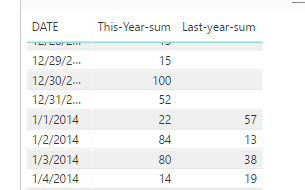
It will calculate running total of actuals when you use DATESYTD function in filter. Based on your description, the DATESYTD is not appropriate. Please create the current year's calls using the formula:


Current Year Calls=SUM(CallCount[Count])


SAMEPERIODLASTYEAR requires continuous date in the filter context. From your attachment, the date is not continuous, so you'd better create a Calendar table by clicking "New Table" under Modeling on Homepage. Please confirm you create a relationship between Calendar[date] and CallCount[date]. Then you can use the formula to create the last year's calls.

Last Years Calls=CALCULATE(sum(CallCount[Count]),SAMEPERIODLASTYEAR(Calendar[Date]))


Please check if there is a relationship between your fact table and Calendar Table. I test it using my sample table, it returns the expected result.
1.PNG

Finally, create a natrix visual, select the CallCount[date] as rows, the [Last Years Calls] and [This Years Calls] as the values levels.

Best Regards,
Angelia

View solution in original post

4 REPLIES 4
Greg_Deckler
Community Champion
Community Champion

I'm a bit confused by this, if you use the same formula in two different columns, you are likely to get the same result. You would need to have two columns/measures, one using SAMPERIODLASTYEAR most likely and one using DATESYTD.


https://msdn.microsoft.com/en-us/library/ee634221.aspx


Sample data would help.


Follow on LinkedIn
@ me in replies or I'll lose your thread!!!
Instead of a Kudo, please vote for this idea
Become an expert!: Enterprise DNA
External Tools: MSHGQM
YouTube Channel!: Microsoft Hates Greg
Latest book!:
DAX For Humans

DAX is easy, CALCULATE makes DAX hard...

SampleTest.jpg


Please find attached.


The column Calls FYTD is coming blank. However the total below is coming correctly. I need to display the count of calls in the column Calls FYTD besides every last year's same date.

Hi @reacharihant,

It will calculate running total of actuals when you use DATESYTD function in filter. Based on your description, the DATESYTD is not appropriate. Please create the current year's calls using the formula:


Current Year Calls=SUM(CallCount[Count])


SAMEPERIODLASTYEAR requires continuous date in the filter context. From your attachment, the date is not continuous, so you'd better create a Calendar table by clicking "New Table" under Modeling on Homepage. Please confirm you create a relationship between Calendar[date] and CallCount[date]. Then you can use the formula to create the last year's calls.

Last Years Calls=CALCULATE(sum(CallCount[Count]),SAMEPERIODLASTYEAR(Calendar[Date]))


Please check if there is a relationship between your fact table and Calendar Table. I test it using my sample table, it returns the expected result.

1.PNG

Finally, create a natrix visual, select the CallCount[date] as rows, the [Last Years Calls] and [This Years Calls] as the values levels.

Best Regards,
Angelia

Thanks! it worked.

Helpful resources

Announcements
Power BI DataViz World Championships

Power BI Dataviz World Championships

The Power BI Data Visualization World Championships is back! Get ahead of the game and start preparing now!

December 2025 Power BI Update Carousel

Power BI Monthly Update - December 2025

Check out the December 2025 Power BI Holiday Recap!

FabCon Atlanta 2026 carousel

FabCon Atlanta 2026

Join us at FabCon Atlanta, March 16-20, for the ultimate Fabric, Power BI, AI and SQL community-led event. Save $200 with code FABCOMM.