This time we’re going bigger than ever. Fabric, Power BI, SQL, AI and more. We're covering it all. You won't want to miss it.
Learn moreLevel up your Power BI skills this month - build one visual each week and tell better stories with data! Get started
CURRENT PROBLEM: My current week / month will cut off when the beginning of the month falls on either the end or begining of the week.
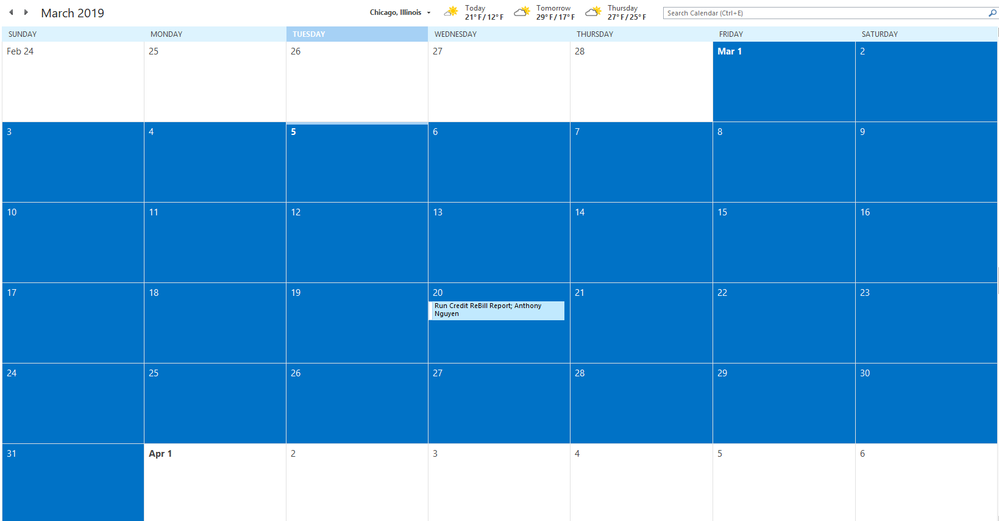
- EX: March 1 falls on Friday = my data will calculate the week to only have 2 days.
- EX: March 31 falls on Sunday = my data will calculate the week to only have 1 day. (see calendar screenshot below for reference)
PROBLEM TO SOLVE: Is there a way in which I can structure my time intelligence / calendar table to where if I want to model by the week level, the months do not cut off and will continue to account for 7 days? This is causing my data model to show sudden dips when in reality, it is just a change in the month during the week. The sudden dips in my model are bothering my clients and I am struggling to find a solution on how I can remedy this. Please see screenshot below (specifically the white arrows). The white arrows point to the very end / beginning of the month.
I have a calendar table with the following:
- Month = FORMAT('Calendar'[Date], "MMM")
- Week = WEEKNUM('Calendar'[Date])
I am pretty sure this is how it should be set up but if I am not correct, please let me know. Any guidance or suggestions will be greatly appreciated!
hi, @Anonymous
Usually, People just put year and week together. You'd better do not put month and week together.
Or if you could try this way:
Add a month No and week No. column in Calendar table
Then use a measure like this
Measure 5 =
CALCULATE (
SUM ( Table3[Qty] ),
FILTER (
ALLSELECTED ( Table3 ),
Table3[Month]
= MAX ( Table3[Month] ) - 1
&& Table3[Week] = MAX ( Table3[Week] )
)
)
+ CALCULATE ( SUM ( Table3[Qty] ) )
+ CALCULATE (
SUM ( Table3[Qty] ),
FILTER (
ALLSELECTED ( Table3 ),
Table3[Month]
= MAX ( Table3[Month] ) + 1
&& Table3[Week] = MAX ( Table3[Week] )
)
)
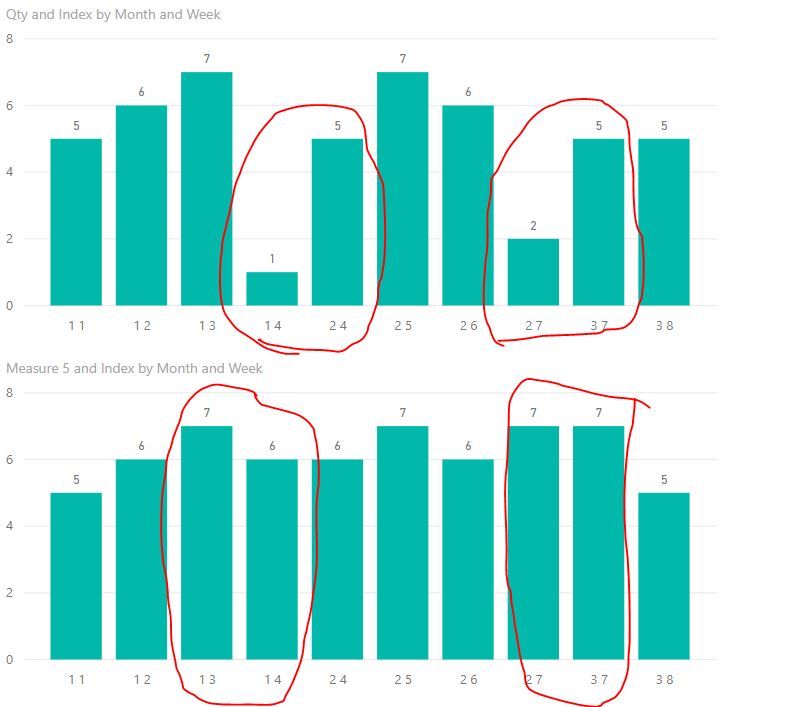
For example:
Best Regards,
Lin
Check out the April 2026 Power BI update to learn about new features.
Sign up to receive a private message when registration opens and key events begin.
If you have recently started exploring Fabric, we'd love to hear how it's going. Your feedback can help with product improvements.
| User | Count |
|---|---|
| 31 | |
| 25 | |
| 21 | |
| 18 | |
| 17 |
| User | Count |
|---|---|
| 61 | |
| 35 | |
| 33 | |
| 23 | |
| 23 |