Get Fabric or SQL Certified for Free.
Get certified for free when you join Fabric Data Days 2026 and dive into Fabric, Power BI, SQL, AI, and other essential data skills.
Join now- Power BI forums
- Get Help with Power BI
- Desktop
- Service
- Report Server
- Power Query
- Mobile Apps
- Developer
- DAX Commands and Tips
- Custom Visuals Development Discussion
- Health and Life Sciences
- Power BI Spanish forums
- Translated Spanish Desktop
- Training and Consulting
- Instructor Led Training
- Dashboard in a Day for Women, by Women
- Galleries
- Data Stories Gallery
- Themes Gallery
- Contests Gallery
- QuickViz Gallery
- Quick Measures Gallery
- Visual Calculations Gallery
- Notebook Gallery
- Translytical Task Flow Gallery
- TMDL Gallery
- R Script Showcase
- Webinars and Video Gallery
- Ideas
- Custom Visuals Ideas (read-only)
- Issues
- Issues
- Events
- Upcoming Events
Data Days is here! Join us now for 60+ days of learning, challenges, and connection. Learn more
- Power BI forums
- Forums
- Get Help with Power BI
- Desktop
- Re: Time Intelligence Date Question
- Subscribe to RSS Feed
- Mark Topic as New
- Mark Topic as Read
- Float this Topic for Current User
- Bookmark
- Subscribe
- Printer Friendly Page

- Mark as New
- Bookmark
- Subscribe
- Mute
- Subscribe to RSS Feed
- Permalink
- Report Inappropriate Content
Time Intelligence Date Question
Hi Guys. Wanted some help on the following.
I have a table with two different dates showing two different revenue amounts.
| ID | Claim Date | Claim Revenue | Claim Due Date | Due Date Revenue |
| 1 | 1/04/2020 | $ 123.00 | 1/04/2020 | $ 250.00 |
| 2 | 1/05/2020 | $ 150.00 | 1/05/2020 | $ 500.00 |
| 3 | 1/06/2020 | $ 271.00 | 1/06/2020 | $ 750.00 |
| 4 | 1/07/2020 | $ 329.33 | 1/07/2020 | $ 1,000.00 |
| 5 | 1/07/2020 | $ 429.44 | 1/07/2020 | $ 1,250.00 |
I am basically after a two fold step.
On the same chart, I would like to show (if possible) the Sum of Claim Revenue and Sum of Due Date Revenue only for the current month.
for example, for month of May20, it should show two bar graphs (claimed revenue and due date revevue), which changes automatically to Jun20 next month.
Solved! Go to Solution.


- Mark as New
- Bookmark
- Subscribe
- Mute
- Subscribe to RSS Feed
- Permalink
- Report Inappropriate Content
Hello @Anonymous ,
You need to take help of a calendar table
Once added in the model, create the relationship between the calendar table date, and Claim Date & Claim Due Date
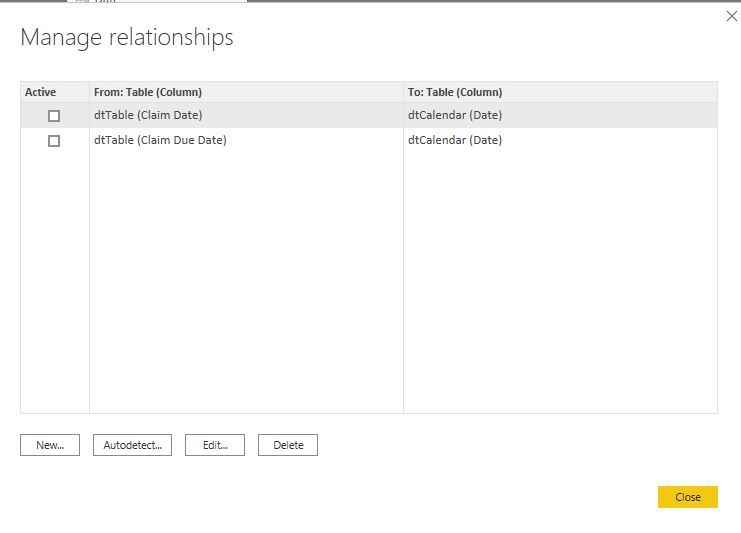
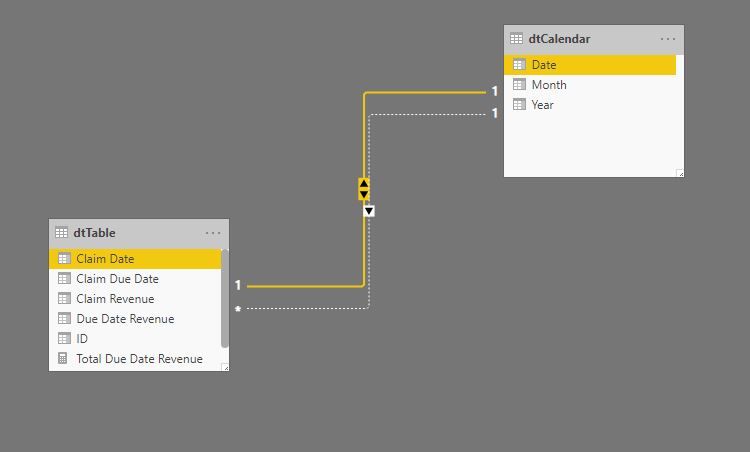
Then you can create following measures for calculating the total revenue on claim date and due date
Total Claim Revenue =
CALCULATE(
    SUM(dtTable[Claim Revenue]),
    USERELATIONSHIP(dtCalendar[Date],dtTable[Claim Date])
)

Total Due Date Revenue =
CALCULATE(
    SUM(dtTable[Due Date Revenue]),
    USERELATIONSHIP(dtCalendar[Date],dtTable[Claim Due Date])
)
You will get the following results:
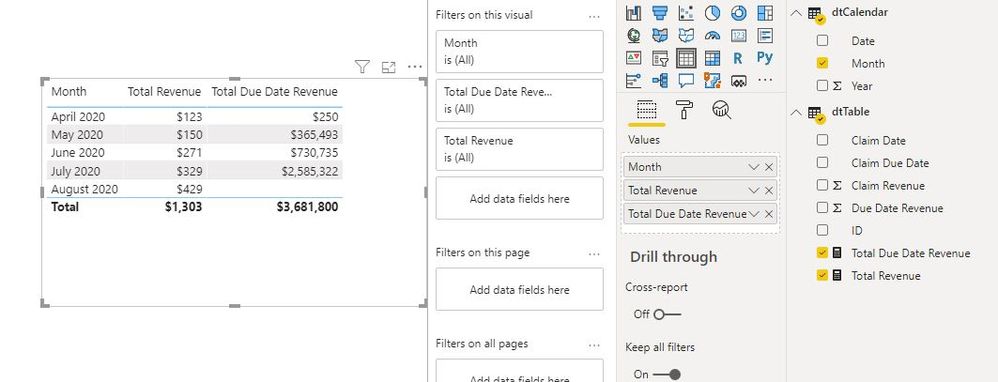
Alternatively, you can use TREATAS function and skip the Relationship creation part suggested above (Calendar table is required though):
Total Revenue =
CALCULATE(
    SUM(dtTable[Claim Revenue]),
    TREATAS(VALUES(dtCalendar[Date]),dtTable[Claim Date])
)

Total Due Date Revenue =
CALCULATE(
    SUM(dtTable[Due Date Revenue]),
    TREATAS(VALUES(dtCalendar[Date]),dtTable[Claim Due Date])
)
Cheers!
Vivek
If it helps, please mark it as a solution
Kudos would be a cherry on the top 🙂
https://www.vivran.in/
Connect on LinkedIn
- Mark as New
- Bookmark
- Subscribe
- Mute
- Subscribe to RSS Feed
- Permalink
- Report Inappropriate Content
Hello @Anonymous ,
You need to take help of a calendar table
Once added in the model, create the relationship between the calendar table date, and Claim Date & Claim Due Date
Then you can create following measures for calculating the total revenue on claim date and due date
Total Claim Revenue =
CALCULATE(
    SUM(dtTable[Claim Revenue]),
    USERELATIONSHIP(dtCalendar[Date],dtTable[Claim Date])
)

Total Due Date Revenue =
CALCULATE(
    SUM(dtTable[Due Date Revenue]),
    USERELATIONSHIP(dtCalendar[Date],dtTable[Claim Due Date])
)
You will get the following results:
Alternatively, you can use TREATAS function and skip the Relationship creation part suggested above (Calendar table is required though):
Total Revenue =
CALCULATE(
    SUM(dtTable[Claim Revenue]),
    TREATAS(VALUES(dtCalendar[Date]),dtTable[Claim Date])
)

Total Due Date Revenue =
CALCULATE(
    SUM(dtTable[Due Date Revenue]),
    TREATAS(VALUES(dtCalendar[Date]),dtTable[Claim Due Date])
)
Cheers!
Vivek
If it helps, please mark it as a solution
Kudos would be a cherry on the top 🙂
https://www.vivran.in/
Connect on LinkedIn
- Mark as New
- Bookmark
- Subscribe
- Mute
- Subscribe to RSS Feed
- Permalink
- Report Inappropriate Content
Hi @vivran22 . Worked a treat my friend. Thanks for your help and indepth explanation with screenshots. Helped alot.


- Mark as New
- Bookmark
- Subscribe
- Mute
- Subscribe to RSS Feed
- Permalink
- Report Inappropriate Content
@Anonymous , you can connect both dates with a same date table and use userelation to change the date
refer to example in blog how to use
To get the best of the time intelligence function. Make sure you have a date calendar and it has been marked as the date in model view. Also, join it with the date column of your fact/s. Refer :
https://radacad.com/creating-calendar-table-in-power-bi-using-dax-functions
https://www.archerpoint.com/blog/Posts/creating-date-table-power-bi
https://www.sqlbi.com/articles/creating-a-simple-date-table-in-dax/
See if my webinar on Time Intelligence can help: https://community.powerbi.com/t5/Webinars-and-Video-Gallery/PowerBI-Time-Intelligence-Calendar-WTD-Y...
Appreciate your Kudos.
- Mark as New
- Bookmark
- Subscribe
- Mute
- Subscribe to RSS Feed
- Permalink
- Report Inappropriate Content
Hi Amit. So I implemented a date table, and joined that with my main table through two relationships. One active and the other non active. The problem is, the amount being calculated is the overall amount, and not separated according to the months.
- Mark as New
- Bookmark
- Subscribe
- Mute
- Subscribe to RSS Feed
- Permalink
- Report Inappropriate Content
Hi Amit.
Thanks for the reply. How would you calculate the current month?
Helpful resources

Fabric Data Days 2026
Don't miss out on Data Days, June 15 through August 7. Learn Fabric, Power BI, SQL, AI and more.

Power BI Monthly Update - May 2026
Check out the May 2026 Power BI update to learn about new features.

Power BI DataViz World Championships - June 2026
A new Power BI DataViz World Championship is coming this June! Don't miss out on submitting your entry.

| User | Count |
|---|---|
| 23 | |
| 23 | |
| 21 | |
| 17 | |
| 13 |


| User | Count |
|---|---|
| 58 | |
| 51 | |
| 39 | |
| 29 | |
| 24 |


