Get Fabric or SQL Certified for Free.
Get certified for free when you join Fabric Data Days 2026 and dive into Fabric, Power BI, SQL, AI, and other essential data skills.
Join now- Power BI forums
- Get Help with Power BI
- Desktop
- Service
- Report Server
- Power Query
- Mobile Apps
- Developer
- DAX Commands and Tips
- Custom Visuals Development Discussion
- Health and Life Sciences
- Power BI Spanish forums
- Translated Spanish Desktop
- Training and Consulting
- Instructor Led Training
- Dashboard in a Day for Women, by Women
- Galleries
- Data Stories Gallery
- Themes Gallery
- Contests Gallery
- QuickViz Gallery
- Quick Measures Gallery
- Visual Calculations Gallery
- Fabric Apps Gallery
- Notebook Gallery
- Translytical Task Flow Gallery
- TMDL Gallery
- R Script Showcase
- Webinars and Video Gallery
- Ideas
- Custom Visuals Ideas (read-only)
- Issues
- Issues
- Events
- Upcoming Events
July 7 - July 17 | Round 2 of the Power BI Dataviz World Championships. Don't miss your chance! Learn more
- Power BI forums
- Forums
- Get Help with Power BI
- Desktop
- Re: Time Difference
- Subscribe to RSS Feed
- Mark Topic as New
- Mark Topic as Read
- Float this Topic for Current User
- Bookmark
- Subscribe
- Printer Friendly Page


- Mark as New
- Bookmark
- Subscribe
- Mute
- Subscribe to RSS Feed
- Permalink
- Report Inappropriate Content
Time Difference
Hello Everyone.
I have two columns Start Time and End Time and want to calculate difference between two date/time columns but I can only get the column name by using an Aggregation function like Count, Min, Max.
Why is it like that how can I subtract them and get the desired results?
my Data Values here:


I want to create a measure, Need Help!
Solved! Go to Solution.

- Mark as New
- Bookmark
- Subscribe
- Mute
- Subscribe to RSS Feed
- Permalink
- Report Inappropriate Content
You can still create a measure with sum/max/min, and change the to Time format.
Measure = SUM('Table (2)'[End])-SUM('Table'[Start])
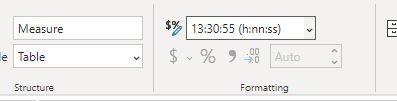
If you cannot make the columns in a same table, you should have a relationship between the two tables.
Paul Zheng _ Community Support Team
If this post helps, then please consider Accept it as the solution to help the other members find it more quickly.
- Mark as New
- Bookmark
- Subscribe
- Mute
- Subscribe to RSS Feed
- Permalink
- Report Inappropriate Content
You can still create a measure with sum/max/min, and change the to Time format.
Measure = SUM('Table (2)'[End])-SUM('Table'[Start])
If you cannot make the columns in a same table, you should have a relationship between the two tables.
Paul Zheng _ Community Support Team
If this post helps, then please consider Accept it as the solution to help the other members find it more quickly.


- Mark as New
- Bookmark
- Subscribe
- Mute
- Subscribe to RSS Feed
- Permalink
- Report Inappropriate Content
Hello! to calculate the time difference between two columns, you can use the DATEDIFF function, to calculate it in a new column, which in your case would be:
Columna_nueva = DATEDIFF(tabla[EndTime], tabla[StartTime], minute)
and you can change the unit of measurement you want to be returned, in this case "Minute".
What if, the format of this is as integer or decimal.
I do not know the method for this to be in time format, I hope it serves, Greetings!
- Mark as New
- Bookmark
- Subscribe
- Mute
- Subscribe to RSS Feed
- Permalink
- Report Inappropriate Content
Dear Sir @Anonymous @amitchandak @Greg_Deckler
I have used this Formula
Time DF = SUM('Log Header'[EndTime])-SUM('Log Header'[StartTime])
and my Table Structure is this:
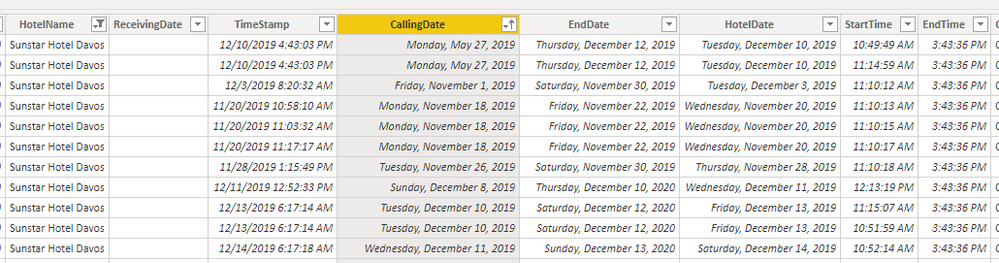
when I used the formula in the viusalization it shows me bigger values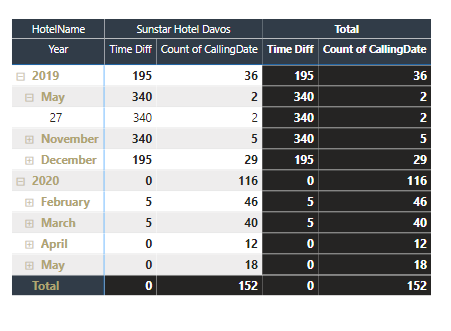
, is it correct or worng I can't verify it please help!


- Mark as New
- Bookmark
- Subscribe
- Mute
- Subscribe to RSS Feed
- Permalink
- Report Inappropriate Content
@MH3 - If you are referring to the Total, it's a measure totals problem. Very common. See my post about it here: https://community.powerbi.com/t5/DAX-Commands-and-Tips/Dealing-with-Measure-Totals/td-p/63376
Also, this Quick Measure, Measure Totals, The Final Word should get you what you need:
https://community.powerbi.com/t5/Quick-Measures-Gallery/Measure-Totals-The-Final-Word/m-p/547907
Follow on LinkedIn
@ me in replies or I'll lose your thread!!!
Instead of a Kudo, please vote for this idea
Become an expert!: Enterprise DNA
External Tools: MSHGQM
YouTube Channel!: Microsoft Hates Greg
Latest book!: DAX For Humans
DAX is easy, CALCULATE makes DAX hard...


- Mark as New
- Bookmark
- Subscribe
- Mute
- Subscribe to RSS Feed
- Permalink
- Report Inappropriate Content
- Mark as New
- Bookmark
- Subscribe
- Mute
- Subscribe to RSS Feed
- Permalink
- Report Inappropriate Content
- Mark as New
- Bookmark
- Subscribe
- Mute
- Subscribe to RSS Feed
- Permalink
- Report Inappropriate Content
@MH3 - So, if these are in two different tables as I suspect, then there must be a relationship between the tables that joins them correct? And I would also need to make the assumption that there is something in the visual that uniquely identifies rows in the tables in question like an ID or something. In that case, you can do something like:
Measure = DATEDIFF(MAX('Table1'[Start Date]), MAX('Table2'[End Date]),HOUR)
That is not your only option (HOUR):
https://docs.microsoft.com/en-us/dax/datediff-function-dax
If they are in the same table, then replace 'Table2' with 'Table1', you will still need something in your visual for unique row identification.
If these are columns in the same table and you would like a calculated column instead of a measure:
Measure = DATEDIFF('Table1'[Start Date], 'Table1'[End Date],HOUR)
Just FYI, you can also do the same calculation as above like this:
'Table1'[Start Date] - 'Table1'[End Date] * 24
The integer portion of a date/time column is the number of days since a certain point in time (december 30th, 1899 or something like that). The decimal portion is fractions of a day. You can get minutes 24 * 60 or seconds 24 * 60 * 60.
If this does not work or assumptions are bad please see this post regarding How to Get Your Question Answered Quickly: https://community.powerbi.com/t5/Community-Blog/How-to-Get-Your-Question-Answered-Quickly/ba-p/38490
The most important parts are:
1. Sample data as text, use the table tool in the editing bar
2. Expected output from sample data
3. Explanation in words of how to get from 1. to 2.
Follow on LinkedIn
@ me in replies or I'll lose your thread!!!
Instead of a Kudo, please vote for this idea
Become an expert!: Enterprise DNA
External Tools: MSHGQM
YouTube Channel!: Microsoft Hates Greg
Latest book!: DAX For Humans
DAX is easy, CALCULATE makes DAX hard...
Helpful resources

FabCon & SQLCon – Barcelona 2026
Join us in Barcelona for FabCon and SQLCon, the Fabric, Power BI, SQL, and AI community event. Save €200 with code FABCMTY200.

Power BI Monthly Update - July 2026
Check out the July 2026 Power BI update to learn about new features.

Data Days 2026
Join Data Days 2026: 60 days of free live/on-demand sessions, challenges, study groups, and certification opportunities.

Power BI DataViz World Championships - June 2026
A new Power BI DataViz World Championship is coming this June! Don't miss out on submitting your entry.

| User | Count |
|---|---|
| 30 | |
| 25 | |
| 25 | |
| 25 | |
| 16 |


| User | Count |
|---|---|
| 53 | |
| 31 | |
| 26 | |
| 23 | |
| 20 |


