This time we’re going bigger than ever. Fabric, Power BI, SQL, AI and more. We're covering it all. You won't want to miss it.
Learn moreDid you hear? There's a new SQL AI Developer certification (DP-800). Start preparing now and be one of the first to get certified. Register now
Hi,
I'm pretty new to Power Bi and learning a lot from answers given here.
I'm trying to create a ticket backlog.
Following are the relevant columns:
Table: 'case-export'
Case #
Created(creation date)
Resolved
'Case Custom Field 11 (Severity )'(I can also add it later as a filter, I believe it will be more simple)
Table: 'Calander'
Date
Month
The result I'm interested in is a backlog showing for each week, how many tickets were open("created" but not "resolved") and if possible by severity.
For example:
For week 34, we had 12 open tickets with "General" severity, 10 "minor", 5 "Major", 2 "Critical"
Just to show the trend we can use every Sunday as a week marker.
Thanks in advance,
Asher
Hi @AsherB,
Please Create a calculated column Week = WEEKNUM('Calendar'[Date],1) in Calendar table.
Then you can create a measure like below:
Measure = CALCULATE(COUNT('case-export'[Case#]),FILTER('case-export',MAX('Calendar'[Week])>=WEEKNUM('case-export'[Created]) && MAX('Calendar'[Week])<WEEKNUM('case-export'[Resolved])))
You an download the attached pbix file to have a look.
Best Regards,
QiuyunYu
Hi @Anonymous
Thank you for the detailed solution but it doesn't return the correct number I'm afraid.
I've looked over the Power bi file you've attached and it seems to be working correctly.
On my file, it returns a much lower number than expected.
We have cases that remain open for few weeks, maybe that's the issue?
Can you explain to me the parts of the measure you've written?
Kind regards,
Asher
Hi @AsherB,
As you said it returns incorrect values in your pbix file? Would you please share your pbix file with us if possible? Or you can use some dummy data to clarify the issue.
The DAX I written is to compare each calendar week for each record's start week and end week to decide whether it's open in current calendar week.
Best Regards,
Qiuyun Yu
Hi,
I'm pretty new to Power Bi and learning a lot from answers given here.
I'm trying to create a ticket backlog.
Following are the relevant columns:
Table: 'case-export'
Case #
Created(creation date)
Resolved
'Case Custom Field 11 (Severity )'(I can also add it later as a filter, I believe it will be more simple)
Table: 'Calander'
Date
Month
The result I'm interested in is a backlog showing for each week, how many tickets were open("created" but not "resolved") and if possible by severity.
For example:
For week 34, we had 12 open tickets with "General" severity, 10 "minor", 5 "Major", 2 "Critical"
Just to show the trend we can use every Sunday as a week marker.
Thanks in advance,
Asher
Hi @AsherB,
If you can please share some sample data to test, it will be help for analysis.
Regards,
Xiaoxin Sheng
Hi @Anonymous,
Thank you for your comment, not sure what you were expecting.
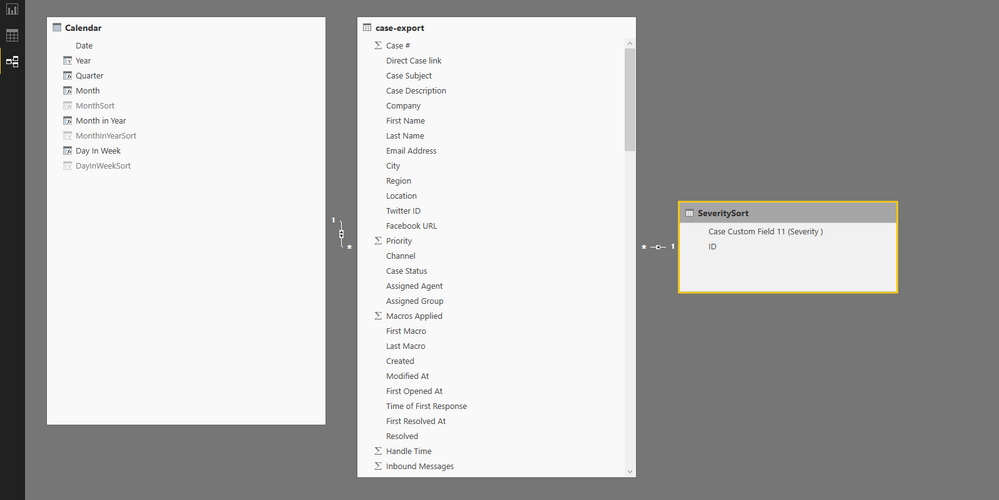
I'll attach a screenshot of the tables.
If it helps, attached a single line from the raw data('case-export').
Asher
Check out the April 2026 Power BI update to learn about new features.
Sign up to receive a private message when registration opens and key events begin.
If you have recently started exploring Fabric, we'd love to hear how it's going. Your feedback can help with product improvements.
| User | Count |
|---|---|
| 34 | |
| 31 | |
| 30 | |
| 21 | |
| 16 |
| User | Count |
|---|---|
| 62 | |
| 51 | |
| 31 | |
| 23 | |
| 23 |