cancel
Showing results for 
Search instead for 
Did you mean: 

Try your skills in the Power BI Dataviz World Championship! Round one ends June 26. Join now

Reply
AsherB
New Member

Ticket Backlog

Hi,


I'm pretty new to Power Bi and learning a lot from answers given here.

I'm trying to create a ticket backlog.


Following are the relevant columns:

Table: 'case-export'

Case #

Created(creation date)

Resolved

'Case Custom Field 11 (Severity )'(I can also add it later as a filter, I believe it will be more simple)


Table: 'Calander'

Date

Month


The result I'm interested in is a backlog showing for each week, how many tickets were open("created" but not "resolved") and if possible by severity.


For example:

For week 34, we had 12 open tickets with "General" severity, 10 "minor", 5 "Major", 2 "Critical"

Just to show the trend we can use every Sunday as a week marker.


Thanks in advance,

Asher

6 REPLIES 6
v-qiuyu-msft
Community Support
Community Support

Hi @AsherB,


Please Create a calculated column Week = WEEKNUM('Calendar'[Date],1) in Calendar table.


Then you can create a measure like below:


Measure = CALCULATE(COUNT('case-export'[Case#]),FILTER('case-export',MAX('Calendar'[Week])>=WEEKNUM('case-export'[Created]) && MAX('Calendar'[Week])<WEEKNUM('case-export'[Resolved])))


You an download the attached pbix file to have a look.


Best Regards,
QiuyunYu


Community Support Team _ Qiuyun Yu
If this post helps, then please consider Accept it as the solution to help the other members find it more quickly.

Hi @Anonymous


Thank you for the detailed solution but it doesn't return the correct number I'm afraid.

I've looked over the Power bi file you've attached and it seems to be working correctly.


On my file, it returns a much lower number than expected.


We have cases that remain open for few weeks, maybe that's the issue?


Can you explain to me the parts of the measure you've written?


Kind regards,

Asher

Hi @AsherB,


As you said it returns incorrect values in your pbix file? Would you please share your pbix file with us if possible? Or you can use some dummy data to clarify the issue. 


The DAX I written is to compare each calendar week for each record's start week and end week to decide whether it's open in current calendar week. 


Best Regards,
Qiuyun Yu 

Community Support Team _ Qiuyun Yu
If this post helps, then please consider Accept it as the solution to help the other members find it more quickly.
AsherB
New Member

Hi,


I'm pretty new to Power Bi and learning a lot from answers given here.

I'm trying to create a ticket backlog.


Following are the relevant columns:

Table: 'case-export'

Case #

Created(creation date)

Resolved

'Case Custom Field 11 (Severity )'(I can also add it later as a filter, I believe it will be more simple)


Table: 'Calander'

Date

Month


The result I'm interested in is a backlog showing for each week, how many tickets were open("created" but not "resolved") and if possible by severity.


For example:

For week 34, we had 12 open tickets with "General" severity, 10 "minor", 5 "Major", 2 "Critical"

Just to show the trend we can use every Sunday as a week marker.


Thanks in advance,

Asher

Anonymous
Not applicable

Hi @AsherB,


If you can please share some sample data to test, it will be help for analysis.


Regards,

Xiaoxin Sheng

Hi @Anonymous,


Thank you for your comment, not sure what you were expecting.

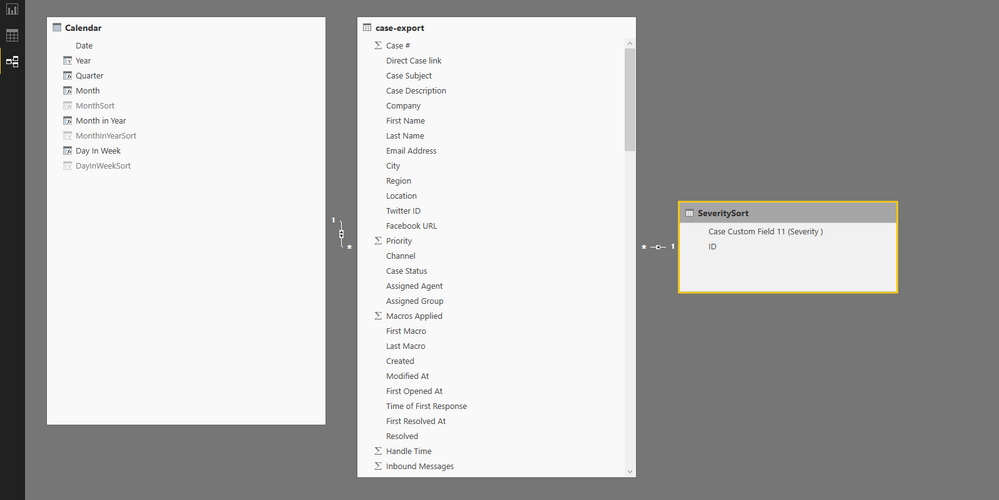
I'll attach a screenshot of the tables.


If it helps, attached a single line from the raw data('case-export').


https://ufile.io/1fmgu


Asher


Ticket Backlog.PNG


Helpful resources

Announcements
Fabric Data Days is here Carousel

Fabric Data Days 2026

Don't miss out on Data Days, June 15 through August 7. Learn Fabric, Power BI, SQL, AI and more.

May Power BI Update Carousel

Power BI Monthly Update - May 2026

Check out the May 2026 Power BI update to learn about new features.

Power BI DataViz World Championships carousel

Power BI DataViz World Championships - June 2026

A new Power BI DataViz World Championship is coming this June! Don't miss out on submitting your entry.