FabCon is coming to Atlanta
Join us at FabCon Atlanta from March 16 - 20, 2026, for the ultimate Fabric, Power BI, AI and SQL community-led event. Save $200 with code FABCOMM.
Register now!- Power BI forums
- Get Help with Power BI
- Desktop
- Service
- Report Server
- Power Query
- Mobile Apps
- Developer
- DAX Commands and Tips
- Custom Visuals Development Discussion
- Health and Life Sciences
- Power BI Spanish forums
- Translated Spanish Desktop
- Training and Consulting
- Instructor Led Training
- Dashboard in a Day for Women, by Women
- Galleries
- Data Stories Gallery
- Themes Gallery
- Contests Gallery
- QuickViz Gallery
- Quick Measures Gallery
- Visual Calculations Gallery
- Notebook Gallery
- Translytical Task Flow Gallery
- TMDL Gallery
- R Script Showcase
- Webinars and Video Gallery
- Ideas
- Custom Visuals Ideas (read-only)
- Issues
- Issues
- Events
- Upcoming Events
The Power BI Data Visualization World Championships is back! Get ahead of the game and start preparing now! Learn more
- Power BI forums
- Forums
- Get Help with Power BI
- Desktop
- Re: Thousand-Separator-and-Decimal-Separator
- Subscribe to RSS Feed
- Mark Topic as New
- Mark Topic as Read
- Float this Topic for Current User
- Bookmark
- Subscribe
- Printer Friendly Page


- Mark as New
- Bookmark
- Subscribe
- Mute
- Subscribe to RSS Feed
- Permalink
- Report Inappropriate Content
Thousand-Separator-and-Decimal-Separator
hello,
for the currency column, I'm having problems with decimal separator and thousand separator.
Decimal separator is a comma and thousand separator is a point. But PowerBi goes wrong
for example - powerbi shows 121,000.00 (thousand separator is a comma and Decimal separator is a point)
Output expected, 121.000,00 (Decimal separator is a comma and thousand separator is a point)
Thanks
Solved! Go to Solution.


- Mark as New
- Bookmark
- Subscribe
- Mute
- Subscribe to RSS Feed
- Permalink
- Report Inappropriate Content
The display of numeric felds (and dates, times etecetera) depends on your Regional Settings.
It can be adjusted in Power BI Desktop or in Windows (Land/Region). It looks like the Windows setting is leading, but you have to close and reopen your pbix file after adjusting the Regional Settings.
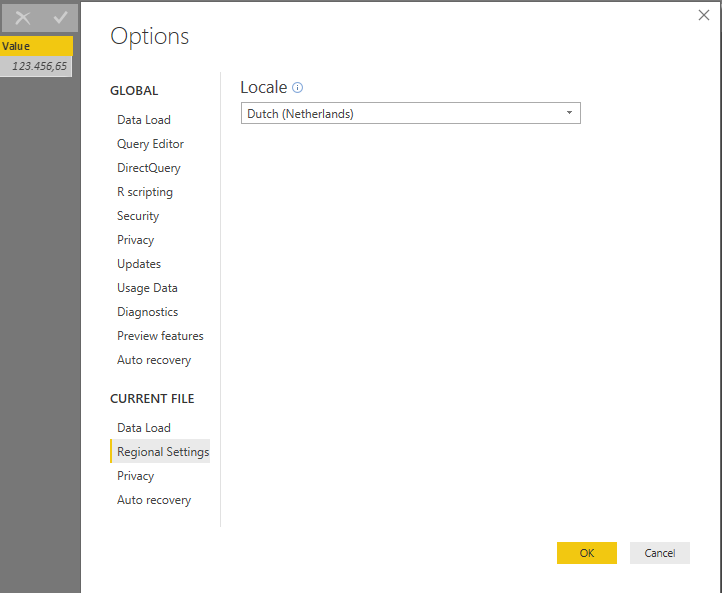
In Power BI you can also adjust your language settings to influence the display format for published reports.

- Mark as New
- Bookmark
- Subscribe
- Mute
- Subscribe to RSS Feed
- Permalink
- Report Inappropriate Content
Formatted Sales =
FORMAT(
[Your Measure or Column Name],
"Currency",
"nl-NL"
)

- Mark as New
- Bookmark
- Subscribe
- Mute
- Subscribe to RSS Feed
- Permalink
- Report Inappropriate Content
Hello,
We have a power bi report embedded int .net application. We have given ($)United States format for one column in the report. It shows $123,345,678(Right format) in few browsers and machines and $12,33,45,678(wrong format) in few browsers.
Can some one help me to fix this please.
Thanks,
Power BI Learner

- Mark as New
- Bookmark
- Subscribe
- Mute
- Subscribe to RSS Feed
- Permalink
- Report Inappropriate Content
The Thousand Separator could not work, if the currency value contains more than 8 digits. Provide solution for this.

- Mark as New
- Bookmark
- Subscribe
- Mute
- Subscribe to RSS Feed
- Permalink
- Report Inappropriate Content
Helle all,
Thanks to this blogpost I have found a sulution for this problem without changing the locale for the whole Power Bi file. The steps are:
- Go to the Power Query-editor and select the column
- Change the data type to "decimal number" in the transform menu
- Open the advanced editor and add the desired locale string to the "Table.TransformColumnTypes" function.
Example:
#"Type gewijzigd" = Table.TransformColumnTypes(#"Kolommen verwijderd",{{"sales.grand_total_month", type number}}, "en-US")
- Mark as New
- Bookmark
- Subscribe
- Mute
- Subscribe to RSS Feed
- Permalink
- Report Inappropriate Content
This is the right answer. I don't care about Regional Display, I want the Power Query to correctly parse my column as it is written.

- Mark as New
- Bookmark
- Subscribe
- Mute
- Subscribe to RSS Feed
- Permalink
- Report Inappropriate Content
Hi @RacAgr,
Based on test, if I export these data to csv, it will remove custom format and keep the normal number. So I think you store these value with text format, right?
Regards,
Xiaoxin Sheng
- Mark as New
- Bookmark
- Subscribe
- Mute
- Subscribe to RSS Feed
- Permalink
- Report Inappropriate Content
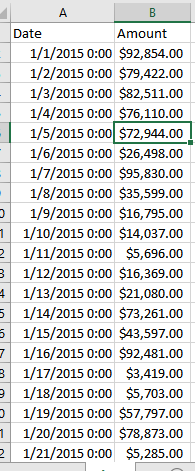
these values are in decimal number then using currency
- Mark as New
- Bookmark
- Subscribe
- Mute
- Subscribe to RSS Feed
- Permalink
- Report Inappropriate Content
- Mark as New
- Bookmark
- Subscribe
- Mute
- Subscribe to RSS Feed
- Permalink
- Report Inappropriate Content
Output expected, 121.000,00 (Decimal separator is a comma and thousand separator is a point)
in your result, you get 121,000.00 (Decimal separator is a point and thousand separator is a comma), which i am able to get as well. but i need the output as shown in first line
- Mark as New
- Bookmark
- Subscribe
- Mute
- Subscribe to RSS Feed
- Permalink
- Report Inappropriate Content
The display of numeric felds (and dates, times etecetera) depends on your Regional Settings.
It can be adjusted in Power BI Desktop or in Windows (Land/Region). It looks like the Windows setting is leading, but you have to close and reopen your pbix file after adjusting the Regional Settings.
In Power BI you can also adjust your language settings to influence the display format for published reports.
- Mark as New
- Bookmark
- Subscribe
- Mute
- Subscribe to RSS Feed
- Permalink
- Report Inappropriate Content
Has something recently changed in this behaviour? I can't seem to get the xxx.xxx,xx formatting using the Locale setting..
- Mark as New
- Bookmark
- Subscribe
- Mute
- Subscribe to RSS Feed
- Permalink
- Report Inappropriate Content
I found the solution to my issue; PBI Desktop seems to be only looking at the "Region - Format" part in the Win10 - Control Panel - Clock and Region - Region settings e.g:
Format: Dutch (Netherlands). When customizing this format using the "Additional settings" button, these customizations are not taken into account by PowerBI Desktop; So, it's VERY important to pick the correct Format: selection and not customize an existing selection to the needs of your users.
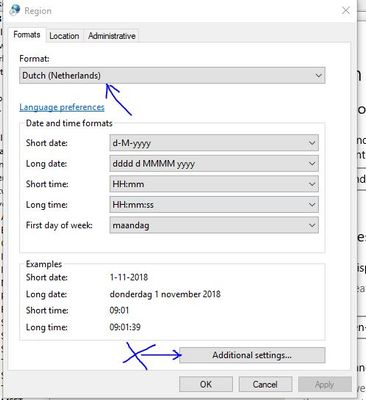
Created a blogpost around my findings on this.
- Mark as New
- Bookmark
- Subscribe
- Mute
- Subscribe to RSS Feed
- Permalink
- Report Inappropriate Content
After several days of trial and error - this fixed it for me!

- Mark as New
- Bookmark
- Subscribe
- Mute
- Subscribe to RSS Feed
- Permalink
- Report Inappropriate Content
It works. Important: All figures on data model should have the same type. Be careful when you were transforming data


- Mark as New
- Bookmark
- Subscribe
- Mute
- Subscribe to RSS Feed
- Permalink
- Report Inappropriate Content
this is the correct format as far as i know.
powerbi shows 121,000.00
If I took the time to answer your question and I came up with a solution, please mark my post as a solution and /or give kudos freely for the effort 🙂 Thank you!
Proud to be a Super User!
- Mark as New
- Bookmark
- Subscribe
- Mute
- Subscribe to RSS Feed
- Permalink
- Report Inappropriate Content
any suggestions pls on how to achieve the expected output?
Helpful resources

Power BI Dataviz World Championships
The Power BI Data Visualization World Championships is back! Get ahead of the game and start preparing now!

Power BI Monthly Update - December 2025
Check out the December 2025 Power BI Holiday Recap!

FabCon Atlanta 2026
Join us at FabCon Atlanta, March 16-20, for the ultimate Fabric, Power BI, AI and SQL community-led event. Save $200 with code FABCOMM.

| User | Count |
|---|---|
| 38 | |
| 38 | |
| 36 | |
| 28 | |
| 28 |


| User | Count |
|---|---|
| 124 | |
| 89 | |
| 73 | |
| 66 | |
| 65 |


