FabCon is coming to Atlanta
Join us at FabCon Atlanta from March 16 - 20, 2026, for the ultimate Fabric, Power BI, AI and SQL community-led event. Save $200 with code FABCOMM.
Register now!- Power BI forums
- Get Help with Power BI
- Desktop
- Service
- Report Server
- Power Query
- Mobile Apps
- Developer
- DAX Commands and Tips
- Custom Visuals Development Discussion
- Health and Life Sciences
- Power BI Spanish forums
- Translated Spanish Desktop
- Training and Consulting
- Instructor Led Training
- Dashboard in a Day for Women, by Women
- Galleries
- Data Stories Gallery
- Themes Gallery
- Contests Gallery
- QuickViz Gallery
- Quick Measures Gallery
- Visual Calculations Gallery
- Notebook Gallery
- Translytical Task Flow Gallery
- TMDL Gallery
- R Script Showcase
- Webinars and Video Gallery
- Ideas
- Custom Visuals Ideas (read-only)
- Issues
- Issues
- Events
- Upcoming Events
The Power BI Data Visualization World Championships is back! Get ahead of the game and start preparing now! Learn more
- Power BI forums
- Forums
- Get Help with Power BI
- Desktop
- Re: This expression refers to a Relationship objec...
- Subscribe to RSS Feed
- Mark Topic as New
- Mark Topic as Read
- Float this Topic for Current User
- Bookmark
- Subscribe
- Printer Friendly Page


- Mark as New
- Bookmark
- Subscribe
- Mute
- Subscribe to RSS Feed
- Permalink
- Report Inappropriate Content
This expression refers to a Relationship object , which has an error.
Hi I am getting the following error on the created column when i am refreshing the data. I did not have nay issues before the refresh.
Following is the code snippet
Billable = if(
not(
ISBLANK(
LOOKUPVALUE(Task[isbillable],Task[id],SheetsAll[id])
)
),
LOOKUPVALUE(Task[isbillable],Task[id],SheetsAll[id]),
LOOKUPVALUE(Jobs[isbillable],Jobs[id],SheetsAll[id]))
Following is the error
This expression refers to a Relationship object named '902a1ae2-e95d-420e-9f24-eae5303c57d8', which has an error.
Can some one help me in debugging this issue?


- Mark as New
- Bookmark
- Subscribe
- Mute
- Subscribe to RSS Feed
- Permalink
- Report Inappropriate Content
Nowadays, I would try searching for that GUID using VS Code against the PBIP format.

- Mark as New
- Bookmark
- Subscribe
- Mute
- Subscribe to RSS Feed
- Permalink
- Report Inappropriate Content
I get this error almost exclusively when there is a duplicate in a table with relationships that don't allow it to have duplicates.

- Mark as New
- Bookmark
- Subscribe
- Mute
- Subscribe to RSS Feed
- Permalink
- Report Inappropriate Content
I also get the same error. There was an calculated table named X with SUMMARIZECOLUMNS dax function connected to an imported table named Cities's CityName column. I think the problem began when i change the calculated table function and droped the CityName column the column of X table without removing the relation. And now even that simple code gives error.
This expression refers to a Relationship object named 'bf855ba5-b193-4adb-9744-48e8d65b063e', which has an error.
- Mark as New
- Bookmark
- Subscribe
- Mute
- Subscribe to RSS Feed
- Permalink
- Report Inappropriate Content
This same exact error happened to me as well after I replaced a measure calc with a new relationship. I deleted the previous (non-active) relationship and the error disappeared.
- Mark as New
- Bookmark
- Subscribe
- Mute
- Subscribe to RSS Feed
- Permalink
- Report Inappropriate Content
Whenever there is an error in the primary key (of any table related to your table and not only the table in contention) this error pops up. Please ensure all the relationships with the Task and Jobs Table are valid. Whenever a cross table reference is made PBI checks the validity(no errors in the primary key) of all the relationships with that table.
To be totally safe, Click on Modelling and then Manage Relationships, Check the validity of every relationship in this menu so that Relationship object based errors are avoided.
- Mark as New
- Bookmark
- Subscribe
- Mute
- Subscribe to RSS Feed
- Permalink
- Report Inappropriate Content
Thanks so much Rohit for that very helpful tip. In my case, I had to find the calculated column which formed the primary key, which had duplicate values after a refresh. None of the relationships showed any error.
This gets my vote for the most obscure error message - perhaps for all time, but certainly for the year! I suppose with an extension tool you could eventually track down that relationship guid, but can they not give us a clue?

- Mark as New
- Bookmark
- Subscribe
- Mute
- Subscribe to RSS Feed
- Permalink
- Report Inappropriate Content
I am experriencing similar issues only if the report is using an "On-premises data gateway". While using the personal gateway mode my report and refreshing seems to work as intended.
Has anyone managed to solve this issue in any way?
Best regards
arefossa
- Mark as New
- Bookmark
- Subscribe
- Mute
- Subscribe to RSS Feed
- Permalink
- Report Inappropriate Content
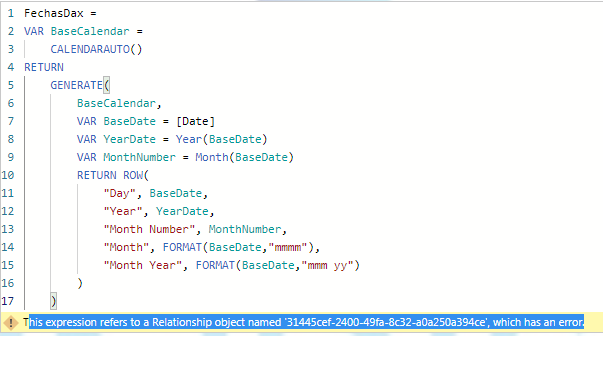
I have the same kind of error
"his expression refers to a Relationship object named '31445cef-2400-49fa-8c32-a0a250a394ce', which has an error."
I guess that is referred to this DAX:
- Mark as New
- Bookmark
- Subscribe
- Mute
- Subscribe to RSS Feed
- Permalink
- Report Inappropriate Content
Do you still have an active connection to your data source?
- Mark as New
- Bookmark
- Subscribe
- Mute
- Subscribe to RSS Feed
- Permalink
- Report Inappropriate Content
Yes, I was able to get data for the columns mentioned in DAX.
Helpful resources

Power BI Dataviz World Championships
The Power BI Data Visualization World Championships is back! Get ahead of the game and start preparing now!

Power BI Monthly Update - December 2025
Check out the December 2025 Power BI Holiday Recap!

FabCon Atlanta 2026
Join us at FabCon Atlanta, March 16-20, for the ultimate Fabric, Power BI, AI and SQL community-led event. Save $200 with code FABCOMM.

| User | Count |
|---|---|
| 39 | |
| 38 | |
| 38 | |
| 28 | |
| 27 |


| User | Count |
|---|---|
| 124 | |
| 88 | |
| 73 | |
| 66 | |
| 65 |


