
Join us at FabCon Atlanta from March 16 - 20, 2026, for the ultimate Fabric, Power BI, AI and SQL community-led event. Save $200 with code FABCOMM.
Register now!The Power BI Data Visualization World Championships is back! Get ahead of the game and start preparing now! Learn more
Theme json structure. I do not find the json structured to set default heading 1 to 6.
I am working on putting together a complete Theme, but see that there are some gaps here.
Same with setting the default on the different shapes.
No not quite. I did not fully understand the layout, but have tried different examples. What we want to achieve is to be able to define, for example, that Header1 = arial, 24 Header2 = arial, 18
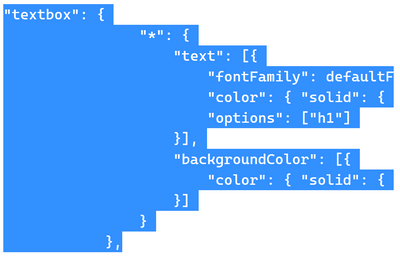
"textbox": { "*": { "text": [{ "fontFamily": defaultFont, "color": { "solid": { "color": white } }, "options": ["h1"] }], "backgroundColor": [{ "color": { "solid": { "color": darkBlue } } }] } },
This exsample not working
Hi @Anonymous ,
Refer to:
You may try this:
Best Regards,
Eyelyn Qin
If this post helps, then please consider Accept it as the solution to help the other members find it more quickly.
Negative I have already testet it.
@Anonymous , Check if theme generators can help
https://www.mssqltips.com/sqlservertip/6692/power-bi-theme-generator/
The Power BI Data Visualization World Championships is back! Get ahead of the game and start preparing now!
| User | Count |
|---|---|
| 38 | |
| 37 | |
| 33 | |
| 32 | |
| 29 |
| User | Count |
|---|---|
| 132 | |
| 88 | |
| 82 | |
| 68 | |
| 64 |