cancel
Showing results for 
Search instead for 
Did you mean: 

The Power BI Data Visualization World Championships is back! Get ahead of the game and start preparing now! Learn more

Reply
Analitika
Post Prodigy
Post Prodigy

The operation was cancelled because of locking conflicts

Feedback Type:
Frown (Error)

Timestamp:
2020-07-17T09:18:16.7833835Z

Local Time:
2020-07-17T12:18:16.7833835+03:00

Session ID:

Release:
June 2020

Product Version:
2.82.5858.641 (20.06) (x64)

Error Message:
The operation was cancelled because of locking conflicts.

OS Version:
Microsoft Windows NT 10.0.18362.0 (x64 en-US)

CLR Version:
4.7 or later [Release Number = 528040]

Peak Virtual Memory:
41.9 GB

Private Memory:
1.81 GB

Peak Working Set:
1.59 GB

IE Version:
11.959.18362.0

User ID:

Workbook Package Info:
1* - lt-LT, Query Groups: 3, fastCombine: Enabled, runBackgroundAnalysis: False.

Telemetry Enabled:
True


Model Default Mode:
Import

Model Version:
PowerBI_V1

Is Report V3 Models Enabled:
False


How to fix this error?

5 REPLIES 5
v-zhenbw-msft
Community Support
Community Support

Hi @Analitika ,


We would suggest you upgrade the Desktop to the latest version and try again.


The1.jpg


This maybe an issue on the database side, often caused by long-running queries. If your query takes too many resources, it will get shut down. you may try to talk with your DBA.


Best regards,


Community Support Team _ zhenbw

If this post helps, then please consider Accept it as the solution to help the other members find it more quickly.

@v-zhenbw-msft @Analitika 

I got one as well. Data was already imported yesterday. File was already saved before. Measures are ran multiple time and now all of the sudden are 'locked'. I removed one of the column and put it back in (Matrix visual) and it worked again. Hopefully my end users won't encounter the issue in Service. I'll see if our governance team can release the July version earlier for me.

Untitled.png

Feedback Type:
Frown (Error)

Timestamp:
2020-07-21T14:37:51.6055971Z

Local Time:
2020-07-21T16:37:51.6055971+02:00

Session ID:
7998c5f8-8611-427b-944a-c211ed9753ad

Release:
June 2020

Product Version:
2.82.5858.641 (20.06) (x64)

Error Message:
The operation was cancelled because of locking conflicts.

OS Version:
Microsoft Windows NT 10.0.16299.0 (x64 en-US)

CLR Version:
4.7 or later [Release Number = 461308]

Peak Virtual Memory:
38.7 GB

Private Memory:
1.79 GB

Peak Working Set:
2.76 GB

IE Version:
11.1932.16299.0

User ID:
(...)

Workbook Package Info:
1* - en-US, Query Groups: 3, fastCombine: Disabled, runBackgroundAnalysis: True.

Telemetry Enabled:
True

Snapshot Trace Logs:
(...)

Model Default Mode:
Import

Model Version:
PowerBI_V1

Is Report V3 Models Enabled:
False

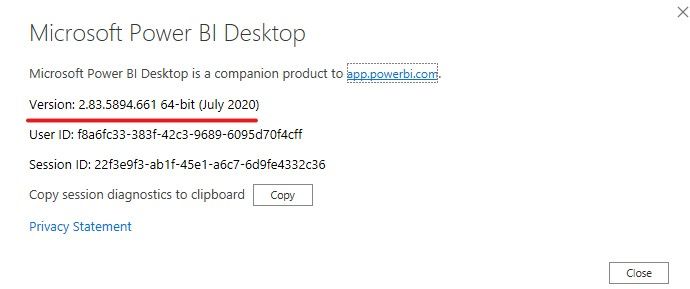
We havent DBA, PBI latest update, i dont know why PBI show wrong version

amitchandak
Super User
Super User

@Analitika , which operation was canceled. Reading from Source DB. Saving ?


If saving, just checks the file is not opened twice and may be hagged on another open instance.

Share with Power BI Enthusiasts: Full Power BI Video (20 Hours) YouTube
Microsoft Fabric Series 60+ Videos YouTube
Microsoft Fabric Hindi End to End YouTube

Helpful resources

Announcements
Power BI DataViz World Championships

Power BI Dataviz World Championships

The Power BI Data Visualization World Championships is back! Get ahead of the game and start preparing now!

December 2025 Power BI Update Carousel

Power BI Monthly Update - December 2025

Check out the December 2025 Power BI Holiday Recap!

FabCon Atlanta 2026 carousel

FabCon Atlanta 2026

Join us at FabCon Atlanta, March 16-20, for the ultimate Fabric, Power BI, AI and SQL community-led event. Save $200 with code FABCOMM.