Join us at FabCon Atlanta from March 16 - 20, 2026, for the ultimate Fabric, Power BI, AI and SQL community-led event. Save $200 with code FABCOMM.
Register now!The Power BI Data Visualization World Championships is back! Get ahead of the game and start preparing now! Learn more
Hi,
In my products table, I would like to calculate a total profit for each product, using Qty, and Profit/Qty from sales table.
What will be the syntax?
Must I use RELATED and/or CALCULATE?
Thank you,
Alex
Solved! Go to Solution.
Hi @Sasha,
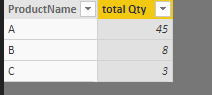
If you use a table visual, you can directly drag Products[ProductName] and Sales[Qty] into table visual. Choose the sum aggregation for Qty.
If you want to add a calculated column to show total Qty in Product table, please refer to below DAX:
total Qty = CALCULATE(SUM(Sales[Qty]),USERELATIONSHIP(Products[ProductName],Sales[ProductName]))
Best regards,
Yuliana Gu
Hi @Sasha,
If you use a table visual, you can directly drag Products[ProductName] and Sales[Qty] into table visual. Choose the sum aggregation for Qty.
If you want to add a calculated column to show total Qty in Product table, please refer to below DAX:
total Qty = CALCULATE(SUM(Sales[Qty]),USERELATIONSHIP(Products[ProductName],Sales[ProductName]))
Best regards,
Yuliana Gu
i @Sasha, this highly depends on your data model
Did I answer your question correctly? Mark my answer as a solution!
Proud to be a Datanaut!
Only Sales and Products exist - one to many on the product id.
The Power BI Data Visualization World Championships is back! Get ahead of the game and start preparing now!
Check out the November 2025 Power BI update to learn about new features.
| User | Count |
|---|---|
| 59 | |
| 46 | |
| 42 | |
| 23 | |
| 18 |
| User | Count |
|---|---|
| 192 | |
| 125 | |
| 99 | |
| 67 | |
| 48 |