This is best Fabric, Power BI, SQL and AI community event. How do we know? The last event sold out! Save €200 with code FABCMTY200.
Register nowA new Data Days event is coming soon! This time we’re going bigger than ever. Fabric, Power BI, SQL, AI and more. Don't miss out.
Origianl Topic is there
https://community.powerbi.com/t5/Desktop/The-Missing-Values-Pattern/td-p/538927
Sorry for the confusion, post has been duplicated
Am I missing something or is it as simple as, if Report Period is less than Project Starting Date then blank, otherwise 1?
It may works in the first table but total will be wrong and no correct answer in second table when no Period context is defined.
Dealing wih a calculated column won't help as well because we are dealing with data that does not exist.
Look carefuly to the available data at the top.
Hi @Grumelo,
Based on my test, you could refer to below steps:
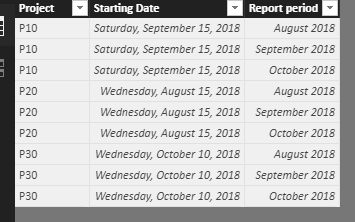
Sample data:
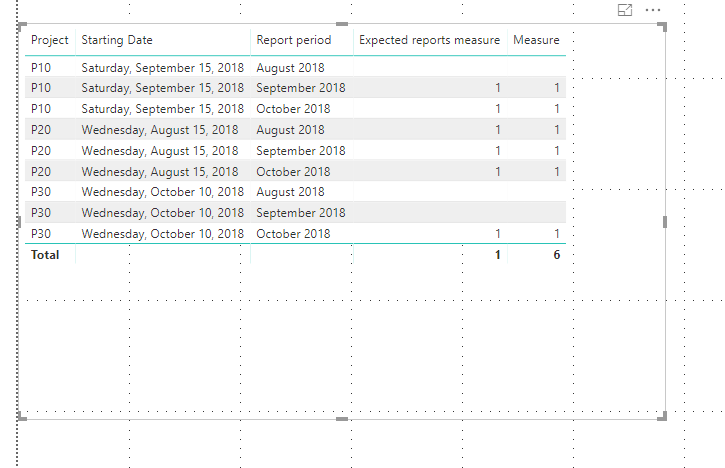
Create two measures:
Expected reports measure = IF(MONTH(MAX('Table1'[Starting Date]))>MONTH(MAX('Table1'[Report period])),BLANK(),1)
Measure = SUMX('Table1','Table1'[Expected reports measure])
Result:
You could also download the pbix file to have a view.
Regards,
Daniel He
Look at my data model, there is no such table combining all projects and all periods. That would be too simple.
We are dealing with missing data, missing records.
Project P30 has no records at all in the Project Report Table and I'm trying to calculate how many are expected.
Hi @Grumelo,
Could you please share some sample file to have a test or share the pbix file if possible?
Regards,
Daniel He
Sign up to receive a private message when registration opens and key events begin.
If you have recently started exploring Fabric, we'd love to hear how it's going. Your feedback can help with product improvements.
| User | Count |
|---|---|
| 33 | |
| 25 | |
| 23 | |
| 20 | |
| 15 |
| User | Count |
|---|---|
| 64 | |
| 41 | |
| 27 | |
| 22 | |
| 22 |