This is best Fabric, Power BI, SQL and AI community event. How do we know? The last event sold out! Save €200 with code FABCMTY200.
Register nowA new Data Days event is coming soon! This time we’re going bigger than ever. Fabric, Power BI, SQL, AI and more. Don't miss out.
I have a table with repeating values that has worked fine so far as a slicer but has just started to show every value individually even though they are the same.
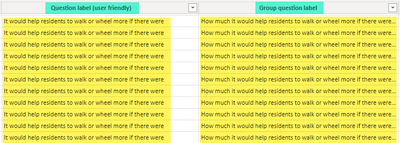
The field that is no longer working is "Group Question Label". I am comparing it to the field "Question label (user friendly). As you can see they both repeat in the data source.
But when shown in a table (no other fields used), Group Question Label repeats for each value when it shouldn't (and didn't previously)
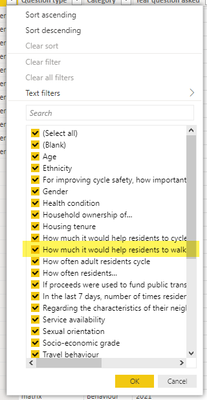
I checked to see if there were slight differences between the values, perhaps some spaces, but the filter only lists the values once, so they should be the same.
What might be happening here?
Solved! Go to Solution.
@Anonymous If you use 'Sort by Column' or if you mark the column as a Key in the Model view properties then it will show each duplicate value multiple times. Is there a chance that you did either of those things recently?
Copying DAX from this post? Click here for a hack to quickly replace it with your own table names
Has this post solved your problem? Please Accept as Solution so that others can find it quickly and to let the community know your problem has been solved.
If you found this post helpful, please give Kudos C
I work as a Microsoft trainer and consultant, specialising in Power BI and Power Query.
www.excelwithallison.com
Thanks for the quick response, it was the sorting. I had created a sort field that had been affected by a recent change in Power Query so it wasn't unique anymore. The duplication resolved when I removed the sort and I got the warning about non-unique numbers when I tested adding it again. Fixing the calculation to create the sort allowed me to resolve the problem.
@Anonymous If you use 'Sort by Column' or if you mark the column as a Key in the Model view properties then it will show each duplicate value multiple times. Is there a chance that you did either of those things recently?
Copying DAX from this post? Click here for a hack to quickly replace it with your own table names
Has this post solved your problem? Please Accept as Solution so that others can find it quickly and to let the community know your problem has been solved.
If you found this post helpful, please give Kudos C
I work as a Microsoft trainer and consultant, specialising in Power BI and Power Query.
www.excelwithallison.com
Check out the May 2026 Power BI update to learn about new features.
Sign up to receive a private message when registration opens and key events begin.
If you have recently started exploring Fabric, we'd love to hear how it's going. Your feedback can help with product improvements.
| User | Count |
|---|---|
| 27 | |
| 25 | |
| 23 | |
| 19 | |
| 14 |
| User | Count |
|---|---|
| 50 | |
| 45 | |
| 20 | |
| 18 | |
| 18 |