FabCon is coming to Atlanta
Join us at FabCon Atlanta from March 16 - 20, 2026, for the ultimate Fabric, Power BI, AI and SQL community-led event. Save $200 with code FABCOMM.
Register now!- Power BI forums
- Get Help with Power BI
- Desktop
- Service
- Report Server
- Power Query
- Mobile Apps
- Developer
- DAX Commands and Tips
- Custom Visuals Development Discussion
- Health and Life Sciences
- Power BI Spanish forums
- Translated Spanish Desktop
- Training and Consulting
- Instructor Led Training
- Dashboard in a Day for Women, by Women
- Galleries
- Data Stories Gallery
- Themes Gallery
- Contests Gallery
- QuickViz Gallery
- Quick Measures Gallery
- Visual Calculations Gallery
- Notebook Gallery
- Translytical Task Flow Gallery
- TMDL Gallery
- R Script Showcase
- Webinars and Video Gallery
- Ideas
- Custom Visuals Ideas (read-only)
- Issues
- Issues
- Events
- Upcoming Events
The Power BI Data Visualization World Championships is back! Get ahead of the game and start preparing now! Learn more
- Power BI forums
- Forums
- Get Help with Power BI
- Desktop
- Re: Text value in matrix (several text values for ...
- Subscribe to RSS Feed
- Mark Topic as New
- Mark Topic as Read
- Float this Topic for Current User
- Bookmark
- Subscribe
- Printer Friendly Page

- Mark as New
- Bookmark
- Subscribe
- Mute
- Subscribe to RSS Feed
- Permalink
- Report Inappropriate Content
Text value in matrix (several text values for column group)
I have table with information about project which I need to show by Month.
Initial Data looks like:
|   Company   |   Project    | ProjectInfo |     Month      |     Year     |
|-------------|--------------|-------------|----------------|--------------|
|  Company1   |   Project1   |    text1    |    september   |     2018     |
|  Company1   |   Project1   |    text2    |    october     |     2018     |
|  Company1   |   Project1   |    text3    |    november    |     2018     |
|  Company1   |   Project1   |    text4    |    november    |     2018     |
|  Company2   |   Project2   |    text5    |    september   |     2018     |
|  Company3   |   Project3   |    text6    |    october     |     2018     |
When I need to use text data in value of matrix, Matrix can take only 1 value for each month (first or last), but I need information of all.
Example of expected data in matrix:
                  |  september  |    october     |    october   |
Company1          |-------------|----------------|--------------|
	Project1  |    text1    |    text2   	 |     text3    |
	          |             |                |     text4    |
If it doesn't possible, then duplicate new row with this project on case when I table has several ProjectInfo data in 1 month.
                  |  september  |    october     |    october   |
Company1          |-------------|----------------|--------------|
	Project1  |    text1    |    text2   	 |     text3    |
	Project1  |             |                |     text4    |
How I it can be done ?
Solved! Go to Solution.


- Mark as New
- Bookmark
- Subscribe
- Mute
- Subscribe to RSS Feed
- Permalink
- Report Inappropriate Content
Hi,
This is the result i cam up with. You may download my PBI file from here.
Hope this helps.
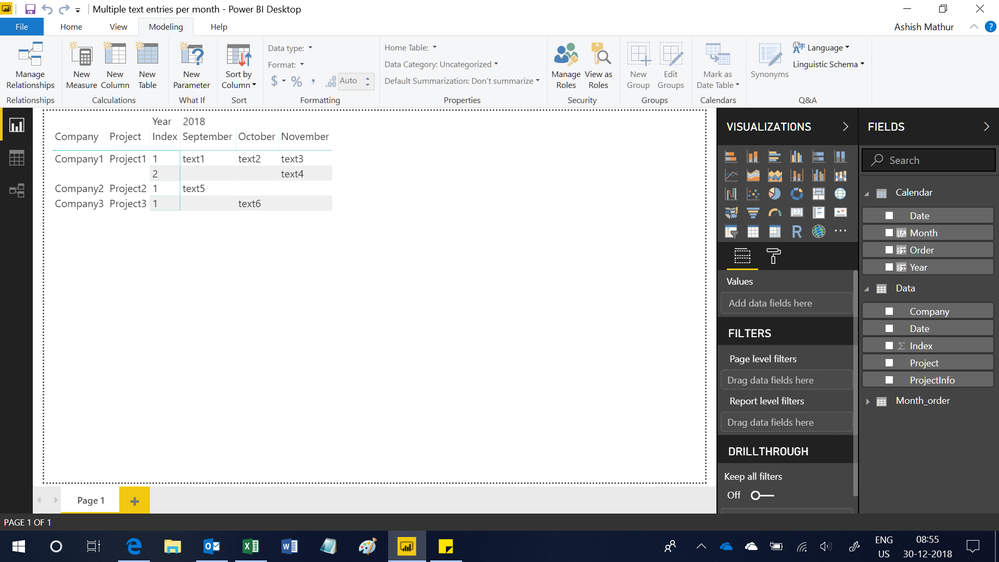
Regards,
Ashish Mathur
http://www.ashishmathur.com
https://www.linkedin.com/in/excelenthusiasts/
- Mark as New
- Bookmark
- Subscribe
- Mute
- Subscribe to RSS Feed
- Permalink
- Report Inappropriate Content
DUBPLICATE (my previous question marked as spam)
I have table with information about project which I need to show by Month.
Initial Data looks like:
|   Company   |   Project    | ProjectInfo |     Month      |     Year     |
|-------------|--------------|-------------|----------------|--------------|
|  Company1   |   Project1   |    text1    |    september   |     2018     |
|  Company1   |   Project1   |    text2    |    october     |     2018     |
|  Company1   |   Project1   |    text3    |    november    |     2018     |
|  Company1   |   Project1   |    text4    |    november    |     2018     |
|  Company2   |   Project2   |    text5    |    september   |     2018     |
|  Company3   |   Project3   |    text6    |    october     |     2018     |
When I need to use text data in value of matrix, Matrix can take only 1 value for each month (first or last), but I need information of all.
Example of expected data in matrix:
                  |  september  |    october     |    october   |
Company1          |-------------|----------------|--------------|
	Project1  |    text1    |    text2   	 |     text3    |
	          |             |                |     text4    |
If it doesn't possible, then duplicate new row with this project on case when I table has several ProjectInfo data in 1 month.
                  |  september  |    october     |    october   |
Company1          |-------------|----------------|--------------|
	Project1  |    text1    |    text2   	 |     text3    |
	Project1  |             |                |     text4    |
How I it can be done ?
- Mark as New
- Bookmark
- Subscribe
- Mute
- Subscribe to RSS Feed
- Permalink
- Report Inappropriate Content
Hi,
This is the result i cam up with. You may download my PBI file from here.
Hope this helps.
Regards,
Ashish Mathur
http://www.ashishmathur.com
https://www.linkedin.com/in/excelenthusiasts/


- Mark as New
- Bookmark
- Subscribe
- Mute
- Subscribe to RSS Feed
- Permalink
- Report Inappropriate Content
Hi @Dmitriy
How about using CONCATENATEX( )? Something like":
CONCATENATEX( Table1,Table1[ ProjectInfo], ", ")
or any other delimiter of your choice instead of ", "
- Mark as New
- Bookmark
- Subscribe
- Mute
- Subscribe to RSS Feed
- Permalink
- Report Inappropriate Content
@AlB,
Thank you for answer, if I got you correctly, this will retun values in 1 row.
But it means that I can't add color conditional formatting, because it works on whole cell and not for each position of my data inside this cell.
Does it possible to make this with such way?
                  |  september  |    october     |    october   |
Company1          |-------------|----------------|--------------|
	Project1  |    text1    |    text2   	 |     text3    |
	Project1  |             |                |     text4    |
Or is not possible in matrix and it will be grouped by Project1 for 1 row anyway?
- Mark as New
- Bookmark
- Subscribe
- Mute
- Subscribe to RSS Feed
- Permalink
- Report Inappropriate Content
Hi @Dmitriy
I'm afraid I don't know how to do that (or whether it can be done). Hopefully someone else can lend a hand
- Mark as New
- Bookmark
- Subscribe
- Mute
- Subscribe to RSS Feed
- Permalink
- Report Inappropriate Content
I have table with information about project which I need to show by Month.
Initial Data looks like:
|   Company   |   Project    | ProjectInfo |     Month      |     Year     |
|-------------|--------------|-------------|----------------|--------------|
|  Company1   |   Project1   |    text1    |    september   |     2018     |
|  Company1   |   Project1   |    text2    |    october     |     2018     |
|  Company1   |   Project1   |    text3    |    november    |     2018     |
|  Company1   |   Project1   |    text4    |    november    |     2018     |
|  Company2   |   Project2   |    text5    |    september   |     2018     |
|  Company3   |   Project3   |    text6    |    october     |     2018     |
When I need to use text data in value of matrix, Matrix can take only 1 value for each month (first or last), but I need information of all.
Example of expected data in matrix:
                  |  september  |    october     |    october   |
Company1          |-------------|----------------|--------------|
	Project1  |    text1    |    text2   	 |     text3    |
	          |             |                |     text4    |
If it doesn't possible, then duplicate new row with this project on case when I table has several ProjectInfo data in 1 month.
                  |  september  |    october     |    october   |
Company1          |-------------|----------------|--------------|
	Project1  |    text1    |    text2   	 |     text3    |
	Project1  |             |                |     text4    |
How I it can be done ?

- Mark as New
- Bookmark
- Subscribe
- Mute
- Subscribe to RSS Feed
- Permalink
- Report Inappropriate Content
Hi @Dmitriy,
I'd like to suggest you use below measure formula to instead use projectinfo column on matrix visual:
Measure =
CALCULATE (
    CONCATENATEX ( VALUES ( Table[ProjectInfo] ), [ProjectInfo], "," ),
    ALLSELECTED ( Table ),
    VALUES ( Table[Company] ),
    VALUES ( Table[Month] )
)
Regards,
Xiaoxin Sheng
Helpful resources

Power BI Dataviz World Championships
The Power BI Data Visualization World Championships is back! Get ahead of the game and start preparing now!

Power BI Monthly Update - December 2025
Check out the December 2025 Power BI Holiday Recap!

FabCon Atlanta 2026
Join us at FabCon Atlanta, March 16-20, for the ultimate Fabric, Power BI, AI and SQL community-led event. Save $200 with code FABCOMM.

| User | Count |
|---|---|
| 60 | |
| 43 | |
| 40 | |
| 36 | |
| 21 |


| User | Count |
|---|---|
| 177 | |
| 122 | |
| 110 | |
| 77 | |
| 51 |


