


Join us at FabCon Atlanta from March 16 - 20, 2026, for the ultimate Fabric, Power BI, AI and SQL community-led event. Save $200 with code FABCOMM.
Register now!Get Fabric Certified for FREE during Fabric Data Days. Don't miss your chance! Request now
Hello!
Maybe it is a weird bug because I have used this same DAX.
I want to count the rows where a text cell on a row in one table is equal to the text cell in another table.
I get a syntax error. Both columns are text columns, made in Power Query.
Please check out the file in table: calculate.
https://www.dropbox.com/s/drumqziixfdlogs/KPI%20Dashboard%20hulp%20rev1.pbix?dl=0
Solved! Go to Solution.
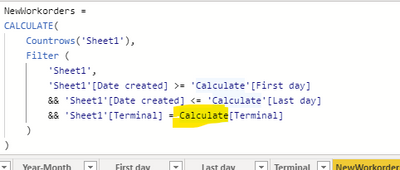
@IAMI looked at the broken code:
You don't have ' ' wrapping the last calculate. It thinks it's the calculate fucntion.
Put ' ' around it like in the 2 others.
But more important, never call a table name like a DAX function name 🙂
Change the table name to a different name.
Just replace Calculate with 'Calculate', it will work.
Power BI has an inbuilt Calculate function, hence you will have to explicitly tell Power Bi that it is a table named calculate.
@IAMI looked at the broken code:
You don't have ' ' wrapping the last calculate. It thinks it's the calculate fucntion.
Put ' ' around it like in the 2 others.
But more important, never call a table name like a DAX function name 🙂
Change the table name to a different name.
Check out the November 2025 Power BI update to learn about new features.
Advance your Data & AI career with 50 days of live learning, contests, hands-on challenges, study groups & certifications and more!